Design your way

Tuesday, September 8, 2020

Those who live in New York can easily recognize the brand of clothing, shoes, and skateboards – Supreme. This is from the past millennium setting a trend among youth by offering products that are inspired by the street scene of hip-hop, rock, and extreme sports. Part of their success as a brand is because they know how to maintain a simple but fresh style, and there is no better example of that that the Supreme font.

Since its founding in 1994, Supreme has tried to offer what young people want, and for this audience to understand it, they had to create a logo according to them. They had to design a logo that did not have that corporate appearance that keeps away those who want to enjoy their youth, and the best thing for this purpose was to place the name on a solid background.

Of course, part of Supreme’s success story stems from how they knew how to choose their allies. Aiming at the same consumer niche, the brand has had collaborations with Nike, PlayBoy, North Face, and many other clothing and footwear companies on more than one occasion. Thanks to the popularity they have gained, today it is easy to recognize the Supreme logo font on their products, and the best thing is that it can be used by anyone as it is a basic typeface.

What is the Supreme font?
Supreme_logo What font does Supreme use? Check out the Supreme font

Coming from a great brand like Supreme, it would not be unreasonable to think that they commissioned the design of an exclusive typeface for their logo, but the truth is that they decided to use one that has been around for almost a century.

The typeface is the Heavy Oblique variant of Futura, which was created in 1927 by Paul Renner. Since its inception, Futura has been a standard choice for writing prominent titles and texts due to its thick build and simplicity. With the arrival of the internet, its use became more common, being used on many websites because it is excellent on any screen.

Futura is a letter that seems to be directly inspired by the artistic movement of the Bauhaus. However, Renner did it without thinking about the Bauhaus, but about the evolution of design in the world.

Humanity was barely emerging from the dominant Renaissance and Gothic ideas of the 19th century, where designs were exaggerated and compulsive. Renner contributed his idea of ​​what the next step in the global design should be: something minimalist, but with character. His conclusion led him to use the foundations of geometric figures.

Futura redefined the Sans Serif, making all the previous fonts to form the group currently called “Grotesques”.

The font’s current reception

Despite its age, Futura is still a constantly used letter. Its success is due to the wide popularity it achieved in the middle of the last century when it was the favorite choice of newspapers and magazines.

It can still be found in some logos such as Crayola, HP, Volkswagen, Supreme, and many more. That is why saying that it is exclusively the Supreme brand font is not recognizing Futura’s fame and adaptability.

Futura Font – Readability over everything else
futura What font does Supreme use? Check out the Supreme font

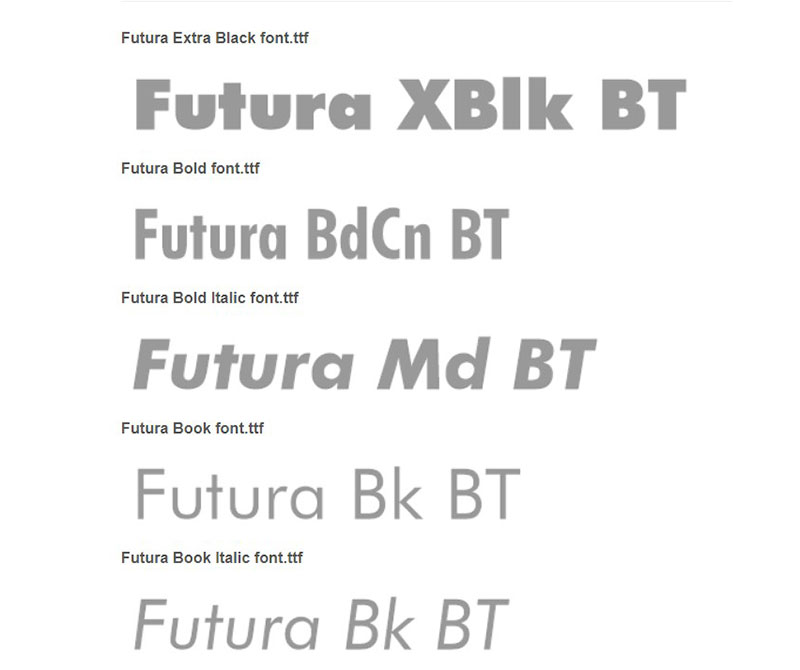
When a clear font is needed, Futura is one of the best options. The typography has a simple design free of additional details, with a constant thickness throughout the letter, which makes it easy to read.

Its wide surface allows the application of textures without loss of quality, and its wide range of characters can be used to write anything you want. Lowercase letters have strokes that exceed the average height, which gives them more character.

Thanks to the use of the Roman style as a base, it has been possible to create a basic letter that is easy to manipulate to create striking variations.

Futura Heavy Oblique – Ideal for the brand
futura-heavy-oblique What font does Supreme use? Check out the Supreme font

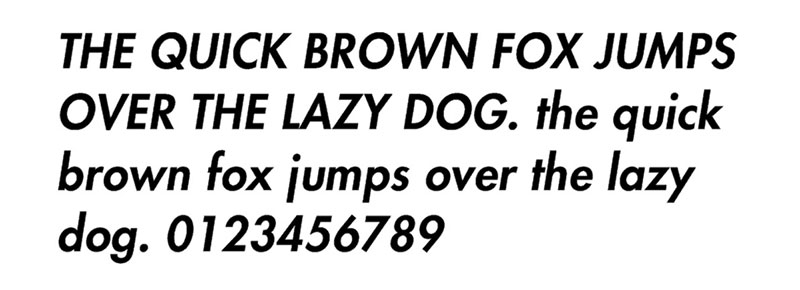
As we mentioned before, the Supreme font is a variation of Futura whose characters have been slightly modified to have thinner strokes, a slight inclination typical of cursive letters, and wider spacing. All this combines to create sharper text ideal for advertising and exhibitions.

Alternatives to the Supreme font

Didact Gothic – A more minimalist option
didact-gothc What font does Supreme use? Check out the Supreme font

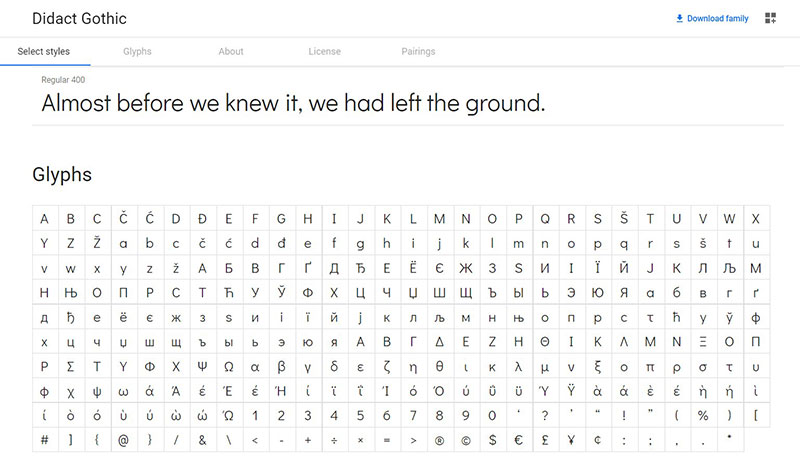
Unlike Futura, Didact Gothic offers a slimmer, firmer appearance, which is perfect for printing because it doesn’t require a lot of ink.

This quality has made it the predominant typeface in classrooms that use the Latin alphabet since it is easy to print them on boards and study guides.

The only problem with Didact Gothic is that it does not have italicized or bold versions, so you will have to settle for the standard layout.

Poppins – For users of the Devanagari alphabet
poppins What font does Supreme use? Check out the Supreme font

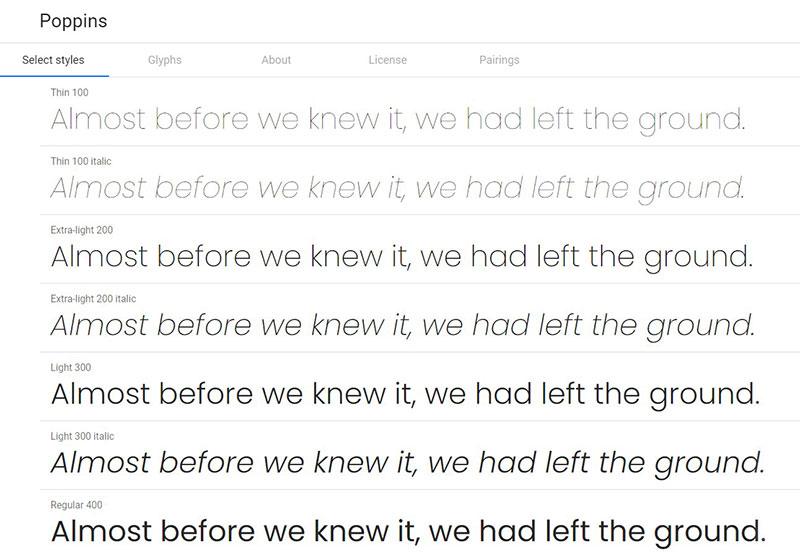
In addition to including the Latin alphabet, Poppins also includes all the characters necessary for the writing of Nepali and some Indian languages, making it a universal option that maintains the original idea of ​​Futura.

The main difference with the Supreme text font is that it has an extremely thin thickness and a smaller width, which creates long letters. Also, all capital letters (including Devanagari) are aligned at the same height.

NunitoSans – You won’t notice the difference
nunito-sans What font does Supreme use? Check out the Supreme font

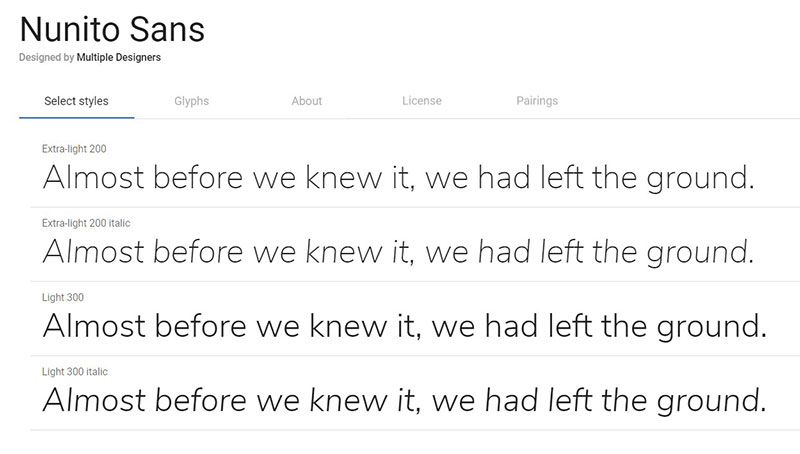
If you are looking for an alternative to the Supreme font with which to write your texts, Nunito Sans may be what you need. It offers the basic Latin characters, and its design is very similar to Poppins in terms of thickness. However, it has some characteristic visual details such as the J.

Hind – The option for user interfaces
hind What font does Supreme use? Check out the Supreme font

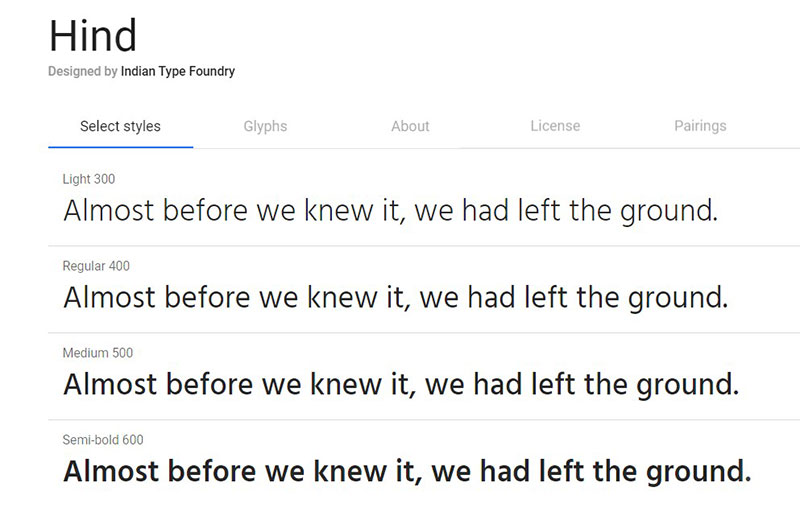
The secret to a useful user interface is that it is readable and not distorted no matter what screen it is used on. For the latter to be possible, the terminations of the letters should be straight, following the pixels’ direction.

Hind just offers this quality. Both its Latin and Devanagari characters appear to have been designed using a grid, as they have perfect horizontal and vertical proportions.

ITC Avant Garde Gothic – Take advantage of horizontal space
ITC-avant-garde-gothic What font does Supreme use? Check out the Supreme font

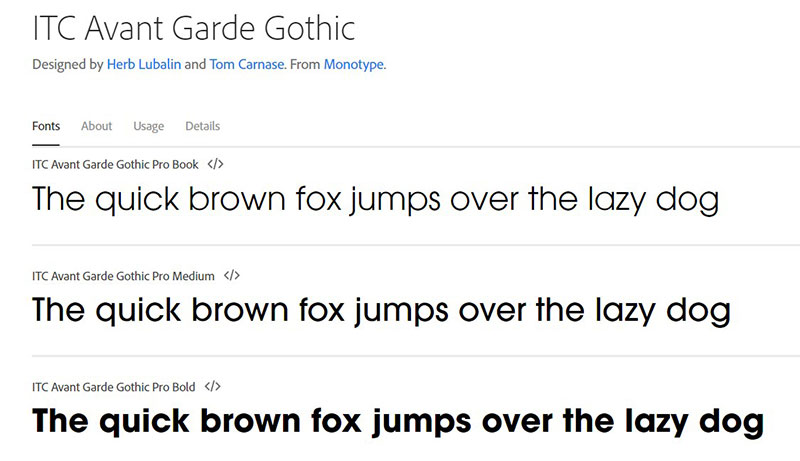
Perhaps part of the appeal of the Supreme typeface is the width of its lettering. With this alternative, you will have even wider characters thanks to the width and the separation between each letter.

Created in 1970 by Tom Carnase and Herb Lubalin, the name of the font is because it was designed to be used in the Avant Garde magazine. Adidas currently uses a basic variant of these characters.

Jost – For accurate calculations
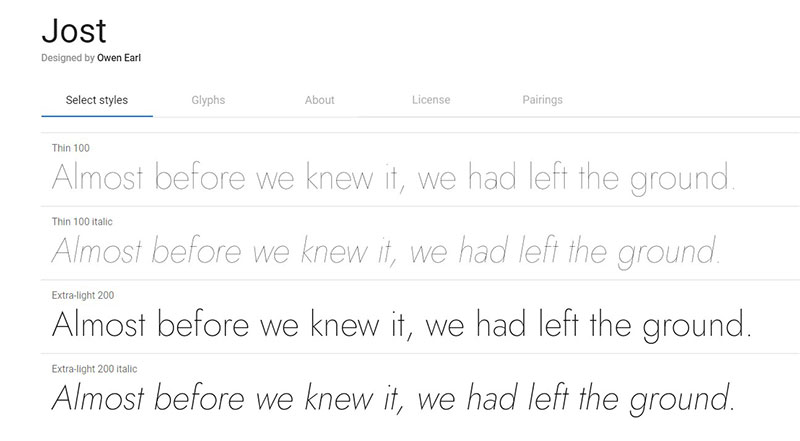
jost What font does Supreme use? Check out the Supreme font

Accounting is an exact mathematics that needs a precise design so that the values ​​can be read properly. To achieve this there is nothing better than Jost’s tabular numbers, which maintain a constant separation between each character.

It also features proportional numbers if you wish, and 9 different thickness styles.

FF Super Grotesk – A new perspective on Futura
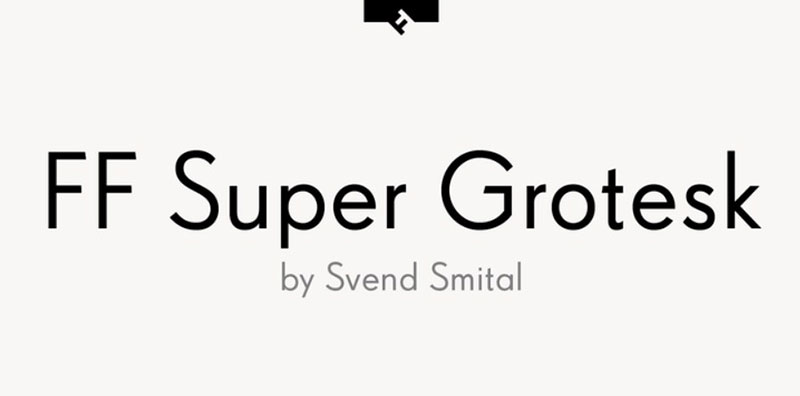
FF-Super-Grotesk-A-new-perspective-on-Futura What font does Supreme use? Check out the Supreme font

Created by SvendSmital, FF Super Grotesk is a reinvention of the original letter by Arno Drescher, which was also based on Futura, but with changes in the letters’ geometry, making them more symmetrical. Although the character set is very complete, it has the disadvantage of not being free.

Renner* – A worthy successor
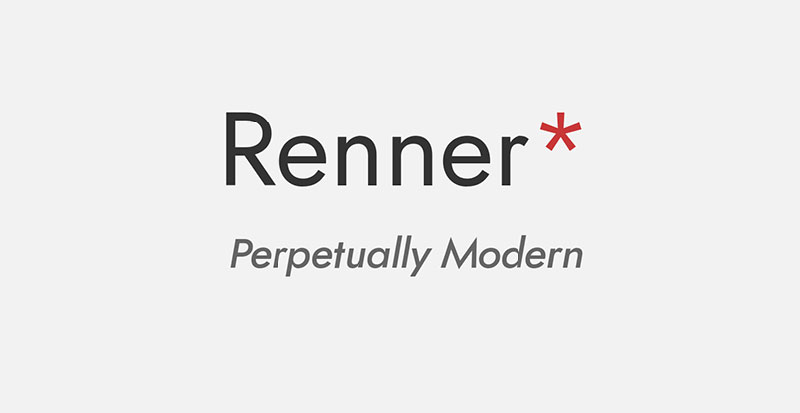
Renner-A-worthy-successor What font does Supreme use? Check out the Supreme font

It is easy to make your own Supreme logo if you use a letter similar to that of the company, but it is best to give it your personality to make it unique. The same goes for Renner *, which is a typeface that honors Paul Renner’s creation offering an identical design, but each character has been modernized to adapt to the digital age, which curiously results in a unique letter.

If you enjoyed reading this article about the Supreme font, you should read these as well:

The post What font does Supreme use? Check out the Supreme font appeared first on Design your way.


Source: https://ift.tt/3bCDiZc

Design your way

Monday, September 7, 2020

Giving a presentation can be an intimidating task. You want to inform or persuade your audience, yet you also want to keep their attention. The key to such an excellent presentation is an appealing presentation. Not only it helps you present your idea, plan, or company, but it can further be a vital part to guarantee you have a prosperous result.

Unfortunately, lacking design skills is often a common obstacle among many people. It can be quite detrimental to the outcome. In that case, existing PowerPoint templates are the right choice for you.

With the rise of minimalism, simple aesthetic templates can both impress and engage your audience. This simple white template can deliver your message right across.

What’s even more impressive about the whole design community is that many artists and creators share their work with no extra charges, including beautiful free PowerPoint templates.

You can begin your presentation with one of their collections of free minimalist PowerPoint templates. They’re simple, and they center the focus on you as the spokesman and everything you have to say.

So embrace the minimal design philosophy and choose a stunning PowerPoint template for your next presentation that has clean lines, subtle design, and a simple, professional look-and-feel.

Free minimalist Powerpoint templates

Tyler’s Sleek Minimalist Template

Tylers-Sleek-Minimalist-Template The best free minimalist Powerpoint templates

If you want a template that mainly focuses on big and bold statements, then Tyler Free PowerPoint Template is for you.

This free minimalist PowerPoint template emphasizes background images. All while maintaining a significant amount of text to a minimum. You can also customize the colors and hues of your presentation.

It also comes with different styles so that you can adjust the whole appearance by your preference.

Enable – Simplistic PowerPoint Templates

Enable-–-Simplistic-PowerPoint-Templates The best free minimalist Powerpoint templates

With easily customizable free layouts and sophisticated image placeholders – Enable offers a set of presentation templates suitable for business and creative projects.

Viola Free Minimalist PowerPoint Templates

Viola-Free-Minimalist-PowerPoint-Templates The best free minimalist Powerpoint templates

This free minimalist PowerPoint template offers to improve your presentation by one click. It is customizable, featuring a rich theme of styles, icons, and slides. Working best on a 16:9 screen layout, it will add an elegant touch to the presentation.

Air Aesthetic Backgrounds

Air-Aesthetic-Backgrounds The best free minimalist Powerpoint templates

Air models provide simple yet powerful designs that are easily accessible. They’re quite extraordinary – they follow the international standard format, and they come in a package with multiple original slides.

Choosing these simple PowerPoint templates will definitely impress everyone.

Gower Minimalist Presentation Slides

Gower-Minimalist-Presentation-Slides The best free minimalist Powerpoint templates

Having a neat presentation theme can aid you efficiently and effectively present your main ideas.

Gower’s free minimalist PowerPoint templates present you up to 80 different styles and icons. All of them, which you can comfortably design and readjust. These professional templates will step up your game in no time.

London – Aesthetic PowerPoint Theme

1London-–-Aesthetic-PowerPoint-Theme The best free minimalist Powerpoint templates

Impressing your colleagues, clients, or even friends and family has never been easier. Offering print-ready and customizable free slides, London’s PowerPoint template is perfect for you.

From business cards to minimalist presentations, it will allow your creativity to flourish and inspire.

Minimal – Simple Aesthetic Backgrounds

Minimal-Simple-Aesthetic-Backgrounds The best free minimalist Powerpoint templates

Make an impression with the Mintus minimalist PowerPoint template.

Engage your audience with the right balance of pictures, icons, colors, and fonts. Make your ideas pop-out and your message memorable.

Hera – Powerful Graphic Designs

Hera-Powerful-Graphic-Designs The best free minimalist Powerpoint templates

Despite having an aesthetic template, Hera’s template has many different slides for you to show your work. From swot analysis to timeline, mockups, charts, maps, etc.

It is a perfect template to fit any work of yours into a compelling aesthetic PowerPoint presentation.

Corporate Minimalist Slides

Corporate-Minimalist-Slides The best free minimalist Powerpoint templates

When creating a business presentation, you might want something that you can easily adjust. This simple aesthetic template not only has eight unique slides, but you can easily customize them. From changing fonts to changing color hues and so much more, this template has it all.

Your presentation is not business-related if you don’t include charts and graphs – which this template also offers. So make the right choice and choose this template.

Zeen: Modern Presentation Styles

zeen-powerpoint-template-1 The best free minimalist Powerpoint templates

When it comes to using flat colors, Zeen is the CEO. With contrasting templates, Zeen makes sure your information stands out among your competitors. So, stand out with this simple template, and you might become the next CEO.

Resume Presentation – PowerPoint Styles

Resume-Presentation-–-PowerPoint-Styles The best free minimalist Powerpoint templates

What better guarantees you a job than a visually appealing portfolio? Visual appearances are always crucial to success.

So choose from one of these 14 bold slides to make a bold statement. They’re available in both PowerPoint and Google Slides. Dynamic and practical, they are something everyone will be jealous of.

Minima’s Minimal Templates

Minimas-Minimal-Templates The best free minimalist Powerpoint templates

Detailed yet lower in number, these slides offer an outstanding template for your presentation.  It has a color scheme that grasps attention and an easily customizable gold highlight.

With this fantastic combination of colors, your audience will most certainly have a hard time straying away from your presentation.

Simple & Minimal Slides

Simple-Minimal-Slides The best free minimalist Powerpoint templates

Let’s say you have the skills to win the hearts of your audience. Yet, for some reason, your presentations go badly. Your poorly made presentation design could be the reason for no feedback.

Now you can instantly solve that problem with this Simple & Minimal PowerPoint Template.

With a standard format and bold typography, your content will surely amaze and engage your desired target.

Mifridix – Minimalist Slide Design

1Mifridix-–-Minimalist-Slide-Design The best free minimalist Powerpoint templates

Often templates are found to be dark and dreary. And when it comes to fashion and beauty, these kinds of templates often divert attention from your main idea.

You might want something bright and daring. Something that uniquely presents your brand or product. Mifridix is the perfect choice for a beautiful and feminine design.

Modern PowerPoint Templates by Casper

1Modern-PowerPoint-Templates-by-Casper The best free minimalist Powerpoint templates

Casper offers transparent and clear slide designs, which you can use to design your next fantastic portfolio.  With more than 60 original designs and animations and infographics, this template will transform your life.

HEXA Google Slides themes and PowerPoint templates

HEXA-Google-Slides-themes-and-PowerPoint-templates The best free minimalist Powerpoint templates

What more could mesmerize your clients than a minimalist pastel design?

HEXA promises that these designs will deliver your messages across. Such unique and innovative slides come with vector shapes and icons that are very easy to edit.

This easy customization will momentarily improve your presentations and add a bonus to your whole impression.

Minimalistic – Clean PowerPoint Template Design

Minimalistic-–-Clean-PowerPoint-Template-Design The best free minimalist Powerpoint templates

Get rid of unnecessary clutter on your presentations with Minimalistic. These avant-garde designs are everything that you need. Smooth transitions and changeable colors are going to make the most out of your presentations in no time.

Creative – Free Layout Design

Creative-–-Free-Layout-Design The best free minimalist Powerpoint templates

This free minimalist PowerPoint template comes with many benefits. It has it all: a creative design, drag and drop image placeholders and even editable objects. It is an excellent choice for either individual portfolios or work.

Neue Free Background Templates

Neue-Free-Background-Templates The best free minimalist Powerpoint templates

Craft your new business presentation with Neue’s free minimalist PowerPoint template. It serves as a base for a variety of uses.  Unlike many templates, the free version of this template holds up to more than 100 slide designs – perfect for your new presentation.

Bold Aesthetic Free Layouts

Bold-Aesthetic-Free-Layouts The best free minimalist Powerpoint templates

Choosing the wrong template could ruin all the hard work you’ve put into your presentation.  With millions of design choices available at your hand, the probability for you to pick the wrong template is huge.

However, with these free minimalist PowerPoint templates, you could never get your design wrong. Make yourself stand out with these aesthetic backgrounds.

Window – Google Slides Minimalist Templates

window The best free minimalist Powerpoint templates

If you’re a creative agency, searching for a new way to show off your business, then Window seems to be the right choice for you.

Suitable for similar businesses, it offers a large number of chic designs with five pre-made color schemes which will take everyone’s breath away.

Nook Aesthetic Minimalist Template

Nook-Aesthetic-Minimalist-Template The best free minimalist Powerpoint templates

Combining three colors into your design ensures you deliver your content simply and clearly. And Nook does just that. Their low amount of slide designs offers quick and easy choice. Say goodbye to the endless searching. With Nook, you can grab everyone by the hook.

Xara – Presentation Designs

Xara-–-Presentation-Designs The best free minimalist Powerpoint templates

An overwhelmingly large number of slide designs could take up a lot of your time, eventually leading to unmet deadlines. Worry no more!

Xara offers only nine designs, all of them which are with unique and adjustable layouts, charts, and graphics. They are perfect for quick and minimal slideshows and infographics.

If you enjoyed reading this article about free minimalist PowerPoint templates, you should read these as well:

The post The best free minimalist Powerpoint templates appeared first on Design your way.


Source: https://ift.tt/3i80Esb

10 Best Mind Mapping Software Tools for Designers

When you want to represent ideas and concepts in a graphical or pictorial form, you use a mind map or mind mapping tools. Mind mapping tools allow a person to have visual thinking, which helps in organizing the information. These tools help you analyze, understand, recall, and work on new ideas and concepts. When you want to record your thoughts and concepts and form an association between them, use mind mapping tools. These ideas could be anything and could strike you out of nowhere. And such ideas could be anything, like logo design, building an application, or something else. This is where you will essentially require mind mapping tools.

This blog focuses on mind mapping tools focused on designers, which means that these tools are ideal for designers. Let us see each of them in detail.

1. Coggle:

Coggle is an online mind mapping web application available for free for the designers and professionals from other domains. It lets you create structures and mind maps while allowing you to make connections among them. You can also create a branching structure to organize the priority or the flow of the mind map and your thought process. The most significant benefit of this web application is, you can add your colleagues and friends to a group on this tool. They can also add the charts’ ideas and thought processes to make them more comprehensive and understandable.

It also lets you track who else added what kind of details in the chart. Coggle also supports the addition of things like images, color specifications, and offers a feature to document history. It is also possible to revert to the point that would be a potential for error. You can take out the map in the form of PNG or PDF file formats, but since it is very pleasing to view the maps online on Coggle, people generally prefer the latter.

2. XMind:

XMind comes in free and premium versions and is compatible with Windows, Mac, and Linux platforms. Since it is an open-source desktop application, it is easy and free to download and use it. If you opt for a premium version of the tool, you get a lot of benefits. Apart from assistance and the feature to import/export the files, there are other things too. One of the most significant parts of XMind is, it is perfectly compatible with MS Office tools. Hence it becomes easy to directly export the mind map in the MS Office applications where you can view, read, or make necessary changes. XMind also supports and deals with various types of media and also lets you use the option to include the Gantt chart in the mind map.

It also comes with ready to use templates which you can use while creating your mind map. You can make mind maps with different structures like a logic chart, tree chart, and more. XMind is known to organize the ideas systematically to make it articulate and informative. You can also present the information in the form of slides the way you do in the Microsoft PowerPoint presentation.

3. FreeMind:

FreeMind is a free mind mapping software tool that works perfectly on Windows, Mac, Linux, and BeOS platforms. FreeMind is another open-source project that has been coded entirely in Java. Hence, it is practically executable on all the devices that use Java. FreeMind is popular because of its ability to streamline the ideas and organize them to make it more understandable and presentable. The cross-platform compatibility makes it one of the most widely used tools so far. It lets you add XML files to create and modify the tree structure of the mind map.

You can edit the structure by dragging and dropping files into the interface of the application. With a smart copy-paste tool, you can copy and paste HTML links, list the files, and textual format of the posted content. As it is made in Java and is compatible with various platforms, you can have data from different sources. You can also use JPEG, HTML, and PDF files with FreeMind, and it would still work correctly.

4. MindNode:

MindNode is made for Mac OS only, and hence it is a paid application. But there are various packages available to use the tool. But the application is simple yet elegant as well its functionalities. MindNode works perfectly on the iPad; hence you can work on the mind maps while moving around. The application is made so that it can be used on Apple mobiles and desktops. It also lets you export various formats, including the application FreeMind, that we talked about previously.

The user of MindNode can enter their thoughts, ideas, and concepts rapidly through a quick entry feature. He can jot down and thought that springs up and can organize it systematically later, to turn it into a brilliant concept. You don’t have to write down the ideas in only textual form. It also allows using links, notes, images, and organized tasks. MindNode offers a feature called layout where you can organize the thoughts and ideas in a presentable and a visually pleasing form.

5. Bubbl.us:

Bubbl.us is a free online web application based on Flash that enables you to create mind maps in a linear branching manner. You can save these mind maps online and export them to different file formats according to your requirement. Since it requires Flash player to work on mobile, it is not mobile compatible, which is the only drawback of this tool.

Since it is a tool available without any cost, you can use it for projects under a strict budget. The tool lets you write ideas, manage conferences, and share them with members. It enables you to discuss, collaborate, and develop ideas and concepts. Some users may think that since it is not a paid app, it would have fewer features. But the usability and the features it has to offer are countless and beneficial in a lot of ways. As Bubbl.us is a cloud-hosted tool, it can be accessed using the list of available browsers. Bubbl.us is made to suit small, medium, and enterprise business categories and verticals.

6. MindMeister:

MindMeister is a premium web application that is compatible with work on smartphones as well as desktops. It offers a lot of features for both iOS and Android platforms. The subscription for MindMeister starts at $4.99 per month. It offers three types of subscription plans according to the feature set you need. The type of subscription plan you choose to take up decides what kind of file output support would be available. You can take up their free trial period to see if it suits and fits your requirements before you can subscribe to their paid plan.

MindMeister offers an online map editor that lets you create, share, and modify the browser’s mind map. As it is a cloud-based web application, you don’t have to get through the hassle of installing and maintaining the stand-alone application. You can also stylize the mind map with themes and different colors to make it look visually pleasing.

7. Mapul:

Mapul is similar to MindMeister, which is a browser-based web application. You can take up the subscription plan for $2.50 per month. Compared to others, Mapul pops out amongst all because it lets you draw a mind map in a hand-drawn format. The hand-drawn layout makes the mind maps more accessible to the users. Other mind mapping web applications offer a standard and a conservative approach, but Mapul is modern in its way. Mapul happens to be a modified and improved version of mapmyself.com.

You can access the platform using Silverlight plugins. If you want to see if Mapul suits your requirements, you can go to the mapmyself website and take a test drive. If you subscribe to its paid plan, you can access to unlimited maps and pictures. With Mapul, you get access to a lot of color options and background themes. You can export maps into JPG and SVG formats that you can share within your teams. When you can export mind maps into presentation format in MS Powerpoint, you can use it to run a presentation and collaborate with your team.

8. WiseMapping:

WiseMapping is another open-source web-based mind mapping tool that is based on HTML5. You can access this tool through its website or choose to install it on your web browser. This is the best option when you have to run closed intranets within the organization. Since it is an open-source-based on HTML5/SVG, your web developer can tweak its settings and tune it according to your needs. WiseMapping offers a lot of flexibility as it can work with all the modern browsers. Since it is open-source, there is no possibility of any leakage of your mind maps and other information.

It doesn’t communicate your information to other applications hence making it a secure tool to use. The tool lets you use a drag and drop interface that enables you to work in the easiest way possible. You can move the objects around the interface and organize them in the way you deem fit. WiseMapping understands its users’ privacy and offers a private workspace where they can create and maintain their mind maps. But if they choose to, they can share their mind maps with their team members. The shared maps can be allowed to view or modify according to the granted permissions.

9. StormBoard:

Stormboard is a free mind mapping web-based application. The name Stormboard is another name of EdiStorm. It is an HTML5 based web application that offers a platform as well as device independence. The application relies heavily on collaboration and offers non-conservative output options like post-it notes. If you have a team of up to five members, you can use this tool for free. But if you are working with a team that has more than five members, you need to pay $5 or $10 per month according to the plan of your requirements.

The application lets all the team members write their ideas on the shared wall, accessed by other team members. This gives a space for a lot of brainstorming ideas to come through. To increase the creativity of the tool, it lets you post images for your reference as well as understanding. With the voting system, it is easy to see which idea is well-agreed for most team members. This can let you come up with the best idea that all the team members can agree upon collectively.

10. Wridea:

Wridea is a free web application for mind mapping that offers management of ideas and collaborative services. It has a different approach to the concept of the mind mapping tool. Wridea is not just a mind mapping tool strictly, yet it is a collection of various tools for you to come up with new concepts and fresh ideas. This tool offers a simple interface that you can access using browsers on your device. With a lot of collaboration and API integration, it becomes a flexible system to use. With unlimited idea pages and color schema, you can make mind maps that are visually appealing to the viewers. Wridea offers private/public options to let the users have a personal mind map. And the same user can allow others to access the mind map by inviting them and making the mind map public. This gives Wridea a lot of flexibility in its functionality.

Isn’t it a great thing that now you can map your ideas to a computer system to keep in touch with the concept or not lose it again? These tools can be an excellent tool for designers when they are having leisure time, and an idea strikes them at that time. A mind mapping tool helps you when you want to make associations between concepts and ideas. Moreover, these associations can make you find better solutions to problems or come up with new yet practical concepts and ideas. This blog lets you explore the tools that designers and professionals from other fields can use and take advantage of them. You can always look up the tools here in this blog. Some of them are free, while others are paid. You can take up the tools that suit your requirement the best.

The post 10 Best Mind Mapping Software Tools for Designers appeared first on Line25.


Source: https://ift.tt/3jVGuC2
 

The Cash Box Blueprint

Most Reading