9 Popular Multipurpose WordPress Themes in 2021

Thursday, May 6, 2021

Top-rated multipurpose WordPress themes like those described in this article are best sellers for a reason. They give users the flexibility necessary to build websites for a variety of different niches, styles, and types. They often feature the most popular web design tools on the market and they are user friendly. They can be counted on to provide 5-star support to their users.

It generally makes sense to invest in a specialty theme to build a real estate website, a portfolio website, or a travel-oriented site. Many, if not most, multipurpose themes can do so as well.

It becomes a matter of being able to use as few themes as possible to build a variety of websites. With a premium multipurpose site that number can usually be reduced to one.

Here then, are the top 9 multipurpose WordPress sites for 2021.

  1. Total WordPress Theme

Total will be an excellent pick for building websites for a variety of uses where you want each website to be not simply distinctive, but one-of-a-kind. In addition to giving you all the flexibility needed to accomplish this, you’ll find Total to be fast, easy to use, and a provider of 5-star support.

Among this multipurpose theme’s many remarkable features you’ll find:

  • An extended version of the WPBakery page builder
  • 40+ one-click import demos to get projects off to a fast start together with more than 100 drag and drop page-building modules
  • Total’s Theme Customizer for modifying colors and fonts, and changing section and column widths
  • 500+ flexibility-enhancing design element customizer settings
  • Unique post entry Cards for posts, builder modules, and more

Total is WooCommerce and SEO friendly, it’s compatible with all of the popular WordPress plugins, and it is developer friendly as well.

Click on the banner to see why 47,000 web designers have chosen Total as their website builder of choice.

  1. BeTheme

It makes sense that a multipurpose theme that has a larger number of website-building features than most of the others would offer its users more design options and greater flexibility.

That is certainly what BeTheme’s 200,000-users discovered as they became acquainted with this multipurpose WordPress theme’s 40+ core features.

These users also delighted with :

  • Be’s awesome library of more than 600 customizable pre-designed websites that address most industry and business niches and all the popular website types and styles and feature embedded functionality
  • Powerful tools including the Muffin Builder, the new Header Builder, the Shortcode Generator, a Layout Generator, and more
  • A host of design aids together with color, font, grid, and header options and more

Click on the banner to check out all 40+ core features.

  1. Kalium — Creative multipurpose theme for WordPress & WooCommerce

Given the choice of building a website the hard way or the Kalium way, any web designer would quickly opt for the latter unless he or she is a dyed in the wool programmer.

Kalium makes web building so simple.

  • Pick one of its customizable pre-made concept demos, import it, and get started
  • Import whatever you need in the way of pages, theme options, and widgets to create the site you visualized
  • Use the Elementor or WPBakery page builder, LayerSlider, or Revolution Slider to drag and drop your way to completion
  • Kalium also features a host of crafted portfolio layouts, header styles, post types, and page options to help smooth the way
  • Free lifetime updates ensure Kalium is always current with the latest design and industry trends.

Kalium, with its customer base of 38,000, is the highest-rated theme on the market.

  1. Avada Theme

The fact that Avada is the all-time best selling WordPress theme on the market might be enough of a reason to choose it for your web-building tasks. There are more than a few other good reasons for choosing it as well.

Such as:

  • 40+ one-click importable demos to help you get your projects underway
  • access to all the popular WordPress plugins
  • a toolbox filled with $200 worth of web-building tools
  • Enough page and design options to give you all the flexibility you need

Avada is fast, responsive, and WooCommerce compatible.

  1. Uncode – Creative Multiuse & WooCommerce WordPress Theme

This Envato top selling multipurpose pixel-perfect theme is well-suited for creative types, agencies, bloggers, and small businesses.

  • Portfolio and blog website-building are two of Uncode’s strengths
  • Uncode’s Wireframe plugin with its 450+ Wireframes section templates make it easy to create the page layout you want
  • Uncode’s powerful frontend editor speeds up workflows and its new WooCommerce Custom Builder opens up a host of cool online shopping possibilities
  • Viewing Uncode’s showcase of user-created websites to discover what Uncode can do for you

Uncode has logged 85.000+ sales to date.

  1. TheGem – Creative Multi-Purpose High-Performance WordPress Theme

TheGem’s 50,000+ customers refer to it as the ultimate WordPress toolbox. You likely will as well once you become acquainted with this multipurpose theme’s website-building features that include:

  • More than 400 multi-page and single-page ready-to-customize websites
  • The popular WPBakery and Elementor page builders
  • A selection of mix & match customizable templates
  • Pre-designed page sections to speed up your workflows
  • WooCommerce features for online shops
  1. Hongo – Modern & Multipurpose WooCommerce WordPress Theme

Hongo is a new and modern multi-purpose theme that is just waiting to help you design WooCommerce stores, company websites, blogging sites or whatever you wish.

Among Hongo’s cutting-edge features you’ll find:

  • WPBakery custom shortcodes and WordPress Customizer access for maximum flexibility
  • WPBakery page builder and Revolution Slider premium plugins
  • 12 ready store demos, 250 templates and more than 200 creative elements
  1. Brisk – Multi-Purpose Elementor WordPress Theme

If fast and easy website building appeals to you, you could profit from giving Brisk a good, close look.  Brisk is WooCommerce-ready and its interactive design tools and design aids make creating a high-performance, SEO friendly website as easy as 1-2-3.

  • You won’t need coding skills
  • You’ll have 30+ ready-to customize websites and 2,000 Elementor template blocks with plenty of customization options at your fingertips
  • You can easily fine tune your designs down to the finest details with the Elementor page builder
  1. Pofo – Creative Portfolio, Blog and eCommerce WordPress Theme

With its extra emphasis on blog, portfolio, and eCommerce website-building, Pofo is ideally suited for creative types, artists, and the like.

  • WPBakery is the page builder of choice, and a collection of bundled plugins is also included in the package.
  • You’ll have large selections of pre-built elements, custom shortcodes, ready demo pages, and home pages right at your fingertips
  • Pofo is fast, flexible, and delivers first-class customer support

*****

WordPress users have decisions to make when planning an upcoming website-building project. One of the most important is choosing a multipurpose WordPress theme. Well, depending on the circumstances can sometimes be a challenge. The easiest, and usually the best approach is to go with a multipurpose theme.

Multipurpose WordPress themes take a lot of work to create. They have to be extremely flexible to cover a wide range of uses, they should be dependable and easy to use, and they must be kept up to date. The 9 multipurpose WordPress themes covered in this article easily meet these criteria.

The post 9 Popular Multipurpose WordPress Themes in 2021 first appeared on Web Design Dev.


via https://ift.tt/3xQNIPw

9 Great Multipurpose WordPress Themes for Beautiful Websites

Wednesday, May 5, 2021

One feature a WordPress theme must have to enable its owners to create a variety of websites and website types is great flexibility. Single-purpose themes rarely if ever possess the necessary flexibility to do that. Although many of them can serve admirably as specialty themes.

Not every multipurpose WordPress theme may be up to the task. Which is why it’s usually safer and a better investment in terms of economies of scale to go with a premium multipurpose theme.

  • Each of the top premium multipurpose WordPress themes described in this article is noted for its flexibility
  • Each of these multipurpose themes is kept up to date with the latest industry and design trends through a continual series of updates
  • Each has a reputation for providing excellent customer support

With that, let’s get started.

  1. Total WordPress Theme

In terms of its page-building tools, design aids, options, and overall functionality, Total has all the features and flexibility you’ll need to handle any website-building assignment that may come your way, and it will never slow you down.

Among the features you’ll have at your fingertips:

  • 40+ single-click importable demos, the content of which can be copied, modified, and fine-tuned to meet your needs.
  • An advanced version of the popular WPBakery page builder together with over 100 page-building modules
  • 500+ styling settings you can use to customize Total’s impressive array of design features
  • Dynamic Template and Post Cards functionality you can access to produce tailored dynamic templates for your post types

Total was designed with perfection in mind, but ease of use was also a key objective, making it the right choice to get a website up and running no matter your level of experience. 47,000+ Total users can’t be wrong.

Click on the banner to discover more of the good things about Total that its 47,000+ users already know.

  1. BeTheme

BeTheme sets a benchmark for premium multipurpose themes that must meet all the criteria for flexibility, performance, user-friendliness, and excellent customer support.

As the biggest multipurpose theme currently on the market, BeTheme demonstrates that size does indeed matter with its more than 40 core features, 200,000 sales, and its virtually unlimited number of website design options.

Key core features include:

  • 600+ customizable pre-built websites that cover 30 industry sectors and all website styles and types, and feature embedded user-friendly UX functionality
  • A Muffin Builder page builder, Admin Panel, and Shortcode Generator combination that simplifies page building while eliminating any need to code
  • The Layout Generator, a new Header Builder, and a host of grid, color, font, and other design options

Click on the banner to see why BeTheme would be a great addition to your toolbox.

  1. Kalium — Creative multipurpose theme for WordPress & WooCommerce

The fact that Kalium is the highest rated theme on the market could be reason enough to invest in it, but its superior performance, flexibility, and first-class customer support are certainly worth mentioning, as is the fact that this multipurpose theme currently supports a 38,000+ strong user base.

  • Its fast and easy approach to website building is another good reason to go with Kalium and makes it an excellent choice beginners and experienced designers alike.
  • Pick one or more of Kalium’s pre-made concept demos, clone selected content to your site, and put Elementor, the industry’s top page builder, and Kalium’s other website-building tools to work.
  • There’s an abundance of customizable header, navigation, portfolio, and blog layouts to work with together with generous selections of shortcodes and other design elements
  • Kalium is SEO and WooCommerce friendly and GDPR compliant.

Click on the banner to learn more about this top-ranking multipurpose theme.

  1. Uncode – Creative Multiuse & WooCommerce WordPress Theme

To create a smooth and sleek, pixel-perfect, high-performance website every time, perhaps it’s time you consider using the multipurpose theme that its 85.000 users will tell you has the same characteristics — Uncode.

  • With Uncode’s powerful Frontend Editor, 450+ Wireframes section templates you can create virtually any layout
  • Uncode’s new WooCommerce Custom Builder puts it front and center among online shopping website-creating themes

Uncode lets you showcase your creative talents for the world to see

  1. TheGem – Creative Multi-Purpose High-Performance WordPress Theme

TheGem has acquired a reputation as being the ultimate WordPress toolbox with cool features like:

  • Selections of creatively designed multi-page and single-page ready-to-use websites
  • Elementor & WPBakery page builders that allow you to mix, match, and customize TheGems’ web design templates
  • The Blocks, a collection of pre-designed page sections
  • Powerful WooCommerce features for creating high conversion online shops

TheGem has a 5-star rating and supports more than 50,000 satisfied customers.

  1. Avada Theme

Avada is the all-time #1 best-selling theme on the market, and as such has plenty to offer including:

  • 40+ one-click demos plus partial demos, pre-built websites, and a host of supporting design elements
  • $200 worth of website-building tools
  • Plenty of page and design options together with the Dynamic Content System to provide unparalleled flexibility
  • Easy access to the popular WordPress plugins
  • Everything is drag and drop

Avada’s 450,000+ customers give it a 5-star rating.

  1. Brisk – Multi-Purpose Elementor WordPress Theme

Brisk makes website building fun. After the first few clicks, you feel like a pro, and after a few more you realize you have complete control over what will be your website’s look and feel.

  • Brisk’s learning curve is flat, zero, zip.
  • 30+ ready-made websites and 200+ pre-designed sections and pages give you a formidable set of building blocks
  • Control item spacing, aspect ratio, hover effect, complete grid control, etc. add to the fun
  1. Pofo – Creative Portfolio, Blog and eCommerce WordPress Theme

Pofo is a modern and creative multipurpose theme that is a favorite of creatives, agencies, and bloggers.

  • It is especially well suited for creating portfolio, blog, and eCommerce websites.
  • Pofo’s users can take full advantage of the WordPress Customizer and custom shortcodes in their website-building activities
  • The package includes bundled premium plugins, pre-built elements, and ready home and demo pages

Pofo is super-fast, SEO optimized, and offers 5 star customer support.

  1. Hongo – Modern & Multipurpose WooCommerce WordPress Theme

Hongo is a next-generation multiuse theme that is relatively new on the scene. It excels as a WooCommerce-based online shop builder with 12 ready-to-customize store demos and supporting design options and elements.

The package includes:

  • More than 200 creative design elements and 250 customizable design templates
  • The WPBakery page builder together with WPBakery custom shortcodes
  • eCommerce product features that include quick view, compare, wish list, tabs, filters, and more

Hongo has quickly proven to be a favorite among web designers.

*****

A WordPress user must make one of the many design choices. Choosing the right multipurpose WordPress theme to work with can sometimes be the most difficult. And the most costly if a poor choice is made.

Designing and maintaining a multipurpose WordPress theme – that can take an extraordinary amount of skill and hard work. Demos, templates, and page sections have to be in line with current design trends and easily customizable. They should give users the design freedom they need. That way can make them compatible with any type of website while not losing the aesthetics that initially attracted you to them.

The 9 top multipurpose WordPress themes described here easily meet these criteria.

The post 9 Great Multipurpose WordPress Themes for Beautiful Websites first appeared on Line25.


Source: https://ift.tt/3uqq1M6

17 Best WordPress Tutorials for Beginners

Tuesday, May 4, 2021

WordPress is undoubtedly one of the most famous open-source content management systems that can help you to create amazing websites and manage them conveniently. Around 27.5% of all websites available on the internet are powered, created, and managed by WordPress. The trend of WordPress is growing tremendously and if you haven’t accepted it yet, it is a good time that you do. 

However, there is a lot of stigma regarding WordPress that it is difficult and very hard to master. To be honest, understanding WordPress is not that complicated and very easy to work with. To prove to you that, we have compiled a few WordPress tutorials that will help you master this domain in no time. From the basic understanding of the functionality of WordPress to creating intricate websites with it, this consolidated list of video tutorials will make these tasks seem like a cakewalk.  

1. What is WordPress?

Are you still a new entrant to the realm of WordPress and wondering what it is? Are you curious about how it works? Well, here is a video that will answer all your questions. In this explanatory video, Dale McManus, a web developer, explains what exactly WordPress is and how it functions. It includes all the integral information that you need before starting your journey and answers one major question – The difference between wordpress.com and wordpress.org. 

2. How to make a WordPress website?

Now that you know what WordPress is and what you can do with it, let’s start with creating a website. This amazing video by Tyler Moore can be really helpful for that. In just 24 easy steps, he teaches you how to create a professional-level website with all the intricate details and nuances. From getting your domain name to instructions on creating your own logo, this extensive and elaborate video tutorial can really help you build a website on WordPress. So, follow these 24 steps and create your own website, right now! 

3. How to use FTP to upload files on WordPress

File Transfer Protocol (FTP) is one of the most efficient and simple ways to transferring files from one computer to another over the internet. It makes the file transferring process exceptionally faster. But, how to do it on WordPress? This awesome tutorial by WPBeginner will help you with it. In just six minutes, this video will teach you three popular ways to transfer files to WordPress. 

4. How to add a background image on WordPress?

While improving the aesthetic appeal of your website, adding a background image also makes your website more engaging and interactive. However, it can be quite tricky while uploading the image on WordPress. But, worry not. We are here to help you. This amazing video by WPBeginners will show you how to add a background image to your website in just two and a half minutes. It also guides you through different variations of background that you can apply on your website and how it can benefit you. Follow it to the T and you will be good to go. 

5. How to install WordPress on your PC?

Want to build a WordPRess website without having to pay for a domain name or hosting? Well, then this video is what you need. This amazing video shows you how to locally install WordPress on your PC. This is a great technique to test themes and various plugins on your local site, before actually applying them on your live website. With this, all your files will be stored on your PC with only you having the accessibility to view them.  

6. How to make an online store on WordPress? 

 Creating an online store on WordPress can be a tricky job. There are a lot of intricacies that you need to pay attention to and any mistake can make your efforts go down the hill. To help you with it, here is another video by Tyler Moore that will give you a detailed outlook on how to create an online store on WordPress. This two-and-a-half-hour-long video will teach you a step-by-step method of creating an online store. While the video is quite long, you need to pay attention to each and every step, without skipping any, if you want to create a fail-proof online store. 

7. How to customize your WordPress SideBar?

Even though WordPress provides a handy and elegant navigation structure, why should you limit your website to that? Having a distinct sidebar gives your website a creative edge and distinguishes it from other WordPress-created sites. Here is an excellent video by David Hayes from WPShout who will how to customize WordPress widgets. These widgets can be used to customize homepages, footers, and lots more. It will also teach you to edit your sidebar on WordPress. 

8. Top 10 best free WordPress themes for 2021

From the abundant choices of amazing themes that you have on WordPress, it is really hard to choose one that properly fits your needs and also looks aesthetically pleasing. To help you choose the right theme here is an amazing video that introduces you to the top 10 WordPress themes that will blow your mind. Darrel Wilson has consolidated this list while considering all the necessary aspects and keeping in mind the versatility of your objective. Try any one of them and we are sure you will love it. 

9. How to use XAMPP for a local WordPress website

For those who do not know what XAMPP is, it is a free and open-source cross-platform web server which allows you to create a WordPress website even when you are offline. It is a simple and lightweight solution that can be really beneficial while creating a website. You can also use it to test themes and plugins which need a lot of modification before releasing. So, how to use it? Here is an excellent tutorial video by Themeisle which will take you through the entire process of using XAMPP for your local WordPress website. 

10. How to setup all in one SEO for WordPress

Out of all the plugins, All in One SEO (AIOSEO) is one of the best WordPress SEO plugins that can easily optimize your website and improve its performance on search engines and social media platforms. Do you want to learn how to set these plugins to your website? Here is a detailed video by WPBeginner which will help you with it. From making your blogs and content on the website perform better to creating cross-connections between content, this fifteen-minute video is a real life-saver. 

11. How to create a Multi-Page Form?

Certain websites or organizations require a lot of forms and documents that are supposed to be filled for proper permission and accessibility of service. As most of these documents will be legal and contractual, you need to make sure that your website doesn’t hamper them or create complications for the viewer. To prevent that here is a video that will help you create multi-page forms without any hassle and ruckus. 

12. How to change the Gravatar image size

Gravatars are one of the most iconic trends of the 21st century, with everyone wanting their own graphical avatars. Hence, you should definitely add it to your website. Here is a detailed video by WPBeginner that will help you in adding Gravatar images to your website. It will assist you in how to add the image, how to resize it, and how to modulate it as per your needs. No matter how complicated your image is, this tutorial will come in handy. 

13. How to Fix the Error Establishing a Database Connection 

A coder’s worst nightmare is to fix an error that is disrupting the entire code. And, similarly, having an error pop on your WordPress website can be equally terrifying. Out of all the errors that you can encounter, the most dangerous one is the error of establishing a database connection that literally cannot let you log in to your website. If you are caught in such a situation, take a deep breath and go through this video. This detailed tutorial by WPBeginner will help you fix this problem in no time and bring your WordPress website back to functionality. 

14. How to create a menu in WordPress

The menu plays a vital role in any website as it inducts your viewers to the varied content that they can find here. Hence, you need to make an impressive menu that can fulfill your viewer’s needs. To help you get started, here is a video by Cloud Access that will help you in creating a desirable menu for your website. It will teach you how to create a custom menu and how to design a menu structure. It is the 10th video of a Cloud Access’ series on the development of a WordPress website. 

15. How to create a child theme 

Even though you are creating a website that is directed to the older audience, why exclude the younger audience from your target market? Creating a child theme has a different methodology that one needs to follow. Depending on the subject and target market, the color tones and element structuring needs to be differentiated, and here is a video that will help you. This detailed video by Level Up Tuts will teach you all that you need to know while creating a child-themed website.  

16. Speeding up your WordPress Website 

Do you feel like your WordPress website is functioning slowly and it needs to pick up its pace? Well here is a video that can help you. Created by OS Training, this video discusses two popular methods of optimizing your website and making it a lot faster. While the easiest method is to reduce the size of your images and make your web size smaller, this video shows you another approach to it. By caching the data of your website, you can efficiently make your website faster without compromising the quality of images. It can quickly access pages and allows the next user to receive the loaded page. Learn more about it with this video. 

17. How to Make a Social Media Website 

What if someone wants to create a social media website with WordPress? Well, it is very much possible. Here is a tutorial video by WP Crafter that will teach you how to make an online community website. With the tips and tricks provided in this video, you will be able to create a website just like Facebook or Twitter. From adding the basic features to creating a user forum, this two-hour-long video will help you create your own and distinct social media platform in no time.  

Besides these 17 video tutorials, there are tones of more that you will find on YouTube or any other browsing channel. But, we found these to be the most elaborate, detailed, and well-explained ones. They take you to the roots of every concept and help you build a stronger foundation before heading into this WordPress journey. 

By understanding the concepts that are elicited here and by practicing them diligently, you will get a better hang at using WordPress and open your horizon to newer and more interesting websites. 

The post 17 Best WordPress Tutorials for Beginners first appeared on Web Design Dev.


via https://ift.tt/3aZpNUc

17 Amazing Letterhead Designs For Your Brand

Monday, May 3, 2021

Letterheads are a part of your essential stationery items, which reflect your brand and brand personality. You can say a letterhead is a more sincere and professional tool that carries all the important communication on your brand’s behalf. When a designer is hired to design a complete branding kit, he or she may not always put enough of the required focus on the letterhead because generally, the letterhead is designed with logo and as per the business card. Consistency of design is required, but that doesn’t mean you should not put your effort into the letterhead.

Since a letterhead is on a page that your all of your connections would be seeing, it must also not fail your brand on any level. In this blog post, we have gathered some great letterhead designs that you can see for your inspiration and learning. These 17 fantastic letterhead designs are proving that a creative and unique letterhead can make a big difference. They are as follows:

1.  MS Word Letterhead Template:

Amazing Letterhead Designs: MS Word

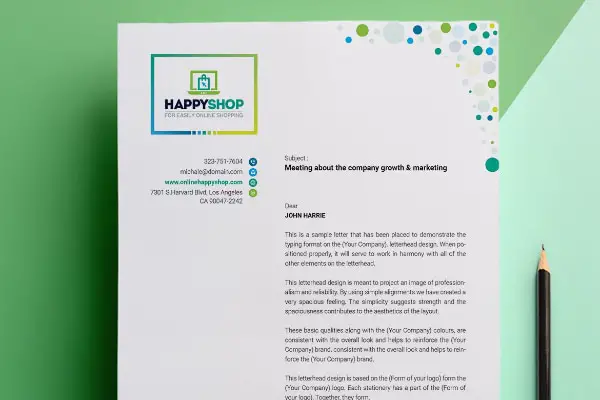
It is a beautiful design with attractive colors and layout. This MS Word letterhead design is a template, so you can use it directly for your designing purpose. It is subtle and eye-catchy with great color combinations and geometric shapes. You can see the header section is not horizontal in this design which makes it unique and creative. There are different-sized bubbles on the footer section and right corner, which adds more vibrance to the design. It’s a perfect design idea for creating a professional yet friendly letterhead design.

2.  PIXFOX:

Amazing Letterhead Designs: PixFox

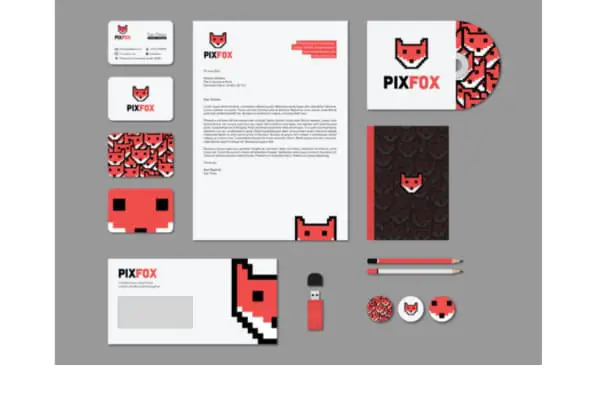
Can Timor is the designer of this letterhead. It is an excellent example for graphic designers. This letterhead is a perfect combination of simplicity and a modern approach. The logo itself is a unique design of a fox. So in letterhead designer has used bright colors with whitespace. The contact details are sitting perfectly with the logo. And the logo is also used on the footer side to fill the excessive whitespace. This way, you can utilize your amazing logo design to create a fantastic letterhead.

3.  Happy Holidays:

Amazing Letterhead Designs: Happy Holidays

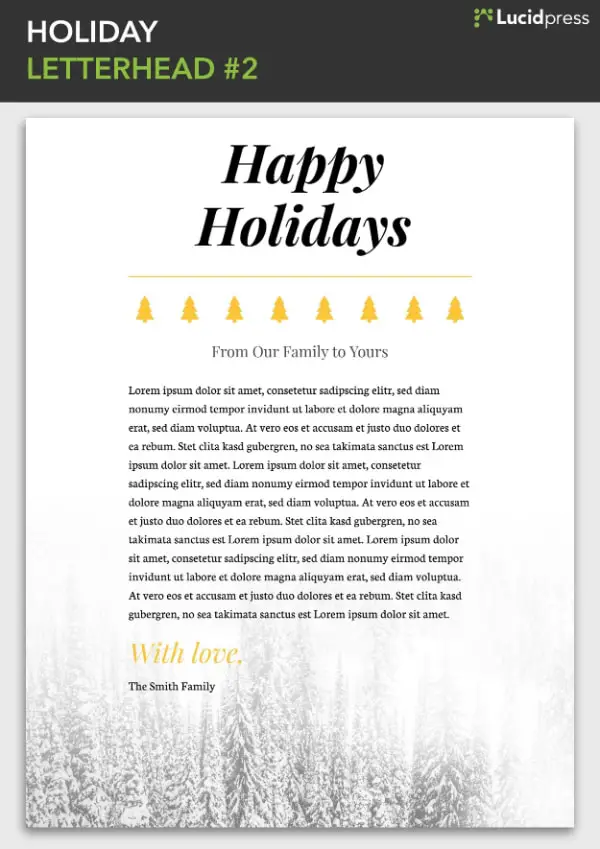
When it comes to creating fun designs for the entertainment and leisure industry, you get little advantage of boundaries. You can break the stereotypes and design a fun and eye-catchy letterhead. This happy holidays letterhead is a good example of that. Here they have used a picture associated with the holiday season and smartly placed it in a gradient style. You can see a straightforward header with a connective and unique footer section. These kinds of ideas can open many doors of creativity, and you can surely think of some great concepts.

4.  Modern Law Firm:

Amazing Letterhead Designs: Modern Law Firm

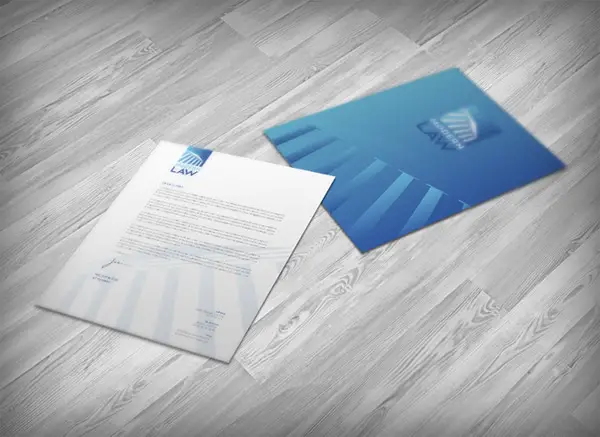
This is designed by Tugrul Ozmen. Here the logo design has a classic color combination of blue and white. And the designer has used the law firm logo in his letter design carefully. The left header corner has a logo, and the right footer corner is with contact details. You can see the logo design on the white space in opaque effect and which is filling the white space beautifully and making the design more communicating. It looks professional and classy, which is perfect for any law firm.

5.  Dylan’s Barbershop:

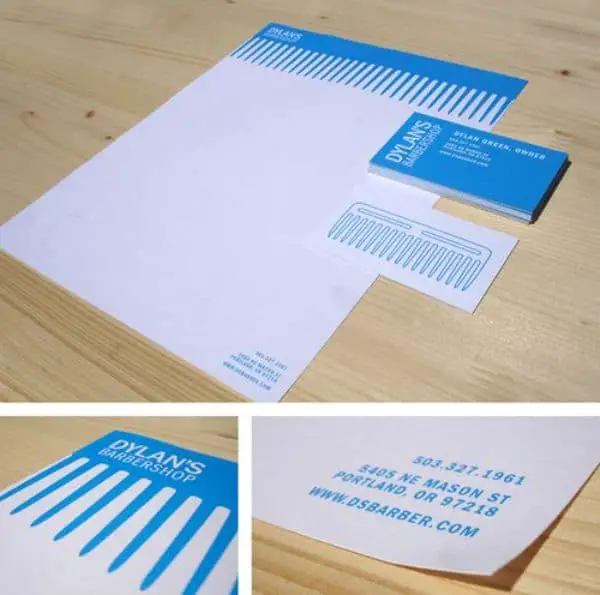
Amazing Letterhead Designs: Dylan's Barbershop

This lovely design is created by Lizzy Green. It is a simple, understandable, and attractive concept. The whole design is having only two colors- blue and white. The letterhead has a big comb design in the header section to emphasize the barbershop brand. One simple element with only required information is the essence of this design. A minimalist design can never fail the concept if you know how to use balanced elements in an interactive way. From the first glance, you can tell the brand’s core operation, and that’s what real branding concepts should achieve.

6.  Unique Framed Letterhead Vector:

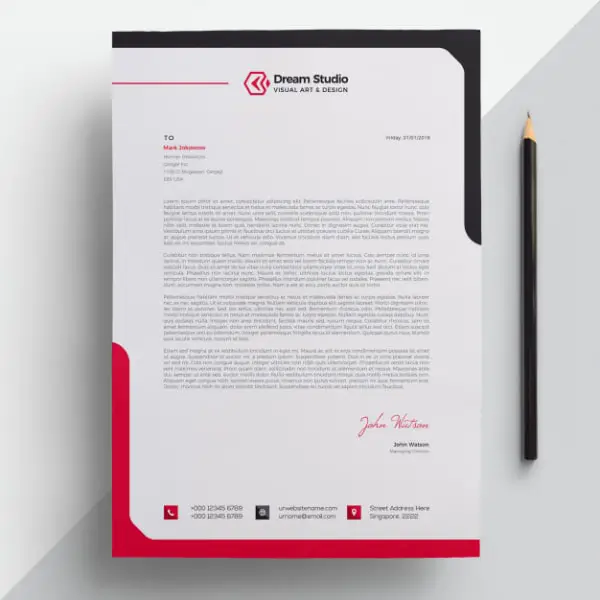
Amazing Letterhead Designs: Unique Frame

Framing in a letterhead is another element that can change the entire look. This letterhead design is from Freepik, and you can definitely use this for your purpose. It has a bright and all-time favorite color combination of designers. The white space is perfectly balanced with the red and black frame. The contact details are rightly placed, and the frame design is very attractive. The frame is not entirely covering the page; it is just for the lateral corners. You can use colors from your color pallet and create exciting frames to make your letterhead stand out.

7.  Strong Yellow Letterhead:

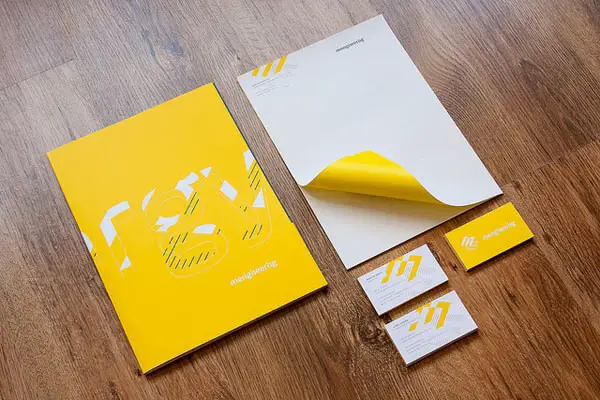
Amazing Letterhead Designs: Strong Yellow

Keeping a letterhead plain white is a traditional concept. Nowadays, designers are finding exciting ways to include colors in the letterhead. Here this design has enough whitespace, but they have used bright yellow color on the page’s backside. After designing a header and footer section, if you include one of the primary colors from your brand’s color pallet to fill the backside, you can create something unexpectedly unique. It makes the letterhead design trendy and appealing.

8.  Using A Signature For Letterhead:

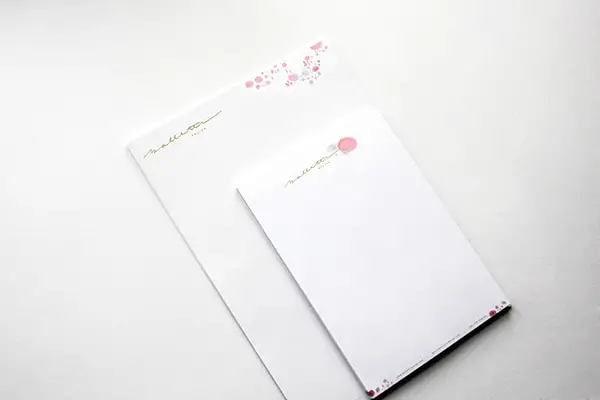
Amazing Letterhead Designs: Signature

A signature in branding elements works really well to create a more personalized touch. In this design, subtle colors with a classy design go well with the header’s signature logo. These kinds of concepts are beneficial for luxurious, creative, or personalized products. Class and elegance come off just right when you send a document with this type of letterhead design. It is one of the beautiful trends, and it is gaining popularity in some particular segments.

9.  Juniper Letterhead Design:

Amazing Letterhead Designs: Juniper

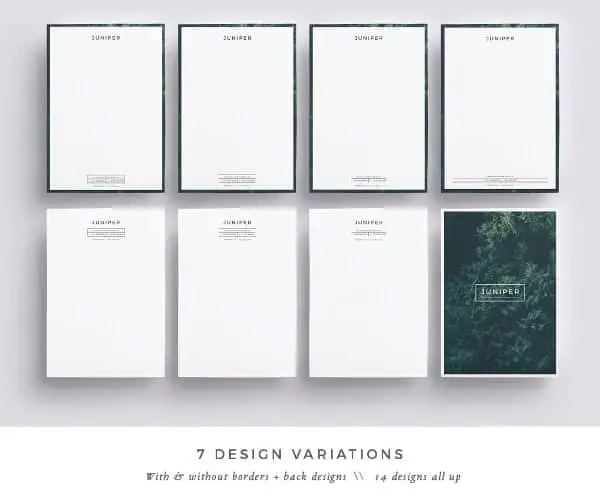
Juniper is a unique example of a letterhead design of a reversed style concept. It is a template, and you can use it for any purpose. In this design, they have smartly used the image on both sides of the page. On the front side, you get a header and footer with a border of the image used on the other side. This gives you an illusion of letterhead on that image. So you can definitely use this idea to use an image for the backside and the border of your letterhead as well. It is a concept that would go for any sort of industry and brand.

10. Creative letterhead concept:

Amazing Letterhead Designs: Creative

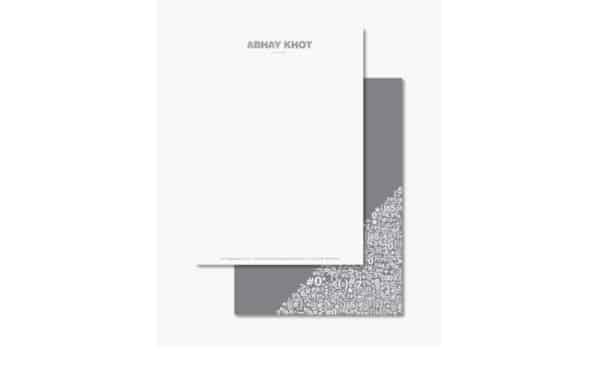
This design is full of inspiration. The designer has used a very smart way to create a logo and letterhead design. It is for a tax consultant, and that is why you can see mathematical shapes and symbols in the logo. And the same has been used on the reversed side of the page. The design is reflecting the brand and its nature in a most straightforward manner. Here the letterhead is sleek, classy and the colors are also complimenting its brand category. It’s a complete package of inspiration for designers who wants to turn a formal or dull design into a fun and interesting one.

11. Turnstyle Letterhead:

Amazing Letterhead Designs: Turnstile

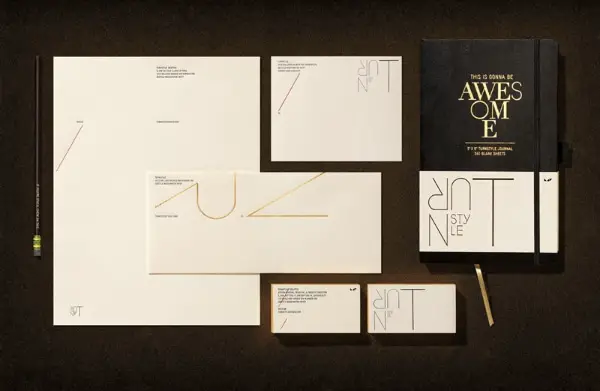
This letterhead design is from the Turnstyle brand. And this exciting design worth mentioning for inspiration. From this design, you can learn that a logo design that is responsive and moldable for various purposes can really add some charm to all your branding elements. Here, this brand’s logo is very unique and interactive, and that’s what makes this letterhead design beautiful. If your design allows you to add some shapes and lines from the logo, you must find some creative ways to do that on your letterhead. And this classic and minimalistic design is communicating that very well.

12. Innovative Typographic Letterhead:

Amazing Letterhead Designs: Typography

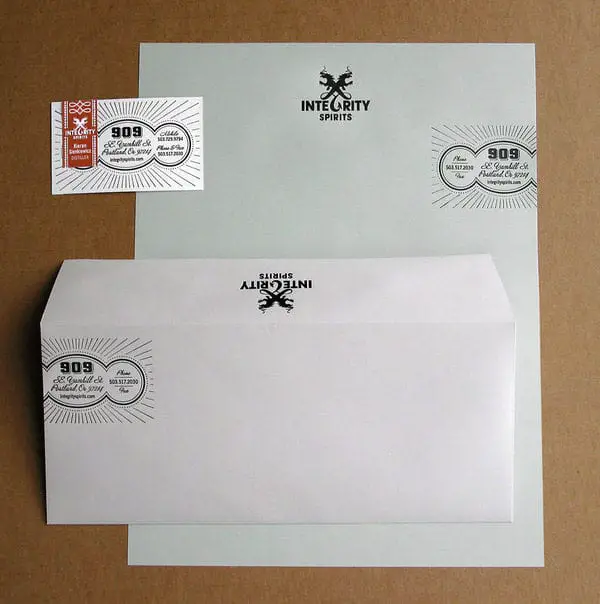
This beautiful design is by Jared Milam. Typography is not just a supportive element of the design; you can actually make it a hero of your design, and this letterhead design is an excellent example of that. There are no attractive colors or modern layouts in this design. The logo and contact details are creating more of a vintage look. The contact details are presented here in a separate block with a traditional design. And that is why this letterhead is unique and attractive. With the smart typographic arrangement, this simple letterhead creates a noticeable impact, and that’s the essence of it.

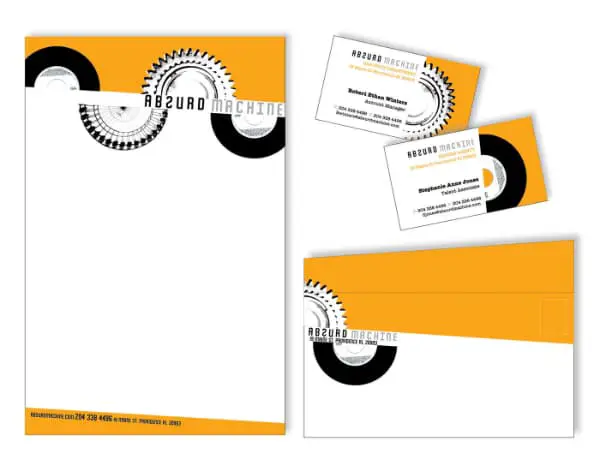
13. Absurd Machine Letterhead:

Amazing Letterhead Designs: Absurd

The absurd machine is a music and video production company, and this design is created by the designer Jessica Benz. in this design, colors and theme are totally justifying the industry. The logo and header section is well designed with suitable elements and placed in a more unique and fun way. Contact details are also placed in a slanted footer section. This design is not very loud or directly delivering some message. It looks trendy but professional as well. Entertainment brands sometimes prefer to keep things formal and straightforward, so in that case, you can add some relevant elements and take a unique layout to come up with a great design without any exaggeration.

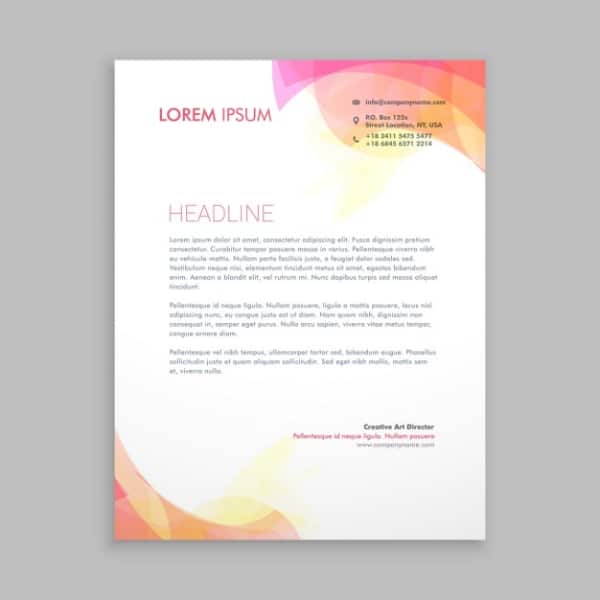
14. Colorful Abstract Letterhead Design:

Amazing Letterhead Designs: Colorful Abstract

This colorful letterhead template is modern and eye-catchy. A basic design concept with an abstract pattern can make your design rich and sophisticated. It works well in most of the segments, and it is a profitable way also. Here shades of pink, yellow, and orange on the two opposite corners adding a volume to the plain letterhead. And you get a suitable space for the logo and contact details. You can give your design any creative turn with this abstract letterhead because it provides a flexible canvas for experiments on a solid base.

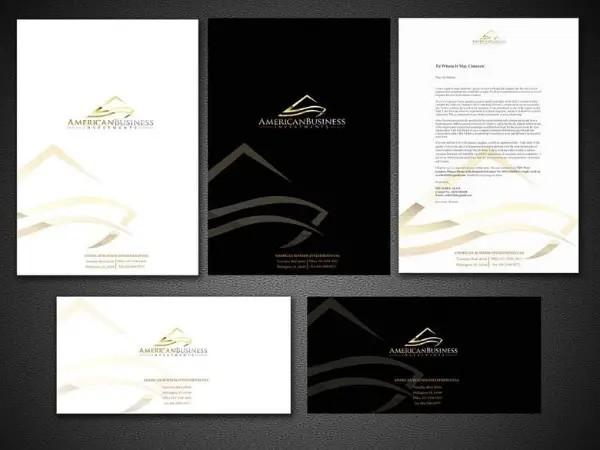
15. Embossed Gold Design:

Amazing Letterhead Designs: Embossed Gold

Gold texture in designs proves luxury and trust. This letterhead design has a fantastic gold embossed theme. You can see the front page with gold shapes, logo, and contact details. And the backside has one of the best complementary colors of gold- black. This kind of color combination and theme works really well for luxurious and market-dominating brands. The gold shade is with a gradient effect, which gives the illusion of 3D, which is why this design is looking fabulous and creative.

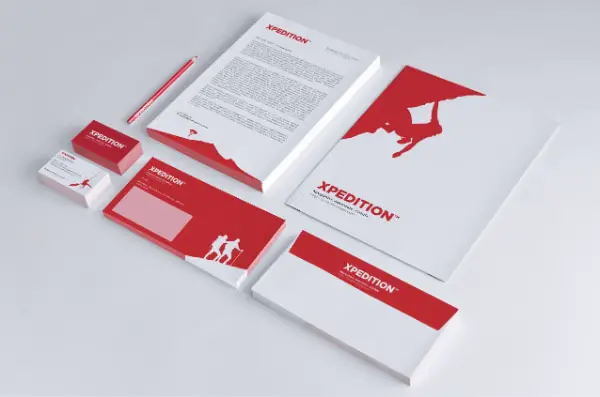
16. Interactive Design Idea:

Amazing Letterhead Designs: Interactive Design

If you are designing whole branding accessories, then you have the liberty to create an interactive format that is connected with each design. In this design, you can see the different silhouette images used in cards, letterheads, and other elements. It is a brilliant idea to paint a vast design concept in small parts. The letterhead design has a beautiful travel-related image in the footer section and logo in the header. You can see the minimalist approach through single color and silhouette image. This red and white design is definitely standing out because of its innovative concept.

17. Maximizing The Logo In Letterhead:

Amazing Letterhead Designs: Logo

If your logo design allows you to use it in various places, then you should. Because a logo is a symbol of your brand and maximizing its use can really benefit the brand. Here, this design is very unique in many ways. The designer has not used the standard header and footer section. We can see essential information vertically placed on the left side and logo as a watermark. On the backside, there is a use of the logo as well. It is a perfect design idea of clever use of the logo on the letterhead. Adding a watermark and reversed side design can add more subject to your letterhead and help you to make it more creative and impactful.

Every branding accessory is representing the brand. And nowadays, there are lots of creative ways and tools that can put you ahead of your competitors when it comes to designing. With letterhead, you don’t need to come up with a completely new concept and format. Ideally, you might be using the core theme and logo design as a base of your letterhead design. But designers are becoming more intuitive and trying to inculcate many unique ideas into this for a better and attractive design.

You can come up with your unique concept, or you can experiment with anyone from the list as well. With the letterhead as mentioned above designs, you can understand what resources you have, for which brand you are working, and what you can do to make the letterhead design better and substantial.

The post 17 Amazing Letterhead Designs For Your Brand first appeared on Line25.


Source: https://ift.tt/3nK52kK

Design your way

Freelance designers are always learning, evolving, and enhancing their skills. As trends in the industry come and go, and as your career evolves, it’s a good idea to periodically re-evaluate the brand image you are putting forth into the world.

Bottom line: you want to make sure that your online branding and presence is updated and optimized to attract the best possible clients to your design practice.

Having an online portfolio site is a key element for any professional designer to maintain, whether you’re a UX engineer pushing the boundaries of design, an illustrator manifesting magic onto a digital canvas, or you work in one of many design-adjacent industries.

Unlike third-party portfolio sites, having your own website provides you with a sharable, virtual gallery where you can showcase your design skills exactly as you like for as long as you like.

Because of the portfolio’s importance, designers are looking for new ways to distinguish their work online.

A simple yet innovative tactic is to elevate your portfolio’s URL by using a .design domain.

Here are more reasons why you should ditch the boring .com domain for a .design domain:

.design tells your potential clients exactly who you are and what you do.

A .design domain name lets people know (especially your clients or future employers) what you do before they even arrive at your website.

These days, attention spans are notoriously short and professionals are continually pushed to do more in less time. That’s why you want to make sure you never miss an opportunity to reinforce your brand with a potential client. A .design domain helps you to break through the “noise” of online life and make a lasting impression. Your website or portfolio speaks for itself with a .design domain name.

.design improves your personal branding.

For a freelancer, a brand identity is a manifestation of your personality, your skills, and your values. Your brand conveys how you want the world to perceive you. It is the context through which your peers and potential clients get to know your work, and it is the foundation upon which your reputation is built.

With an elegant .design domain name, your branding and your domain name can complement each other. Incorporating a .design domain name into an easily-legible logo or visual aesthetic is much easier than using an awkward or too-long .com domain.

Top brands like Spotify, AirBnB, Adobe and Slack are already using .design.

Screenshot_1 7 Reasons Why You Need a Free .design Domain

Major companies have launched sites to show off their design departments and improve industry engagement and recruiting efforts. Innovative companies such as Spotify, AirBnB, Adobe and Slack have dedicated sites on .design domains that allow them to foster their design departments and publicly build their recruiting clout.

This approach bolsters the brands’ reputations as industry thought leaders, simultaneously showcasing their capabilities and strengthening their image. For companies and individuals alike, a .design domain is a more elegant URL that allows designers to stand out from the .com crowd.

.design makes your URL shorter, memorable, and more elegant.

Old domain extensions like .com and .net are ubiquitous, but a .design domain is novel and ahead-of-the-curve. For example, instead of janesmithdesign.com, you can get janesmith.design.

Since your clients will look to you for advice about how to stand out in the contemporary digital marketplace, familiarizing yourself with the implications of new top-level domains like .design can pay off for your clients as much as for yourself.

.design professionalizes your contact information

Unlike .com or .net, a .design domain name reflects what you do as a designer and helps with your branding. Having a custom email address can give you a little extra boost of confidence and professionalism as you are communicating with potential clients! The same goes for business cards, online advertising, professional bios, or anywhere else you want people to have a memorable way to contact you. Using .design is a professional touch that introduces your professional branding into every client communication.

.design is the best way for you to put your portfolio online.

A solid portfolio is an essential tool to win new clients, and a .design domain name is the natural fit to showcase your digital portfolio online. Your .design domain gives context and structure to your portfolio, and helps your prospective clients understand and appreciate your work. Whether you’re an illustrator, decorator, architect, or web designer, a .design domain gives your portfolio a stamp of professionalism, authority, and quality.

However, if you’ve recently pivoted to freelancing or you’re a recent design graduate, you might not have a name-droppy list of impressive clients, nor years of professional work to show off in your portfolio.

Don’t let this stop you from showing the world your creativity, uniqueness, innovation, and skill. Create a portfolio to attract the clients you want to have!

If you don’t have a lot of experience yet, you can hone your talents and build out your portfolio at the same time by working on mock projects. Just imagine your fantasy design job for your ideal client, turn it into a creative brief, and dig in.

Lots of desirable .design domains are still available. Register yours now for free!

Screenshot_2 7 Reasons Why You Need a Free .design Domain

Most .design sites are in use as individual portfolios and agency websites. However, the newsworthy adoption of .design by large companies is a good reason to secure your domain now, before someone else does.

Porkbun is currently offering DesignYourWay readers a free year of .design domain registration.

Best of all, this unbelievable offer is backed by the quality services Porkbun provides as a top-rated domain registrar. Porkbun transparently displays their pricing, bundled services, and Trustpilot reviews on every search page.

Porkbun is so focused on providing great customer service that they openly compare themselves to the competition. A quick comparison reveals that Porkbun has some of the lowest pricing available, offers more services, and boasts better reviews than any comparable registrar. No wonder they have a 5-star Trustpilot rating from over 1,000 reviews.

Every Porkbun domain includes the following premium features for free: a hosting trial, an email trial, SSL certificates, and WHOIS privacy, allowing you to test out Porkbun’s hosting features while keeping your domain secure at all times. With one free year of a .design domain, you’ll enjoy a sleek domain name that will bolster your brand, as well as the premium Porkbun features that will make your registration experience a breeze.

Regardless of your level of internet expertise, Porkbun is ready to help you build and maintain your brand online. With one year free of .design domain registration, now is the perfect time to build or refresh your portfolio.

The post 7 Reasons Why You Need a Free .design Domain appeared first on Design your way.


Source: https://ift.tt/33a3Mhk
 

The Cash Box Blueprint

Most Reading