Adobe Photoshop CC 2019 – New Features and Enhancements

Tuesday, December 25, 2018

Adobe Photoshop is now offering an amazing set of enhancements and new features with its new release. When you launch the software, you are met with a home screen that lists a set of tutorials and presets that will help guide you through each step of your design process. Other additional features include advanced content aware fill tool, frame tool for easy image making, new multiple undo modes and lot more. Besides adding new features, Adobe has also worked on enhancing their existing toolsets. Let us take a look at them in detail.

Adobe Photoshop CC 2019 – New Features:

1. Frame tool for easy image making

Until now designers had to work with clipping masks from the adjustments panel to shape a content into an object. With the introduction of frame tool, designers are able to create an image frame that gives a preview of what the content would look like when placed on a shape. To place an image onto a frame, simply drag and drop the image into them and the image will be scaled automatically. Now you can easily convert text or a shape to be a placeholder frame and drag images into it.

2. Content aware fill

This new tool is able to provide an interactive editing experience for the user. With the ability to edit source pixels you are able to achieve seamless fill results. Powered by Adobe Sensei technology, this tool offers the ability to rotate, scale, and mirror pixels to get the desired results. To use this feature, select the area you are looking to edit in an image, Choose Edit > Content-Aware Fill- this creates an overlay mask on the image, now choose tools and work with modifying the sampling area along with initial selection area.

3. Multiple Undo mode

Now you are able to use Ctrl+z to go back multiple steps in your Photoshop document. Step forward and backward has been removed from the Edit menu but you will still be able to access it from the flyout menu.

4. Radial and Mandala paint symmetry

You can now paint multiple symmetrical brush strokes around the desired axis and use a color wheel to change colors as needed. With paint or pencil tool selected, click on the butterfly icon on the options panel, enter the number of segments to create an outline of the axis to create a framework. Once you apply changes to the outline, use the color wheel from the flyout menu and choose the desired colors for the artwork.

Adobe Photoshop 2019 – Enhancements:

Reference Points

Reference points on a shape will help you scale the object proportionally. If you are looking to distort the shape, select Options bar or use Edit > Preferences > Tools > Show reference point when using Transform to hide the reference point.

Auto Commit

It is easier than ever to apply changes to your artwork made by the tools that have modal states. To commit to an action, simply click outside the bounding box, outside/inside the canvas, select a tool or a layer.

Edit Texts the easy way

Double click to edit texts that are within the bounding box. You do not need to toggle back to the type tool/character panel to edit texts.

Edit Layers the easy way

You can resize and scale most layer types proportionally by default. This means that you don’t have to hold down the shift key while transforming a layer type to constrain its proportions. So this would mean that by dragging down the corner handles you can now resize the layer types without worrying about losing its original proportions. Holding down the shift key while dragging the corner handles will resize it non-proportionally.

Layer Blend hover preview

View different blend modes on the image by scrolling over these options on the layer flyout panel. Photoshop now offers a live blend mode preview as you hover over these modes.

Color wheel to choose colors

Use the new and improved color wheel to find analogous, complementary, split complementary and other color palettes for your next project. To access this feature, click on color panel fly-out menu and choose color wheel.

Home screen

You are met with a list of tutorials and presets as you launch the newly updated software. Tutorials help you learn and understand the tips, tricks and the inner workings of the software. While presets help you choose a predefined document with ease. In addition to these features, you are also able to create a new document or open a pre-existing one for an edit.

Improved learning

Photoshop has integrated in-app learning system that helps guide the user to achieve the results he or she is looking to get. Upon the completion of this tutorial, you can use your own image or artwork to get the desired result in less time.

Distribution of Spacing

You can bow distribute objects in a way that was only possible by Adobe Illustrator. Photoshop already evenly distributes objects by measuring the distance between its center points. If your objects are different in shapes, you can now evenly distribute the spacing between each by simply dragging it along the same axis.

Simple math in input fields

How many times have you used a calculator outside of Photoshop to round off a decimal point or find a numerical value? This version lets you input a simple math operation into the fields and calculates the numerical value for you.

Try out these features and add incredible details to your artwork and illustrations today!

The post Adobe Photoshop CC 2019 – New Features and Enhancements appeared first on Line25.


Source: http://bit.ly/2rVoQFA

Web Design and SEO: Tips, Tricks and Common Mistakes

Monday, December 24, 2018

What is SEO and what impact does it have on your website? SEO stands for search engine optimization — this is a technique in which a search engine or a web crawler explores, reads and understands your content and your offering. If done well, this can improve your website traffic and can improve the visibility of your website dramatically. When designing or building a website, it is important to have a good SEO practice in place and structure the web pages accordingly. This will help your website rank higher and help users find information effortlessly. A “pretty” website doesn’t necessarily equal to a profitable or high conversion website.
Most businesses don’t think about SEO until after the site is built. You could have a website that looks good on the surface but if it is not optimized for the users to find what they are looking for, it is not going to do well in the end. SEO should be an integral part of your website designing and building process and having an SEO strategy in place will not only help with the overall ranking and visibility but also help turn the user into a happy customer.

We have gathered some tips on how best to optimize your site for better visibility and ranking. As a business owner, you should first have a clear understanding of the company and your offering. Once you have this in place structuring your web pages around your value proposition in addition to applying SEO best practices will help you create a functional website that is visible and user-friendly.

Let us start with a few basics of web page optimization.

1. Create a clear, structured and intuitive web pages

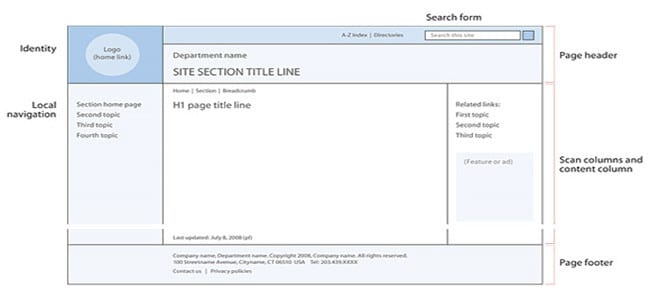
Search engines go through your content page by page so make sure to organize your pages in a clear and structured manner. Web crawlers search for link structure to find indexed pages. By structuring your site well, your pages are bound to be easily indexed and found.

The general rule of thumb is that users should be able to find what they are looking for in no more than three clicks. So building your web pages to have intuitive navigation will help the users find relevant content in the least amount of time possible.

2. Use keywords in your URL

Use a single keyword/phrase in your URL for best optimization. Also, the use of hyphens instead of underscores is preferred. When you use underscores in your URL, web crawlers read the phrase as one single word. So if you are thinking of using multiple words, make sure to break them up by using hyphens instead.

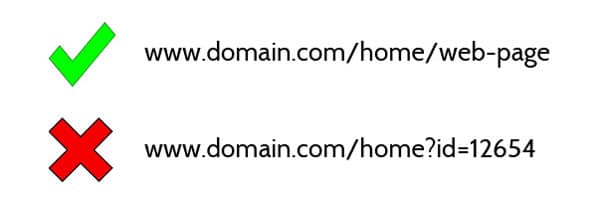
3. Static vs dynamic URLs

Static web addresses have legible keywords in their URLs. Here is an example: http://bit.ly/1vs1bc9
Whereas a dynamic URL looks like this: http://bit.ly/2BGiqyu. Search engines are accustomed to reading and understanding both types but for the human eye, dynamic URLs won’t work. If you are using sites like WordPress, it will automatically convert your web address into a static URL by identifying specific keywords in your title. But for best site optimization, choosing your own keywords is preferred. Keeping the URL address brief, descriptive and relevant will help the user understand at a glance what the website is all about and will in turn help with the keyword optimization.

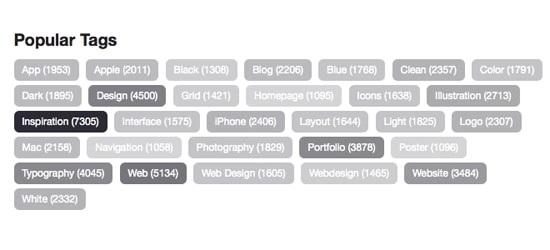
4. Create a tag for every single page of your website

Creating a tag for your web pages will help describe what your domain is all about. Adding short sentences or keywords that describe the functionalities of the site will help the user find what they are looking for. To be able to have better control of your online space, make sure to keep your tags descriptive so when they appear on social media, SERP’s and external pages etc you can still protect your brand identity. Adding a meta description underneath will help represent your brand better. This will also help the user understand the brand and its essence before paying a visit to the website.

5. Optimizing images

Web crawlers read the text, not images. So to be able to understand images better you will need to add an alt attribute to help the search engines understand the meaning behind the images and what it represents. It is also helpful to bold the text underneath the image to help users understand that this image is particularly important for the reader. Whatever cms system you use, when uploading an image, use keywords to optimize it.

6. Keywords and sentences

To build a good SEO strategy, you should have a list of keywords that are relevant to your business. This means that your list should encapsulate all the popular words they search for when users look for websites that are similar to yours. Google keywords planner is a good tool to research keywords. Read more about this tool here. There are 3 main kinds of keywords- generic, broad match and the long tail. These bring different kinds of traffic to your web page- depending on the type, people who visit your site will either be one time users or will likely become your future clients. Make sure to optimize your website for local clients and searches. You can do this by adding your location as a keyword. The best places to add keywords in your content is in headings, subheading, and bolded texts. In addition to all of the above, track and record your SEO rankings. If you don’t track the performance of your keywords, you will fail to optimize your website in the best way possible. In order to do this, you have to know which keywords work in favor of your rankings.

7. Pay attention to your content

One of the most important factors of SEO is your content so make sure to publish high-quality content that is rich in keywords. By carefully planning and strategizing your content you will be able to tailor it to your targeted audience and this will keep them interested and engaged while navigating through your website.

8.  Link building

Invest in link building. Second most important SEO factor is inbound links that come to your site. When you invest in building links make sure to look for quality ones. Search engines will trust your site more if an authoritative website links to yours. Try to avoid sponsored links as this won’t bring much traffic or credibility to your website.

After implementing these SEO strategies don’t forget to monitor them. If you don’t track your efforts you won’t know the impact of your strategy. In addition to this keep an eye on your competitors and their SEO keywords and strategies. This will help you gain a better understanding of how SEO strategies work across the marketplace. We hope that these tips will come in handy in your SEO adventure. Write to us or leave us a comment if you found this article helpful. We love to hear from you!

The post Web Design and SEO: Tips, Tricks and Common Mistakes appeared first on Web Design Blog | Magazine for Designers.


via http://bit.ly/2BHzXX5

How to Become a Better Web Developer in 2019

Friday, December 21, 2018

A career in web development is surely as exciting as it is lucrative. According to Maryville University, web developers earn a median salary of $90,000 per year, and overall job growth is projected to be 17% from 2014 to 2024. That is exciting news.

As such, there has never been a better time to improve your skills as a web developer. The most obvious end results of improving your skills are better pay and improved competitiveness in the job market. And in this guide, we show you exactly how to become a better web developer in 2019 and beyond.

With that preamble, get a mug of coffee ready and let’s start.

How to Become a Better Web Developer in 2019

Becoming a better web developer goes beyond improving your coding skills. It involves knowing the perfect tools to use for any given task. On top of that, becoming a better web dev involves knowing when to ask for help and keeping the clients happy among other things.

In this section, we go over each of these areas (among others) in a bid to point you in the right direction as far as launching and improving your web development career goes. The tips in this post will come in handy whether you work within a company setting or freelance.

That being said, let’s get down to business.

Learn and Learn Some More

The quickest way to become irrelevant in the web development field is to get comfortable in the skills you already possess.

It goes without saying that web development is a fast-paced environment. Technologies and techniques change day in day out. What worked a couple of weeks ago might be obsolete today, but you won’t know this if don’t spare time to learn the latest web trends.

Or as Maryville University puts it,

“There’s always something new to learn in the computer software industry. Companies need tech experts who can keep track of the trends in apps, agile systems, interface design and use it to their strategic advantage.”

For example, we didn’t have responsive web design a couple of years ago, but today it’s a standard technique for all web applications. Another good example is the recently developed REST API, which allows you to create web apps in any language and run them on WordPress among other application frameworks.

For this reason, the web developers of today and the future need skills in such technologies, something that wasn’t a requirement for web developers of days gone.

The same applies to other areas including web security best practices, SEO, design architecture and so on. To stay ahead of the curve (and become a better developer while at it), you must create time for self-development.

Don’t get comfy in the skill set you already have; experiment with new ideas, explore web development blogs, listen to podcasts and generally keep learning to improve your skills each day. If need be, invest in formal education, just ensure you sign up to modern-day web development courses.

Plan or Fail

“If you fail to plan, you’re planning to fail,” goes a popular saying by Benjamin Franklin. And while the saying is self-explanatory and quite common, you’ll be surprised to learn that a majority of web developers (including seasoned pros) don’t plan their projects.

Often times, you’ll catch a developer saying “planning is boring” or “I don’t know how to plan” or “it’s not my responsibility to plan” among other petty and lazy reasons. Well, planning means all the difference between a mediocre and legendary developer.

Do you want to become a better (read legendary) web developer? Boy oh boy, you must plan each and every part of any project that comes your way – from start to completion.

Why is planning important? A sound plan helps you to manage time and other resources effectively. On top of that, you know where you stand at every stage of the project, meaning you can reduce stress significantly. And most importantly, planning helps you to keep the client happy.

With a trillion project management tools such as RedmineUP, Trello and Workflowy among others, you don’t need to look hard to plan and manage any web dev project.

If you’re old-fashioned, you can use a sketchbook. That’s right; all you need to plan your projects is – wait for it – a pen and some paper!

Staying organized is one of the best and easiest ways of becoming a better web developer. Having a plan (and a backup plan B) goes a long way in building a productive and highly rewarding career in web development.

Keep the Client in the Loop

Your top-of-the-range web development chops mean nothing if your communication skills suck big time. And your god-level skills mean jack if the client isn’t happy and end up leaving.

See, things don’t usually go according to plan. There is a billion reasons why your awesome plan can go wrong – and most of these reasons are beyond your control.

At times, natural calamities in your neck of the woods might delay project completion. Other times, you might end up with a bug that takes way too long to fix. Anything can affect your project timelines and even budget negatively. It happens all the time and to everybody, including the pros.

What matters is how you tackle the problem, and most importantly, keeping the client in the know. Will you need more time to complete a project because you need to research some more? Let the client know.

Are you having a hard time fixing unexpected bugs? Let the client know! Need more money for a plugin or framework that would improve the project? Please, just let the client know. In other words, be proactive.

If you want to delight your boss or client, keep them in the loop. Get in the habit of sending them daily updates of your progress and don’t forget to highlight potential concerns, if any.

Updating your client or boss on time makes sure everybody is on track, and there is enough time to find solutions to any problems that arise during the course of the project.

Also, your client or boss will end up trusting you more since it shows you’re a credible and professional person. Don’t just sit and wait for the client to ask for progress updates. Nope, be proactive baby.

Don’t be a YES Man / Woman

Firstly, don’t be desperate or greedy to the extent of accepting each web project that comes your way. Accepting every project is the quickest way to burn out and make peanuts while at it.

Always choose your projects carefully keeping in mind:

  • Your skill set – Be honest about what you can do (and not do) with your current skills
  • The budget – Too low and you’ll burn
  • Time required to complete the project – Set realistic deadlines
  • All the tools you’ll need – Each project demands different tools

Only accept a project if it satisfies all your needs according to the above criterion. In other words, don’t just say YES to make your client or boss happy, no matter how demanding they are.

Secondly, when you do accept a project, be vigilant of the demands that arise (or could arise) during the course of the project.

Agreeing to every change to the project will only leave you struggling with scope creep, stress, exhaustion and an insufficient budget to boot. Now, you don’t want that, do you?

Petr Tichy of Ihatetomatoes.net says:

“Don’t be afraid to call out functionality or feature which is out of your skill set. Being honest is the key, but also make sure you don’t say no to everything.”

At the end of the day, only take projects you’re confident you can complete. Then ensure there is enough time and budget for the project, and a contingency plan (more time and money) for any changes that the client might need. Outline this earlier on in the project timeline to ensure everything runs smoothly for everyone.

Being a yes man eventually bites you in the [you know where], so plan accordingly.

Take a Break

Overworking yourself to a point of madness won’t make you a better web developer. If anything, it will make you a sickly one, which isn’t good for productivity.

Becoming a better web developer means being more productive. Staring at your computer for hours on end will do all kinds of nasty things to your eyesight, back and mood among other things.

Step away from the computer and take a walk. Heck, tack your breaks seriously, grab healthy lunch (or snack) and even meet a friend while at it.

And when time permits, sneak in a little exercise into your routine. In other words, take care of yourself because you need a healthy mind and body to produce stellar work.

By the way, laughing at funny cat videos on YouTube, binge-watching Game of Thrones or drinking copious amounts of coffee don’t count. In fact, these kinds of activities will only make you fidgety, lazy and kill your productivity.

On the other hand, non-digital activities that get your blood pumping will make you feel rejuvenated and ready to take on the world. A healthier web developer, my friend, is a better web developer and you can’t argue with facts. Need I say more? Oh yeah, forego the elevator in favor of the stairs. Thank me later.

Collaborate

Working alone has its perks, but collaborating on projects with team members opens a whole world of opportunities to grow. You save time, learn and generally become awesome.

Whether you work in an office or freelance, teaming up with others will expose you to new skills, perspectives and ideas. If that doesn’t make you a better web developer at the end of the day, I don’t know what will.

Besides, you can always work on solo projects, or have the final say on team projects as the leader, which can help you to hone your leadership skills as well.Conclusion

Becoming a better web developer is all about self-development. Strive to improve your coding, business, leadership and communication skills. On top of that, be a team player and maintain a healthy lifestyle outside of work.

Keep learning and improving and you’ll become the web developer everybody wants to work with.

Do you have any questions or suggestions regarding becoming a better web developer? Let us know in the comments.

The post How to Become a Better Web Developer in 2019 appeared first on Web Design Blog | Magazine for Designers.


via http://bit.ly/2EASaJ7

Design your way

If you are a programmer who is looking for great coding wallpaper, you’ll be happy to know we have a great selection of examples.

When you turn your PC on, the very first thing you will see will be code wallpaper.  If you are a web developer or coder you’ll know how awesome it feels to find a professional programming wallpaper design when your computer flickers to life.

If you’re looking for coding wallpaper to make your computer look great, you’ll be pleased to know that we’ve hunted through the web for the best developer wallpaper out there.

These are code wallpapers which will make you smile.  They will also inspire you while you work on your own creative coding projects.

Here are some great coding wallpaper choices

programming-wallpaper6-700x394 Programming wallpaper examples for your desktop background

programming-wallpaper7-700x525 Programming wallpaper examples for your desktop background

programming-wallpaper5-700x394 Programming wallpaper examples for your desktop background

programming-wallpaper4-700x438 Programming wallpaper examples for your desktop background

programming-wallpaper3-700x525 Programming wallpaper examples for your desktop background

programming-wallpaper2-700x394 Programming wallpaper examples for your desktop background

programming-wallpaper1-700x525 Programming wallpaper examples for your desktop background

programming-wallpaper15-700x560 Programming wallpaper examples for your desktop background

programming-wallpaper8-700x394 Programming wallpaper examples for your desktop background

programming-wallpaper9-700x394 Programming wallpaper examples for your desktop background

programming-wallpaper10-700x525 Programming wallpaper examples for your desktop background

programming-wallpaper11-700x394 Programming wallpaper examples for your desktop background

programming-wallpaper12-700x394 Programming wallpaper examples for your desktop background

programming-wallpaper13-700x425 Programming wallpaper examples for your desktop background

programming-wallpaper14-700x438 Programming wallpaper examples for your desktop background

programming-wallpaper16-700x438 Programming wallpaper examples for your desktop background

programming-wallpaper17-700x394 Programming wallpaper examples for your desktop background

programming-wallpaper18-700x382 Programming wallpaper examples for your desktop background

programming-wallpaper19-700x394 Programming wallpaper examples for your desktop background

programming-wallpaper20-700x382 Programming wallpaper examples for your desktop background

java-700x438 Programming wallpaper examples for your desktop background

Programming World Map Wallpaper

programming-world-map-on-700x394 Programming wallpaper examples for your desktop background

A world map made out of code?  What could possibly be more exiting?  If you’re looking for an excellent coding wallpaper to inspire you to make a difference, this is a great choice.

Programming Wallpapers for Desktop

Programming-Wallpapers-for-Desktop-700x394 Programming wallpaper examples for your desktop background

This clean, simple and very elegant coding wallpaper comes in black and red.  Download this great programming wallpaper free and feel inspired.

Programming Life HD Background

Programming-Life-HD-Background-700x394 Programming wallpaper examples for your desktop background

This great developer wallpaper is simple and easy on the eye to add to your laptop or desktop right away.  If you’re looking for coding wallpaper which is clean and clutter free, this is a great choice.

Technology Programming  Wallpaper

Technology-Programming-Wallpaper-700x438 Programming wallpaper examples for your desktop background

A playful computer coding wallpaper that features a cup of espresso on a burnt orange background and an iconic image.  Do you need a cup of coffee to get your cogs working?  Remind yourself with this interesting coders wallpaper.

Binary Code Abstract Wallpaper

Binary-Code-Abstract-Wallpaper-700x478 Programming wallpaper examples for your desktop background

Enter a new dimension with this futuristic coding wallpaper.  Remind yourself of the interesting shapes and designs open to you as you work on new designs.  This is a great choice in computer programmer wallpaper.

Programmer King Desktop Wallpaper

Programmer-King-Desktop-Wallpaper-700x394 Programming wallpaper examples for your desktop background

Are you feeling stressed while working on a tight deadline?  Are you the king of computer coding?  This great coder’s wallpaper will remind you to keep calm and carry on while you work on your codes.

Zen of Python Wallpaper

Zen-of-Python-Wallpaper-700x394 Programming wallpaper examples for your desktop background

A very attractive coding wallpaper which will take you into another realm.  If you’re looking for great inspiration, this is one of the best coding backgrounds for you.

C Is Sometimes For Coffee

C-Is-Sometimes-For-Coffee-700x394 Programming wallpaper examples for your desktop background

This is a unique programmer’s wallpaper with a funky blue background and a reminder to enjoy a cup of coffee.  If you are looking at coding wallpaper to make you smile, this is a great choice.

Programming Syntax Wallpaper

Programming-Syntax-Wallpaper-700x467 Programming wallpaper examples for your desktop background

An attractive purple and blue coder’s wallpaper with an attractive, blurred font.  If you are looking for coding wallpaper which is bright and attractive, this download is a great option.

Amazing Programming Pictures

Amazing-Programming-Pictures--700x683 Programming wallpaper examples for your desktop background

This is computer coding wallpaper with a coded image and an attractive marbled background.  This inspiring image is free to download for all computer programmers.

Man holds the program code #1

Man-holds-the-program-code-700x438 Programming wallpaper examples for your desktop background

A luminous man holds a board filled with computer code.  This one would make a great choice from the coding backgrounds available to computer coders and web developers.

Code # 2

Code-700x525 Programming wallpaper examples for your desktop background

This exciting coding wallpaper shows green code written upon a dark grey background.  It makes a great coding background hd download for coders and programmers.

Information technology big data collection complex

Information-technology-big-data-collection-complex-700x438 Programming wallpaper examples for your desktop background

Complex data displayed in an organic image.  This is a great coding wallpaper choice for any great web developer or coder.

Code Wallpaper # 3

Code-Wallpaper-3-700x438 Programming wallpaper examples for your desktop background

This subtle dark grey coder’s wallpaper includes game code.  With light grey code on a dark grey background, this coding wallpaper is an excellent choice for all gamers and developers.

Binary Code Wallpapers

Binary-Code-Wallpapers-700x438 Programming wallpaper examples for your desktop background

With a blue and yellow background and a binary code, this interesting code wallpaper is every developer’s dream.

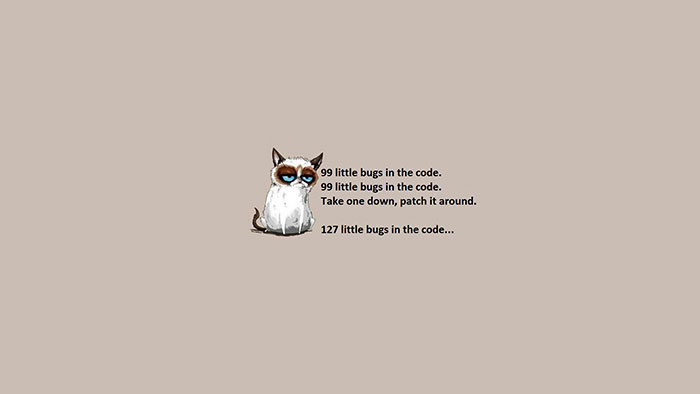
Programming Computer Wallpapers

Programming-Computer-Wallpapers-700x394 Programming wallpaper examples for your desktop background

This coding background hd image includes grumpy cat, frustrated with the number of bugs in a code.  This is humorous code wallpaper that every developer could relate to.

The Time is Now Computer Wallpaper

The-Time-is-Now-Computer-Wallpaper-700x438 Programming wallpaper examples for your desktop background

With its inspiring approach to deadlines and job completion this coder’s wallpaper encourages you to keep working.  An excellent choice for all those aiming to complete a project.

Ending thoughts on using a programming wallpaper for your desktop

With so many great options for a coding wallpaper you’re sure to find something which appeals to you.  Remember to save your favorite and use it on your laptop or desktop PC to add a smile to your day.

If you enjoyed reading this article about using a programming wallpaper for your desktop, you should read these as well:


The post Programming wallpaper examples for your desktop background appeared first on Design your way.


Source: http://bit.ly/2BxmOjC
 

The Cash Box Blueprint

Most Reading