8 Homepage Design Tweaks That Make Your Website More Successful

Monday, June 3, 2013

The basic rules of web design are quite well-known in the community, so to speak. I mean, everyone knows (even people outside of the design world) that a good homepage is one that’s not cluttered, only contains essential info and is direct to the point. However, there are some specific tweaks/adjustments that you can take into account when working on the homepage of your next project to make it even better.


In the end, the whole game is about creating a website that is successful, not necessarily beautiful…although it would be nice if these two goals can go alongside each other.


1. Getting started section


Getting started sections are becoming more and more popular on many blogs, product sites as well as general business sites.


A typical getting started section features either a simple concise message or a short video. The whole idea of such a section is to take your new visitors by the hand and guide them through your site.


As it turns out, for many websites, new visitors are the majority of their whole user base. This can be checked through Google Analytics or other web stats app. This situation means that your first task as a website owner is to provide some clear instructions to every new visitor.


What about the returning visitors? They will stop looking at your getting started block naturally and move on to browsing your site freely. Hence, it doesn’t necessarily make their experience any worse.


The best placement for a getting started block is usually as high up the page as possible. Or even to hijack the whole homepage and make it one big getting started block.


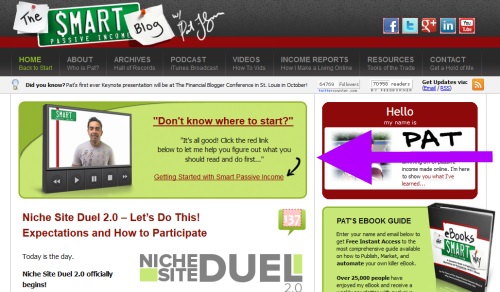
Here’s an example of getting started block that links to a video (on the Smart Passive Income blog – advice for anyone who wants to make money blogging):


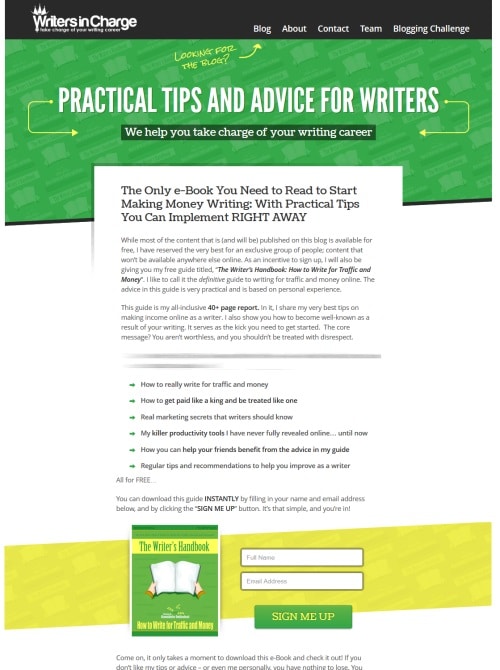
Here’s an example of a text-based getting started message (on a blog for freelance writers – teaching how to get paid to write):


2. Most popular content


The second block worth including on a homepage is the popular content/resources block.


The idea behind popular content is that it’s always easier to take something that’s already popular and make it even more popular than to do it with a completely new piece of content.


The popular content block is meant to do exactly this.


The simplest implementation is a basic list of 5-10 links. If your design allows you to do it, you can include some excerpts. But be careful, your popular content block should not become the main focus point.


Common placements are right below the fold or in the sidebar.


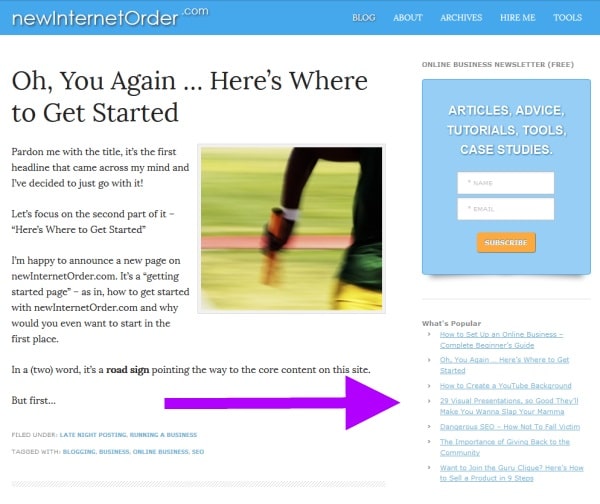
An example (newInternetOrder blog):


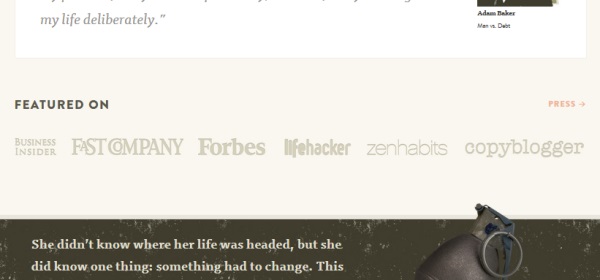
3. Trust elements


Everything that can make your offering/expertise more believable can be considered as trust elements.


For instance, if the site is meant to promote an author then display a badge saying something like “Published author” or “Featured on the New York Times bestseller list.”


For a design company, it can be logos of recognizable brands that they have worked with.


For a blogger, it can be a simple “as seen on” section.


The purpose of trust elements is to convince the visitor that they are dealing with a professional or an expert. The most common placement is near the top of the page (a narrow banner-like block) or in the sidebar.


Here’s an example (Paid to Exist):


4. Small header


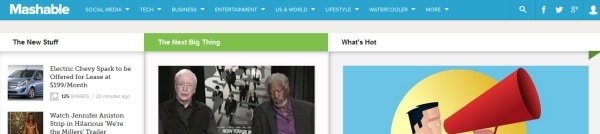
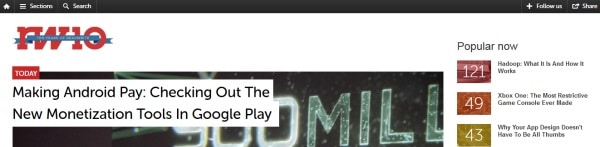
Currently, small headers are becoming a serious trend online. Most of the mainstream sites are using them already (TechCrunch, ReadWrite, Mashable).


Back in the day, the header was the perfect place to display some advertising, a big logo and other what-nots. But this has changed, mostly because header banners no longer generate any clicks (they fell victim to complete banner blindness).


Besides, the overall trend towards minimalism had to hit headers someday too.


As it turns out, websites don’t need big logos to be recognizable. Visitors don’t really care much for the headers and what’s in them. They are more concerned with content.


Here are some examples (ReadWrite and Mashable):


5. Direct links to products


This of course depends on the website itself. But if it’s any kind of a product site then it absolutely must display a set of product links on the homepage.


The form and style of these links is up to you. Because there are thousands of examples on the web, it’s hard for me to even point out the best approach.


Therefore, the rule of thumb is this: If the product on sale is the one guaranteeing someone’s livelihood then you should make it as visible as possible. Don’t even think about feeling bad for forcing it down the audience’s throat. However, if it’s just one of the side projects then it probably doesn’t need such a prime placement.


6. Good visible content


Well, I don’t want to play Captain Obvious here, but content really is the most important thing on every website. It’s the reason why people want to visit the site in the first place.


That being said, various websites understand content in different ways. Sometimes content means blog posts, sometimes it means videos, sometimes it means forum threads and so on.


No matter what the case is with the site you’re currently working on, you have to give your content a prominent placement.


How to do it? … The answer is minimalism.


Quite frankly, the less bells and whistles there are on a website, the easier the content is to digest.


If you take a look at a site like ReadWrite, you’ll notice that it features hardly anything else other than content. Actually, it’s difficult to even find any standard menu with some links in it.


7. Clear main element


Every homepage should have a main element. To put it simply, it’s the element that has the most relevance to the website and its goals. In other words, it answers the question: “What is this site about?”


Now, each of the things/elements discussed above can actually become the main element of your homepage. The choice is up to you, but you have to remember that the main element must be the most visible thing on the homepage.


In a nutshell, when a new visitor comes to the homepage, the main element is what they see first.


8. Subtle branding


If you take a look at some of the most popular sites online, you’ll notice that their branding elements are very subtle and as far from in-your-face as possible.


For instance, for TechCrunch, it’s essentially the color green that’s used to highlight links and as background for various boxes, elements, and bars.
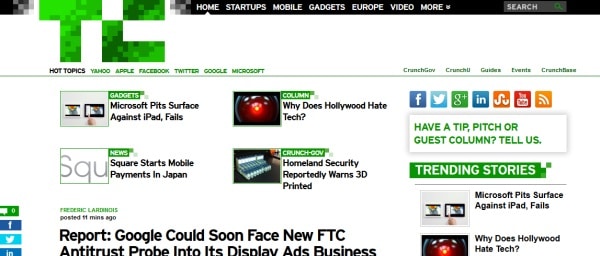


For Mashable, it’s their small blue header that holds a fixed position at the top of the page.


But most importantly, these sites are consistent with their branding. There’s not one out-of-place element in their designs.


I encourage you to try a similar approach in your design. Just a logo and a good color scheme will be enough.


This concludes my list of eight homepage design tweaks to supercharge your website. I’m sure that there’s probably like a dozen of other things that would look good on this list, so here’s my question to you: Do you have any insights of your own on how to build a proper homepage?


About the author


Karol K. is a freelance blogger and writer. He considers blogs being the business tool of the 21st century. He writes and publishes posts about freelancing and writing for a living. If you want to find a way to get paid to write articles and blog posts yourself then feel free to pay him a visit at Writers in Charge.


via http://feedproxy.google.com/~r/LearnWebdesign/~3/G7ncSqIbQsI/8-homepage-design-tweaks-that-make-your-website-more-successful

Design Resource Box

I’ve featured on this site for some time graphic design materials like brochures, business cards, print ads and a lot of printing design materials, but never a service where you can print these.


An interesting service that I want to put in spotlight is 24hourprint.com that has online printing services that designers can use, especially for those project that you want to be printed as fast as possible.


24HoursPrint


This company is a trusted leader in online printing, featuring its signature easy-to-use website and the famous Free File Review, a complimentary proofing service which requires no upfront payment.


24HourPrint offers convenient marketing support services such as design, lists, and direct mailing to help grow small and medium-size businesses nationwide.


vinylb


They are using pretty good machinery for these printing services that they’re offering, having fully automated Komori presses and CREO direct-to-plate, meaning that they offer faster turnaround with minimal human error and lower overhead cost.


canvas prints


They are part of the UPrinting network which you have surely heard of and probably worked with till now. Being part of the UPrinting network means that the prints will be at the highest quality, UPrinting prividing the credibility that it will happen like they are saying it will happen.


custom prints


The selection of what you can print with this company is amazing: business cards, brochures, flyers, gift certificates, stickers, menus, posters, custom greeting cards and event invitations.


brochures


The most interesting thing about this service and which can be seen in the company’s name is that they guarantee that if you submit to them a print-ready file before 7pm EST/4pm PST, your order will arrive on or before the delivery date chosen on checkout or your shipping is free. This on-time guarantee, of course, does not cover delays due to adverse weather conditions or other acts of nature.


Try 24hoursprint.com and see for yourselves that they are performing really well when you want something printed well and delivered fast.


Source: http://feedproxy.google.com/~r/DesignResourceBox/~3/EvXg0Db6SCE/

15 Handy Tools Every Freelancer Should Know About

A freelancer wears many hats. Not only are you responsible for creating cool design work, you’re also in charge of the accounts dept and responsible for managing projects and keeping track of where you’re spending your time. Thankfully there’s a range of tools available that help you run your little business like a global empire. This post rounds up 15 of the most popular tools that are used and recommended by thousands of freelancers in the design industry.


FreshBooks


FreshBooks


What does it do?


FreshBooks is a comprehensive online invoicing, accounting and billing app. It combines all the features you would ever need as a small business into one piece of cloud based software.


How much does it cost?


FreshBooks offer a Free 30 day trial, then there’s a selection of paid packages from £19.95 per month depending on the number of clients you need to manage.


Pancake App


Pancake App


What does it do?


Pancake is an invoicing and project management app, but unlike many business suites featured in this post Pancake is a one-time-payment self-hosted application, meaning there’s no monthly fees and you have control over your data.


How much does it cost?


Pancake requires a one time payment of $49, with deluxe packages offering additional support.


FreeAgent


FreeAgent


What does it do?


FreeAgent offers painless accounting and helps manage your finances, estimates, proposals, invoices and expenses via an online dashboard. Plus it has handy features to assist with UK tax returns.


How much does it cost?


FreeAgent has three separate packages for Sole Traders, Partnerships and Limited Companies ranging from £15 to £25 per month.


CurdBee


CurdBee


What does it do?


CurdBee is another comprehensive online billing and invoicing system. It incorporates all the important features of an accounting app but has one of the best free packages that includes many of the features only available in the premium versions of other apps.


How much does it cost?


The free CurdBee package allows unlimited clients and invoices amongst other important criteria, but other features can be accessed through the Pro and Big packages at $5 and $20 per month.


TeuxDeux


TeuxDeux


What does it do?


TeuxDeux is a simple, designery to-do app. It combines a browser software with a portable iPhone app which both feature a crisp and clean interface design.


How much does it cost?


TeuxDeux offers a free 30 days trial, after which access is charged at $3 per month or $24 a year.


Toggl


Toggl


What does it do?


Many billing apps incorporate a basic time tracking feature, but tracking time is Toggl’s speciality. Instead of a browser based timer, choose to run the app on your desktop or mobile. It also syncs with popular tools such as FreshBooks and Basecamp.


How much does it cost?


Toggl offers just one $5 per month package which includes all features. A 30 day free trial is included.


Remember The Milk


Remember The Milk


What does it do?


Remember The Milk is one of the classic to-do apps and is probably the most versatile with official apps being available for iOS, Android, Blackberry, Gmail, Outlook, Twitter and Evernote.


How much does it cost?


Free!


Less Accounting


Less Accounting


What does it do?


Less Accounting is aimed at smaller businesses and therefore doesn’t include the unnecessary features that sometimes bloat larger accounting apps. One of its main selling points is its ability to connect and import your transaction details from your bank account.


How much does it cost?


Less Accounting offer a single package of $30 per month.


Pulse


Pulse


What does it do?


The main focus of pulse is to help you manage your cash flow. It’s packed full of features to track your income and expenses, view detailed reports and keep an eye on your balance.


How much does it cost?


The standard $14 per month package is limited to 3 accounts and users, so the $24/month package would be much more suitable for the average user. Also includes a free 30 day trial.


Blinksale


Blinksale


What does it do?


Blinksale allows you to create professional invoices and keep track of payments by sending automatic reminders and thank you messages. Blinksale is also combined with Blinkpay to allow clients to pay by credit card, rather than have to rely on services such as PayPal.


How much does it cost?


$15 per month grants you unlimited access to all Blinksale features. 15 day free trial available.


Ronin


Ronin


What does it do?


Ronin is a simple invoicing and time tracking online app for small businesses and freelancers. It features all the same tools as other apps, but can also be run under your own domain.


How much does it cost?


The recommended Team plan at $29/month includes all the best features of Ronin. 30 day free trials are available on all plans.


The Invoice Machine


The Invoice Machine


What does it do?


The Invoice Machine does exactly as the name suggests, it makes it easy to create great looking invoices without having to spend time setting up client and project details.


How much does it cost?


The Invoice Machine plans are based on the number of invoices sent each month. A limit of 30 is priced at $12 per month.


Basecamp


Basecamp


What does it do?


Basecamp is the world’s most popular project management app. It’s a crucial tool for any project involving multiple clients or team members to allow everyone to stay up to date and keep track of progress.


How much does it cost?


Pricing starts at $20 per month and increases as more projects and file storage is added.


Mint


Mint


What does it do?


Mint is a financial management app aimed at the public, but it would also be a great tool for freelancers working from home. It helps keep track of your money to see how your money is being spent, saved or invested.


How much does it cost?


Free!


Harvest


Harvest


What does it do?


Harvest is a simple online time tracking app that builds comprehensive time sheets so you can see where your time is being spent. Then bill for this time with invoicing and payment integration.


How much does it cost?


The solo package for freelancers is priced at $12 per month.


Source: http://line25.com/articles/15-handy-tools-every-freelancer-should-know-about

Design Networks to Find Brand New Freebie Downloads

Sunday, June 2, 2013


Advertise here with BSA


It seems as though every day there are new freebies to be released online. I am usually forcing myself to check out new websites once in a while to see what I am missing. The amount of networks online are simply tremendous! It would suck up at least an hour or more to go through all of the latest releases.


adobe photoshop ui tools software logo magnets


I want to focus on a list of the more popular resources for locating design freebies. The list obviously includes freebie PSD and AI files to use in Adobe software. But icon sets are also typically common among designers. PSD/AI freebies are certainly the most demanded and will provide the best results when creating a website layout. I hope to share a few resources which will benefit web designers and developers around the globe.


Freebbble


Most designers are familiar with Dribbble being an invite-only website for people to share their latest design works. But the related website launch Freebbble is a unique and totally independent curation of freebie downloads. Each of the posts will link back to the original source on Dribbble, along with a preview shot for downloading.


freebbble design network download psd ai files


The website layout itself is gorgeous and utilizes a number of helpful interface features. You may select from a categories listing in the sidebar related to mockups, UI kits, backgrounds, and many other topics. The search bar is also quick with pulling related results and offering a solution based on your search keywords. There are simply not enough nice things to say about Freebbble. Go and check it out for yourself to get a sense of the high-quality releases on this website.


Psddd


Another website pulling from Dribbble’s feed would be Psddd. This network is run like a blog which catalogs all of the most recent Dribbble freebies. You can find user stats which are pulled directly from the Dribbble API to show off the number of likes and visits. Psddd is one of the only options which directly connects into Dribbble for showing related stats.


psddd images dribbble gallery freebies design


I don’t know if I could really compare both this and Freebbble as two head-on competitors. They both offer a similar service to locate freebie graphics. But I also feel that Psddd is more quickly updated with newer releases, and the minimalist layout is less cluttered. And you also have fewer tags and categories for searching. It is also unfortunate how the main download links will only lead back onto the Dribbble shots page, so if the link goes down then you have no way to grab that freebie anymore.


Source Canvas


Very recently I noticed the popular network Source Canvas had updated to a freebie gallery. This is unique because it includes links to both graphics and source code projects. This means you can download freebie PSDs along with jQuery plugins and PHP frameworks all from the same location. It is like a webmaster’s paradise of free resources.


source canvas online freebies source code download


The design is pretty nice and easy to follow along. Many of the freebies are originally hosted on Dribbble by the user who uploads the shot. This could mean the PSD file is either on Dribbble’s servers, or hosted on an alternate cloud service like CloudApp or Dropbox. But Source Canvas has the PSD files hosted right on their servers and the source codes will pull the most up-to-date repo out of Github. It is an excellent freebies gallery with a lot of potential to cover future releases.


PSDHome


The last major resource I want to cover in this post is called PSD Home. One reason this website stands out over all the others is their homepage layout feature. You can easily access the most recently published freebies as they are listed using thumbnail images. I like this grid-style interface design because there is not a lot of wasted room. So you can quickly scan the entries and choose something which may be of interest for your project(s).


psdhome website layout homepage listings freebies


I have found almost everything in this network from iOS user interfaces to full-blown website mockups. And obviously everything in-between for typical website and mobile layouts. The freebie graphics on PSD Home are updated constantly, and the quick layout design makes it easy to grab what you need and move on. Each of the PSDs will link back to the original source, where you may also find other related goodies for free download.


Closing


I know there are bound to be another 10+ examples which I could not cover in this post. Many of the resources which I check have been online for years, and they continue with new releases added constantly. This is why so many other competitors have shut down or stopped adding new freebies altogether. But if you have any similar ideas or suggestions for locating design freebies you may share with us in the post discussion area below.


Advertise here with BSA


Source: http://designm.ag/resources/design-galleries-brand-new-freebies/
 

The Cash Box Blueprint

Most Reading