Design your way

Tuesday, November 22, 2022

Nowadays, online marketing is a crucial part of most businesses. It involves ads on search engines, maintaining social media platforms, expert reviews, etc. Besides, one of the best ways of getting a solid online presence is through search engine optimization (SEO).

In this article, we will look at how you can leverage a VPN to enhance your SEO.

Why a VPN is necessary for SEO

Search engine optimization (SEO) is the technique you can apply to your website to improve its ranking on search engine results pages (SERPs). This helps to make your website more visible to people looking for solutions your product, brand, or service can offer.

A VPN can come in handy in the SEO process in many ways.

Unbiased ranking and competitor research

Where your website appears in search results means a lot to your business. For example, more than 90% of Google traffic appears on the first page of search results. In addition, the first search result (except paid ads) receives 30% of the clicks.

Therefore, you should analyze your website’s SEO by searching the relevant keywords and see where your site will rank on the search results. Also, you should check your competitors’ ranking.

Because you visit your website repeatedly, Google will be biased and favor your site. But this is not an accurate representation of what a random potential customer will see on their results.

However, a virtual private network (VPN) will change your IP address, which will help to eliminate biases in Google results. Hence, you will get a more realistic depiction of your website’s ranking compared to your competitors.

See your site’s ranking in other countries

These days, you could be living in the UK and working for a company based in the US. However, when you look for your company’s Google ranking, you will get UK searches instead of the US, which might be irrelevant.

The solution is to connect to a VPN server in the US. This will make you look like you are in the US, and the results will be different if you do the same research.

Some businesses have branches worldwide. A VPN will help you see your website ranking in different countries and take necessary measures.

How to change your location with a VPN

  1. Subscribe to a trustworthy and reliable VPN
  2. Download and install the VPN software on your device
  3. Open the server list and connect to any location
  4. Go to your browser and conduct the search

Additional tips for unbiased SEO research

Use incognito mode

Many browsers like Google, Edge, and Firefox offer private browsing windows where cookies won’t affect your search results. Hence, your results will be almost the same as your potential clients will see.

Sign out of your Google account

Checking your website’s ranking while logged into your account will show personalized results because of your search history, IP address, and location. However, you can sign out or use a different account so that your personal preferences won’t affect the search results.

Using a VPN for SEO frequently asked questions (FAQs)

  1. Will a VPN affect my search results?

Yes, it will change your search results based on your server location. Also, a VPN will encrypt your traffic to prevent the search engine from using your data to tailor your results.

  1. Will my browser reject my VPN?

No. In fact, some VPNs come with browser extensions, which makes it easy to configure the VPN when accessing the internet.

  1. Is Google analytics affected by a VPN?

Not likely. However, if the people visiting your website are changing their locations with a VPN, then Google Analytics will show these locations instead of their actual locations.

The post Why a VPN is an Excellent Tool for Online Marketing appeared first on Design your way.


Source: https://ift.tt/2mT0pJr

Design your way

Working from home has become a new norm post-COVID-19, and for some freelancers, its benefits to productivity are lucrative.

In 2020, Boston Consulting Group found that 75% of remote workers either maintained or increased their productivity once working from home.

But what about the 25% who suffer decreased productivity in a remote working environment?

In this article, we’ll be covering 14 productivity hacks to improve your freelance workflow. Let’s dive in.

14 productivity hacks for an efficient workflow

#1. Build a strong daily routine

The backbone of productivity is a daily routine. A healthy routine has been linked to lower stress and better sleep. By planning for exercise and meditation, your health will feel a boost as well.

Whether you’re an early riser or a night owl, your routine sets the tone for your working day. Everyone works best on different routines – play to your strengths and make it exciting. Daily routines don’t need to be repetitive and boring.

#2. Create daily schedules

On top of your routine, an ever-changing daily schedule can help you to optimize your working hours. Outline urgent tasks, to-dos and other sub-tasks so you won’t forget anything.

Also important, remember to schedule time for exercise and daily activities. Planning for breaks and physical exercise will boost your motivation and ensure your well-being doesn’t take the passenger seat.

#3. Have a separate working space

Drawing the line between work and home is a common issue that freelancers face. A dedicated workspace at home can help boost productivity by separating work and everyday life stress.

How can your bedroom feel relaxing if it’s also where you work every day? Even if it’s a desk you reserve for work, find a space where you can zone in. Eventually, your work mindset will naturally click in whenever you enter your workspace.

pr2 Boost Your Workflow: 14 Productivity Hacks For Freelancers

#4. Keep your home workspace clean

Now that you’ve dedicated a space in your home for work, keep it clean! Distractions are a huge time-waster that can eat up portions of your work day. For those prone to them, removing distractions is essential to productivity.

Put away any dishes, toys, and devices that might draw your focus from your work. Instead, decorate your desk with calming green plants and consider cleaning the cable salad under your desk.

#5. Clean up your online workspace too

It’s not just your physical workspace that gets untidy – your desktop might also need cleaning. Desktop organization can help to declutter, and having important areas of your work organized will also save your time.

For example, you may opt for an automated backup app that keeps your files secure without you having to back them up manually. A VPN for PC can take care of your safety while you’re busy with other tasks. You’ve got the idea.

pr3 Boost Your Workflow: 14 Productivity Hacks For Freelancers

#6. Centralize work matters with a Kanban board

How do you manage your team and clients? The modern freelance business uses a “kanban board”. Kanban boards are project management tools that maximize efficiency and minimize work in progress.

Apps like Trello help individual freelancers and teams to organize priorities and visualize their workflow before it’s begun. An added bonus is the transparency you can offer your clients, as they can follow your progress from the start.

#7. Take regular breaks

Sometimes, less is more. Maybe the reason for a drop in your productivity is that you’re working too much. Long, uninterrupted work sessions can eventually lead to poor work ethic and even the feeling of being burnt out.

Make time for rest, as a rested mind is much more productive. Take an extra half an hour for lunch, or a short break after each task. Pulling yourself away from work, even for five minutes, can help to gain an objective view of trickier problems.

#8. Schedule a day off

Regular breaks will help your productivity in the short term, but you’ll inevitably need to take more time off. If you’re a workaholic who can’t have even the slightest drop in productivity, you need to consider having some rest.

In fact, being a freelancer, an open schedule is what drew you to the line of work. It is your right to schedule days off. Take a breather and return to work with a renewed spirit and some fresh new ideas.

#9. Experiment with productivity methods

Did you know you don’t need to approach work the same way every day? You can try many tried and tested productivity methods:

  • The Pomodoro Technique: Great for procrastinators – work for 25 minutes and take a 5-minute break. Repeat this with an extended break every 4 rotations.
  • Eat That Frog Method: Pick your most undesirable task for the day (your “frog”), and do it first. Then, every other task will seem easier compared to the first.
  • The Eisenhower Matrix: Rank tasks by urgency and importance, and proceed accordingly.

Every method will boost productivity for particular individuals. Try a few and find the best one to suit your workflow.

#10. Find inspiration in templates, etc.

Let’s be clear – there is no shame in leaning on a template or cheat sheet sometimes. You can’t expect to be on the ball every day of the week. For those off days, use other freelancers’ work as inspiration for your own.

Feeling a lack of ideas for a newsletter? Read through some successful marketing campaigns and extract some ideas from the tone, images, or content. Often you’ll find, all you needed was a spark of inspiration to get going again.

#11. Email automation

As a freelancer, running your own business chews up a lot of time. Personally responding to every client onboarding email, or manually sending out newsletters takes away time from your work.

Luckily, email automation has become very comprehensive and can save you a load of time. Boost your productivity by automating:

  • Client onboarding;
  • Newsletter campaigns and funnels;
  • Blog and social media posts;
  • Accounting tools for your chosen payment processor.

#12. Build your client-base thoughtfully

Like it or not, you can’t get more hours in the week. Choosing the right clients and deciding how many you can successfully manage at once is crucial. If you’re overloaded with work, you can’t put in 100% effort.

High work demand for low pay can sound lucrative at first, but it will take the time you could spend on higher-quality clients. Learn to say “no” to smaller clients, reserving your remaining hours for the bigger fish.

#13. What do you do after work?

What you do off the clock is just as important as when you’re on. How you treat your body and mind after work plays a crucial role in your motivation levels for the next days or weeks.

Consume healthy, nutritious food and limit drinking where possible. Often disregarded compared to physical fitness is your mental health. Take care of your mind as it’s your strongest tool for a productive workflow.

pr4 Boost Your Workflow: 14 Productivity Hacks For Freelancers

#14. Reward yourself

When all is said and done, how do you celebrate after a successful project? Do you reward yourself at all? If not, then you’re missing out! Take yourself out for a fancy dinner or buy that nice bottle of wine.

Life as a freelancer is inherently stressful at times, and you deserve to acknowledge your achievements. Next time you’re overwhelmed, a future reward can be the boost of motivation and productivity you needed all along.

Conclusion

It’s perfectly natural to feel a lull in productivity. As a freelancer, self-driven motivation is just not enough sometimes.

Whenever you’re feeling a drop in productivity, refer to these tips to take your workflow to light speed.

The post Boost Your Workflow: 14 Productivity Hacks For Freelancers appeared first on Design your way.


Source: https://ift.tt/o1F0BEu

What Is The Wix Editor X Website Builder?

Monday, November 21, 2022

Editor X is an extremely powerful web design and development program created for developers, designers, and agencies. This post is more than a review, it’s a detailed explanation of this powerful website creation tool.

Do you want to create amazing websites with complex designs, but without having to write long lines of code? Here’s the chance to do just that. The possibilities are endless with the Wix Editor X website builder.

Sponsored Message

We recently went deeper into the platform and have prepared this guide with some details on the Editor X pricing, templates, training, support, pros, and cons. We will also look at features and explain to you what each feature does and what it allows you to accomplish.

You will also see some details on how to migrate your current website from WiX over to Editor X.

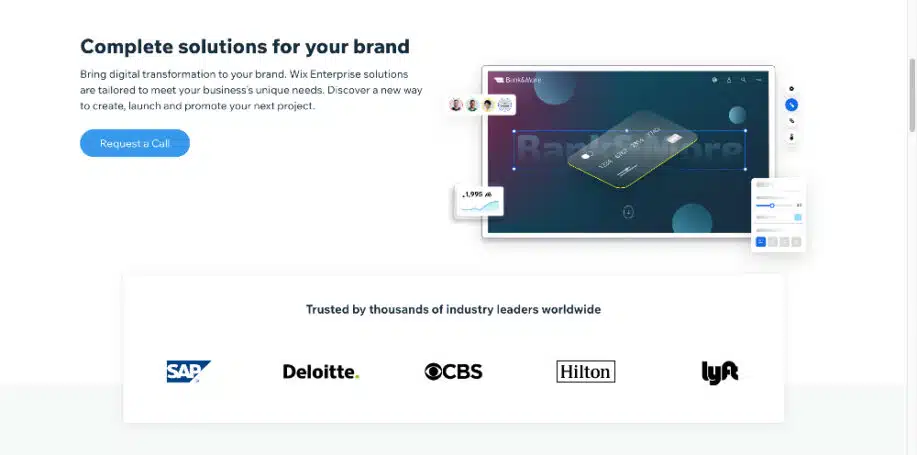
Keep reading to learn more about this powerful website builder that is trusted by big, well-known corporations like CBS, Hilton, and Lyft!

Popular brands using Editor X

What Is Editor X?

One of the most popular web design tools to appear in the last couple of years is Editor X which is owned by the popular website builder WiX which has over 200 million users.

Editor X is a fully responsive website creation platform (CMS – Content Management System) launched in 2020 by Wix Ltd, made especially for web designers and agencies. It offers advanced design and layout tools, enabling you to create, clean but complex websites without bulky code.

Here’s a direct quote from the Editor X website that may simplify what the platform is:

Editor X is an advanced creation platform for designers and web professionals. The platform combines cutting edge responsive design with smooth drag and drop. Those that want to can add custom code and use a powerful CMS to build data driven sites and complex web applications. Editor X offers an unparalleled range of integrated business solutions from a leading eCommerce infrastructure to professional marketing and SEO tools.

Editorx.com

Editor X is a much more advanced version of Wix. It contains modern HTML5 and CSS3 coding, enabling you to easily create websites providing high-end features. Editor X comes with a code editor, an intuitive graphical user interface, design tools, marketing and SEO tools, and an integrated marketplace of website templates.

A developer can use custom templates or create the website from scratch no matter if it’s a simple blog or a complex eCommerce site. This user-friendly platform enables advanced and intermediate designers to have complete control or collaborate with team members.

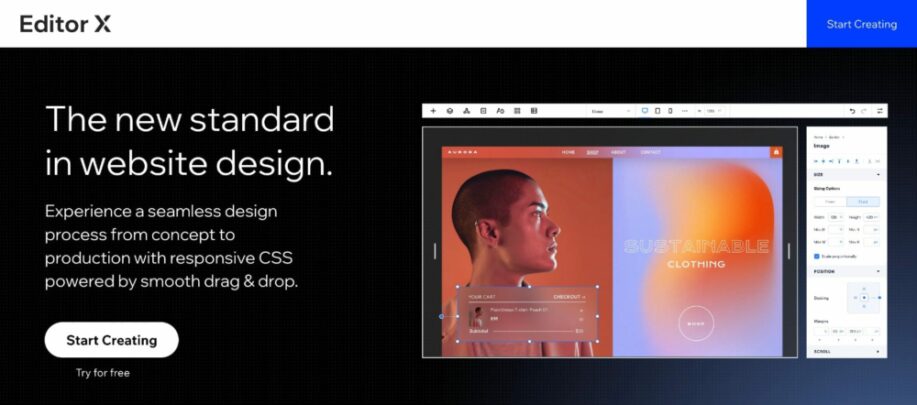
What Is Editor X - Homepage

Top Editor X Features

The following are some features of the Wix EditorX:

  • Grid Layouting: Grid Layouting is an advanced Layouter system based on a CSS grid that lets you position elements within a two-dimensional framework of rows and columns for more control.
  • Docking: Docking is a feature that anchors elements to a reference point as the viewport size changes.
  • Flex Layouter: The Flex Layouter is a container that holds items in the layout of your size. It relies on flexbox technology for an automatic rearranging of elements while resizing.
  • Stack and scale media: Stacking is a helpful tool in responsive design that prevents elements you place above or below each other from overlapping on smaller screens and allows grouping and scaling simultaneously.
  • Custom breakpoints: A breakpoint enables you to adjust the layout of a website and see the different changes for different viewport sizes and not just classic devices.
  • Text scale: Text scaling allows you to make a text element responsive to different screen sizes during formatting.
  • Advanced Sizing control: Wide support for modern CSS unit usage in advanced sizing control determines whether your element is fluid or fixed. That can help create a design that seamlessly adjusts to any screen size.
  • Flexible Canvas: The wide flexible canvas allows designers and web creators to resize the screen to different breakpoints by moving the handles on both sides.
  • Wix design system: Features sections with built-in responsive behavior that matches your site’s color palette.

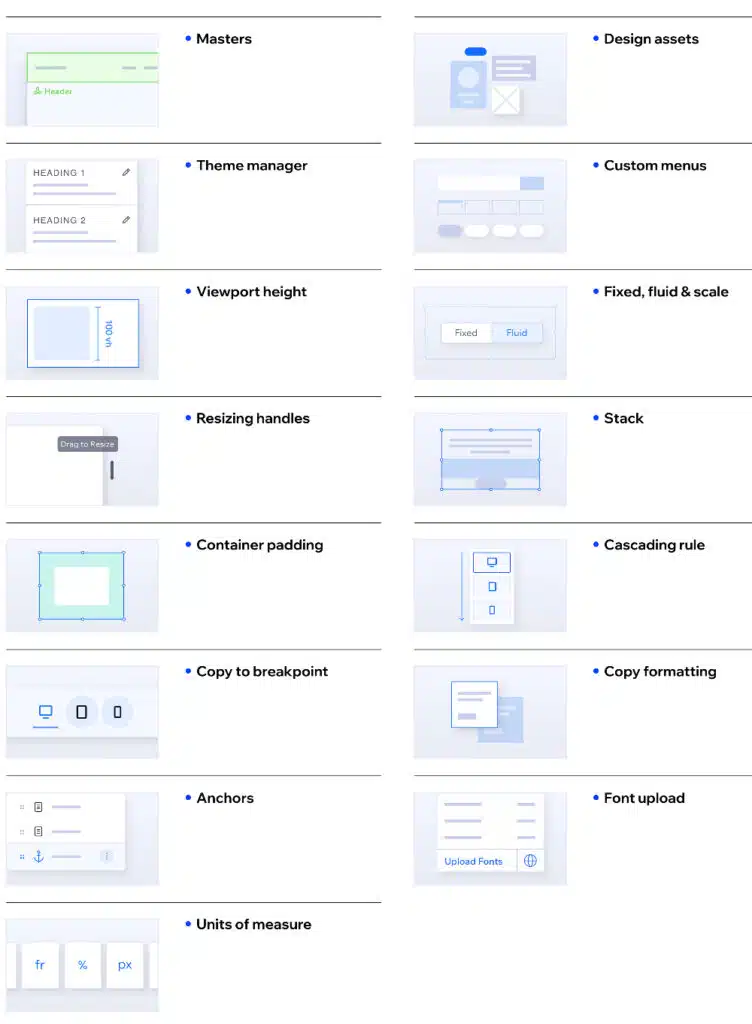
The above list is only a small portion of the many Design & Layouting features available. Take a look at the image below to get a feel for how much control you get over your designs:

Editor X - Extra Design and Layouting Features

Editor X Templates

Editor X currently only has over 30 amazing templates for small businesses, so you should have no issue finding one that matches your business profile. If for some reason you don’t find a good match, you can use a blank template or edit an existing template to customize it.

To fully experience these responsive and interactive website templates, you really need to click on each to preview how fast loading and responsive they are.

Currently, WiX has over 800 pre-built templates, so you can see Editor X has a way to go. What they do have is worth investigating though.

If you click on each template, you’ll instantly see that the quality is super high and they have invested significantly in providing users with quality over quantity. They are expected to add more templates in the weeks and months ahead.

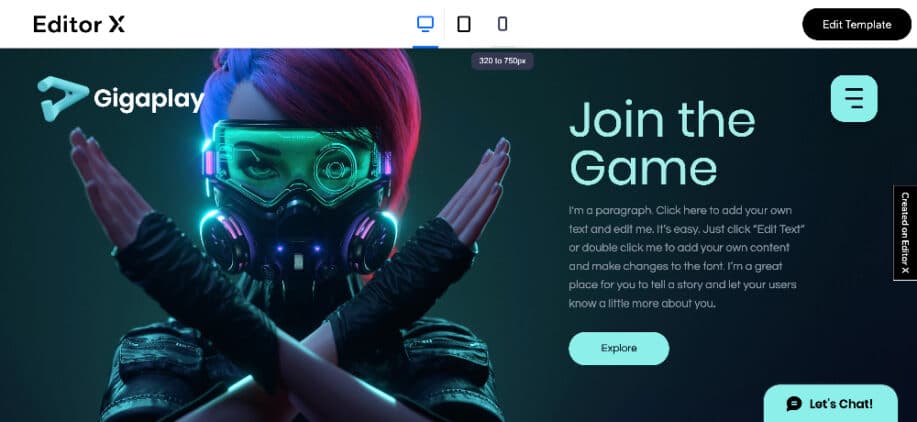
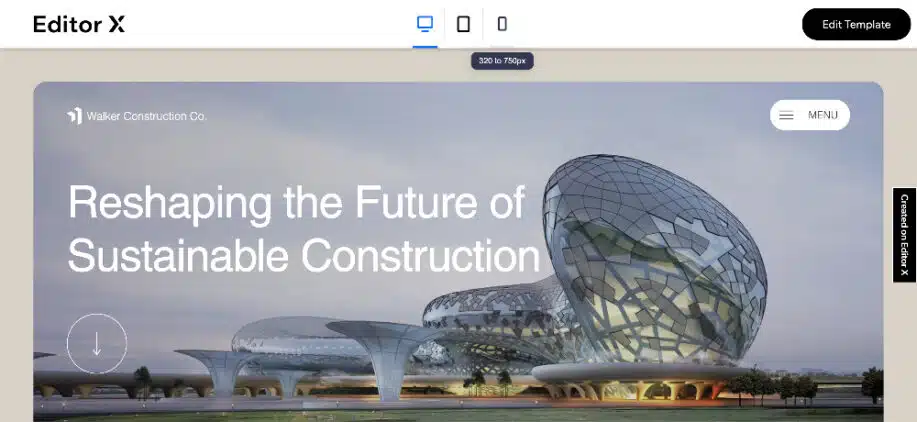
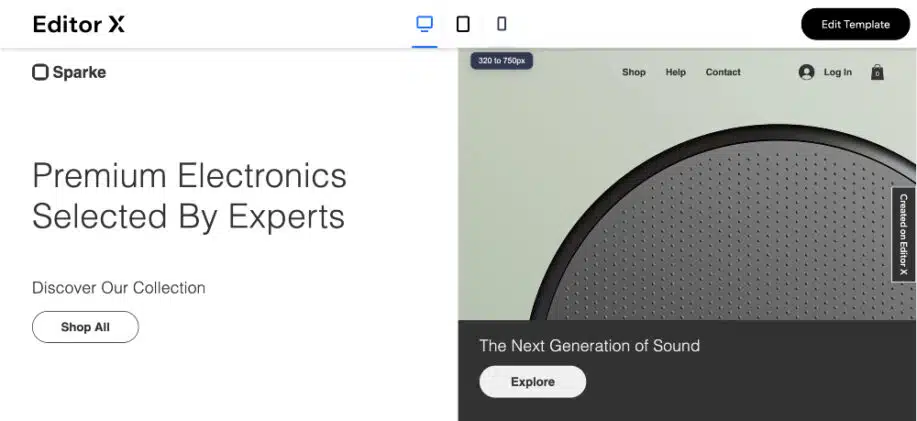
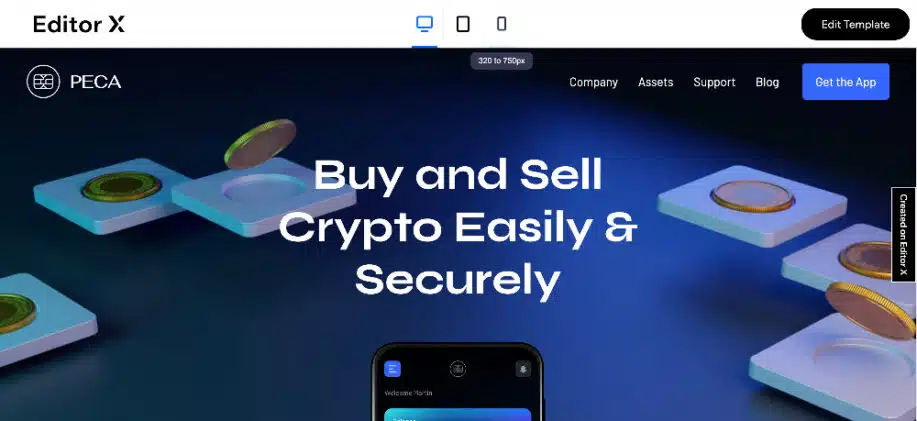
First, choose a template to match your project’s industry. Next, just click “Edit Template” in the right corner. These templates can match almost any industry your site needs to be designed for. Here’s an example of only some of the industries that the Editor X templates work great with:

  • Creative & Digital Agencies
  • Gamers & Tech Companies
  • Financial & Real Estate Firms
  • Electronics & Automotive Businesses
  • Bloggers, Designers, Artists, and more

As mentioned, you can also start with a blank template and design until your heart’s content. Below are 5 example images of the templates (click on the image to go directly to the template for viewing):

Editor X Gamer Website Template
Editor X Construction Website Template
Editor X Automotive Website Template
Editor X Electronics Website Template
Editor X Fintech Website Template

Pros and Cons of the Wix Editor X

The Pros

  • Multiple Layouts – Editor X allows you to choose from dozens of templates designed for various businesses. You may also use the layout builder to build your site if you prefer to customize your design. You can modify and reposition elements to how you like them. On top of that, the media library offers vector art graphics like icons and video animations that enhance your site’s interactivity.
  • The Drag and Drop Editor Interface – Editor X has a drag-and-drop interface that lets you edit your pages without coding. You can build complicated layouts with little knowledge of HTML and CSS, making it easy for anyone who wants to create an online presence to get started. The simple interface also gives users much more room for creativity, as they can fully customize their website with little effort.
  • SEO Plugins – Editor X’s SEO tools are built-in meta descriptions and keywords, which will help your website rank higher on search engines.
  • Team Collaboration – Editor X users can collaborate in groups. Project managers can quickly delegate responsibilities and give authorization to other team members. This function is helpful when website designers need to share content and get real-time feedback without switching between windows.
  • Multiple Devices – Editor X is mobile-friendly, which means your website will be responsive and look good on any screen size. Its layout and design features make it easy to develop intricate designs for any device. The platform is also compatible with all newer smartphones and operating systems, so you don’t have to worry about having an outdated or incompatible website.
  • Different Design Tools – Wix has a text editor, grid layout tool, and advanced sizing tools to help you achieve the best possible website. The sizing tools enable you to customize your site according to different viewports. The platform also allows you to place your logo and other graphics on any page to make it more appealing.
  • Artwork and Vectors – The platform offers a wide range of media elements and an extensive selection of vector graphics. These features make it easy for designers to create websites with many different styles and designs. Depending on the project, you can use these graphics to make your website look more appealing.

The Cons

  • Limited Templates – We’ve covered some great things about the Editor X templates above, but for those who want a simplified method of creating websites (like WiX) there are a limited number of templates to start with. The good news is you can start with a blank template or customize an existing template and they are always adding new ones.
  • Higher Learning Curve – As mentioned, Editor X may be better suited for more advanced users. the platform has new features that may take a little more time to learn than WiX. It may seem harder to use but it is capable of much more and provides ultimate control. However, with Academy X you can literally advance your design skills and in no time at all, you’ll be designing and developing a beautiful responsive website.

If you’re new to the field of website development, and you won’t be creating many websites, we would recommend starting with WiX. You can always migrate over to Editor X if needed.

Editor X Pricing

Overall, Editor X is a little more expensive than WiX, but it offers more control over your sites. It also offers additional functionalities and customization options and team collaboration.

They accept international users, but all prices below are in USD.

All plans include the following security and protection:

  • Free SSL Certificate – Secure HTTPS sites with PCI-compliant checkouts
  • Enterprise Security – The highest international standards of security with auto-updates

The Free Plan

A great way to test the Editor is to take it for a spin on their free trial plan. This way you can see if you like the layout, features, design capabilities, drag-and-drop option, templates, and everything else.

Editor X has a free trial plan, but as a developer, you will probably only use this to test the platform’s interface. If you want to build websites for clients, you need to upgrade for the extra storage space and to connect custom domains.

What’s Included with This Plan?

The free trial must be connected to a paid plan below and you will receive limited access to the options and features of that paid plan for 14 days (as of the date this post was published).

Premium Plans

The Premium plans are perfect for personal projects where you need to build a site for bloggers and individuals who need a personal profile online. This could be a perfect match for bloggers, real estate agents, artists, consultants, and others where regular online payments for products are not necessary.

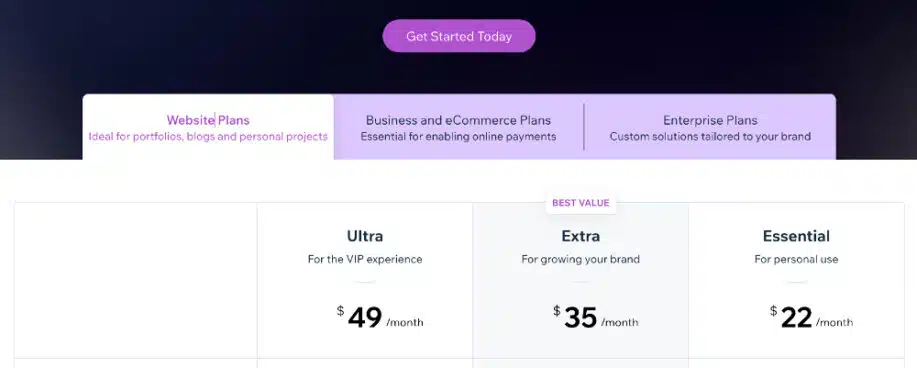
Pricing for Premium Plans:

  • For personal sites – The ESSENTIAL Plan for $22/mo
  • To grow your brand – The EXTRA Plan for $35/mo
  • A VIP Experience – The ULTRA Plan for $49/mo

Top 5 Additional Benefits For the ESSENTIAL Premium Plan at $22/mo:

  1. 10 GB of Storage Space
  2. Free SSL Certificate
  3. Custom Domain Name
  4. 1 Hour of Video – Showcase & Streaming
  5. Dedicated Customer Care – Priority Support

Top 5 Additional Benefits For the EXTRA Premium Plan at $35/mo:

  1. 20 GB of Storage Space
  2. Professional Logo
  3. Social Media Logos
  4. 2 Hours of Video – Showcase & Streaming
  5. All that is included in the ESSENTIAL Plan

Top 5 Additional Benefits For the ULTRA Premium Plan at $49/mo:

  1. 35 GB of Storage Space
  2. Professional Logo
  3. Social Media Logos
  4. 5 Hours of Video – Showcase & Streaming
  5. All that is included in the ESSENTIAL Plan
Premium Plans

Business & eCommerce Plans

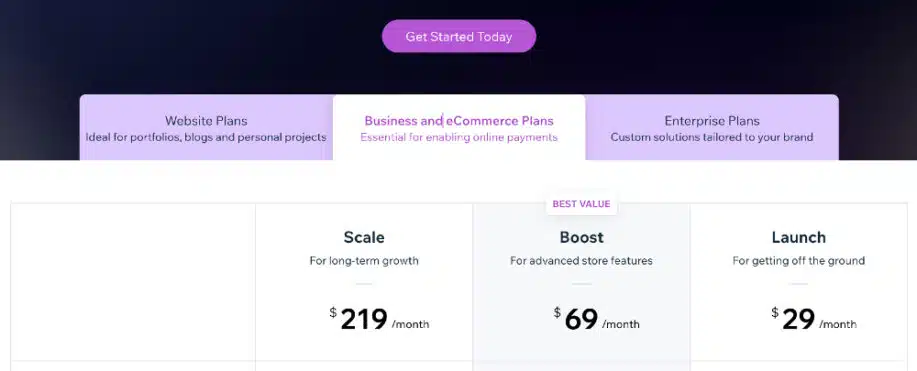
Suitable for developers building a virtual store. The Business & Ecommerce plan has three tiers which are:

  • For starting a store – The LAUNCH plan for $29/mo
  • Advanced store features – The BOOST plan for $69/mo
  • For long-term growth – The SCALE plan for $219/mo

Top 7 Additional Benefits For the LAUNCH plan at $29/mo:

  1. Unlimited Products
  2. Sell on Social channels
  3. 20 GB of Storage Space
  4. Secure Online Payment Collection
  5. Recurring Payments & Subscriptions
  6. 5 Hours of Video – Showcase & Streaming
  7. Customer Accounts for Faster Checkouts

Top 7 Additional Benefits For the BOOST plan at $69/mo:

  1. Unlimited Products
  2. 35 GB of Storage Space
  3. Secure Online Payment Collection
  4. Recurring Payments & Subscriptions
  5. Sell on Social Channels & Marketplaces
  6. 10 Hours of Video – Showcase & Streaming
  7. All that is included in the LAUNCH Plan plus much more!

Top 7 Additional Benefits For the SCALE plan at $219/mo:

  1. Unlimited Products
  2. 50 GB of Storage Space
  3. Shopping Cart Customization
  4. Secure Online Payment Collection
  5. Recurring Payments & Subscriptions
  6. Unlimited Hours of Video – Showcase & Streaming
  7. All that is included in the LAUNCH Plan plus much more!
Business & eCommerce Plans

Enterprise Plans

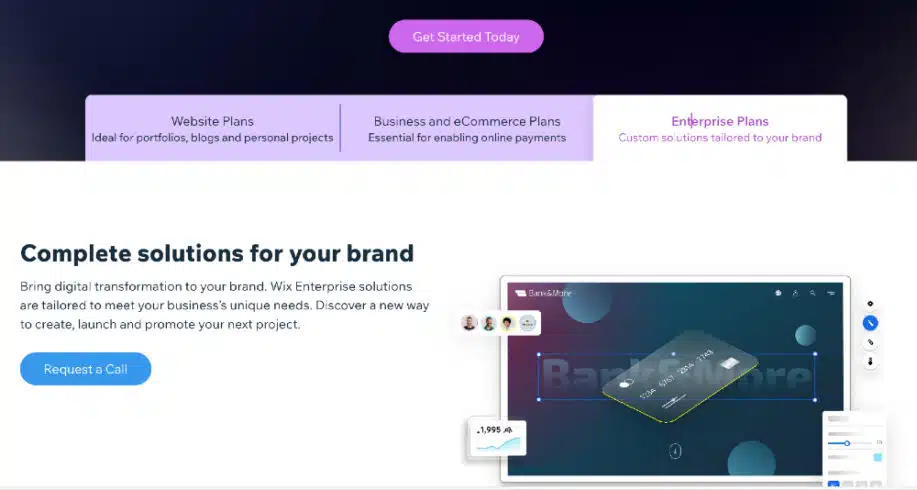
The enterprise Editor x plan is for larger companies looking to scale their website architecture. This plan caters to large corporations like those mentioned earlier. A call must be scheduled to discuss Enterprise pricing.

Enterprise Plans

Academy X

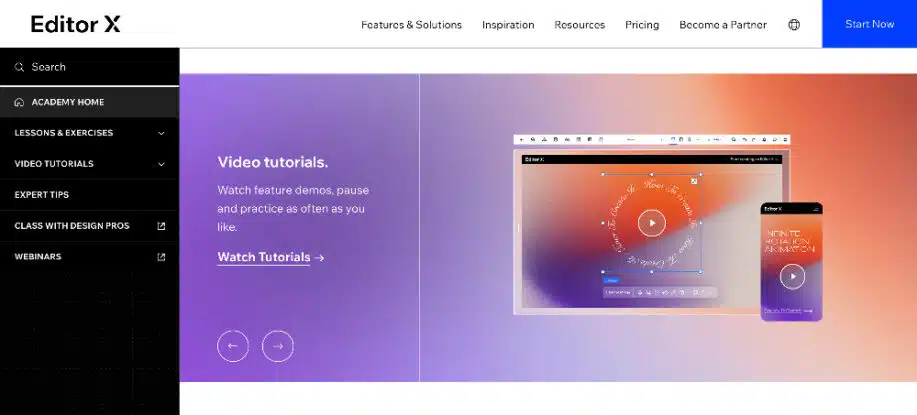
With the video tutorials, lessons, exercises, webinars, and detailed instructions provided via Academy X, you’ll have no problem understanding how to use Editor X. They even offer design classes. This training is available 24/7 so you can learn at your own pace.

No matter how far you go with Editor X, there’s no doubt that you will increase your design skills using the vast resources of Academy X. This clean, simple, and clear training section will provide the knowledge you need to design and develop responsive and modern websites.

You can jump into a webinar, access the Community X forum, or take a class from a pro to feel confident you’re on the right track.

Academy X

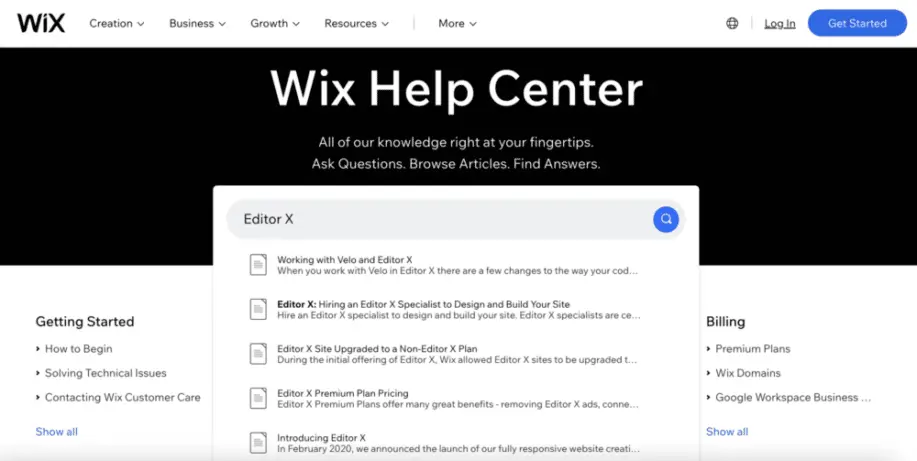
Support

Currently, this website builder and Wix share the same customer support system. A specialized help desk support team is required for Editor X, which is still in its infancy. Additionally, questions regarding editor X’s issues can only be submitted in English.

Editor X Support

Migrating Your Wix Site to Editor X

Editor X is an advanced version of the Wix editor. It contains everything Wix has and much more advanced features as well. If you have a project on Wix, here is how to transfer it to Editor X:

1. Finish the Live Version of Your Site

  • Log in to editorx.com using your current Wix credentials to create a new site.
  •  Back up your Wix site.

2. Move the Site Over to Editor X

  • Click My Sites at the top of your Wix account and select the website you want to move. 
  • Click Site Actions and select the Rebuild option on Editor X. 
  • Click Next.
  • Review the list of elements you want to transfer to Editor X and transfer when ready

3. Rebuild Your Site on Editor X

  • Once the migration process is complete, review the list of elements and check for essential tips and features.

4. Publish Your Site

  • When the migration process is complete, click on publish.

Frequently Asked Questions

Can I create a subscription or membership website?

Absolutely. You can offer recurring subscriptions or collect one-time payments. This is a great feature if you want to sell memberships, training, physical products, downloadable products, or even software.

Is there a showroom of actual live sites built with EditorX?

Yes, there is. You can access this section from the homepage, but for your convenience here are just a few live sites built with Editor X:

Can I send an invoice from my newly created site?

Yes. You can easily create branded invoices and offers along with tracking payments. You can also send automatic reminders if a payment becomes overdue.

What multilingual options are there?

You can have your website translated into over 180 languages and not impact your original design in any way. This can be done with a manual drop-down option or with an automatic translation feature.

What apps are free?

With certain premium plans come apps that are free to use for the first year such as 123 Contact Form and Site Booster. Editor X or WiX support will notify you which plan is eligible for these free apps.

Is it true that I can access a video maker in my dashboard?

This is true. You can access the video maker from your website’s dashboard and create professional-looking promo videos. This is very helpful for promoting a sale or new product. This feature can make you look like a hero to your client.

What social media features are provided by Editor X?

Within your dashboard, you’ll be able to create and promote posts using customizable post templates. You can also personalize text and images you prefer displayed when pages are shared on Instagram, Linkedin, and Facebook.

Getting Started With the Wix Editor X Website Builder

The Wix Editor X has a platform that offers unbelievable creative control and flexibility in design. It has more advanced features that are relatively easy to understand, especially with the Academy X tutorials.

Editor X is the best platform to use if you are a web designer and developer, but there is still enough ease of use for mid-level site builders to get started. Take advantage of the free trial available today before this option is no longer accessible.

Please let us know your experience with the WiX Editor X platform in the comments below. We’d love to hear your thoughts.

The post What Is The Wix Editor X Website Builder? appeared first on WebDesignDev.


What Is The Wix Editor X Website Builder? was first posted on November 16, 2022 at 7:00 pm.
©2022 "WebDesignDev". Use of this feed is for personal non-commercial use only. If you are not reading this article in your feed reader, then the site is guilty of copyright infringement. Please contact me at jc@ventureupwards.com


via https://ift.tt/BzS6keN

Design your way

Every year during the Christmas season, Small Business Saturday is observed to honor all small, local companies. Even if they could get what they need elsewhere, Americans are urged to shop small and purchase locally on the fourth Saturday in November, whether online or in a physical store. This is the day, more than any other day of the year, for small business owners to reach more clients.

Let’s examine how Small Business Saturday originated and how you may benefit from it using specific Small Business Saturday ideas.

Why is Small Business Saturday important?

For a very long time, small companies have been regarded as the lifeblood and center of the American economy. Successful small companies strengthen local ties, raise property values, and support the local economy by keeping money in the area. Small companies contribute to local taxes, so any money spent there supports local amenities like parks, schools, and emergency services.

Small company owners should take advantage of Small Business Saturday to make some extra money before the year is up. According to the Small Business Saturday Consumer Insights Survey, about 110 million customers nationally “shopped small” on Small Business Saturday 2019 and spent a total of $19.6 billion at independent neighborhood shops and eateries.

Small Business Saturday ideas you can use to sell more this year

You can reach your customers on SBS in dozens of ways, but these Small Business Saturday ideas are the most effective:

1. Own your identity as a small business

There are several methods to connect with your consumers on Small Business Saturday, but the following suggestions are the most successful:

Customers want to support small businesses this year, so be sure to emphasize that fact in everything you do. Describe how and why you started, in your own words. Inform your clients of how you support neighborhood initiatives. Tell people what makes your goods and services unique and tailored. Just don’t be afraid to describe how you differ from big-box retailers. It is known as your brand narrative.

You must define your brand’s narrative before you can use it to attract more customers. Your brand narrative encapsulates who you are in general. Combining the following:

  • The people behind your business and their values;
  • The purpose of your business or the problem you’re trying to solve for customers;
  • Your relationship with your customers and how you interact with them;

2. Craft a compelling Small Business Saturday offer or discount

To make your company stand out from the competition, a strong offer is crucial.

Consider your audience and what could appeal to them. What is the specialty of your shop? Has anything in the past proven to be very successful?

Whatever you choose, be sure that it is something that your company can provide.

The following are some offerings that you might wish to think about:

  • 15 percent discount on all new items
  • Free coffee and cookies for guests while they shop
  • Gift with any purchase over $50
  • 20 percent off your next purchase when you spend $40 or more
  • Free wrapping

3. Send out an email series

With the aid of email marketing, you may immediately contact your clients and potential clients.

When someone subscribes to your email list, they are interested in what you have to offer and want to help you out.

Use a “Small Business Saturday” email template from Constant Contact to promote supporting local businesses (you can see all the templates at the end of this post).

Inform people of the benefits of supporting local businesses in your neighborhood. To promote Small Business Saturday, you might provide a unique deal or special content.

Think about collaborating with other nearby companies to promote one another. Inform your email subscribers about local stores they may visit on Small Business Saturday.

Send out three emails in a row to remind consumers to buy with you. These emails are a fantastic method to remind individuals and prompt them to take action in favor of your company during this hectic time of year:

  • Email 1: Send an announcement email as soon as possible. Let them know that Small Business Saturday is coming up and why they should shop locally. Include the details about your offer.
  • Email 2: Send a reminder email a week before. Remind them of the deadline and your offer, so they don’t forget.
  • Email 3: A day or two before Small Business Saturday, send a last-chance email, so they don’t forget to shop with you and use your offer.

4. Reach interested customers on social media

You may reach even more prospective consumers by using social media as a tool.

Start by posting on social media comparable content that was utilized in your email series. Promote the concept of supporting small businesses by using the material and offer you’ve included in your email campaign.

Similar to how you did with your email series, create a series of three social media posts: an announcement, a reminder, and a last-chance reminder.

5. Keep the momentum going

Don’t underestimate the significance of follow-up in the week after Small Business Saturday, no matter how hectic the day may be.

A quick thank you note may go a long way, and it won’t take much time to make one. If you shot a lot of pictures, you might upload an album on Facebook, or you might just choose the finest one to show your admirers.

Keep your content straightforward by using anything like We appreciate everyone who visited #ShopSmall on Saturday. We value your assistance and look forward to seeing you soon!

Your aim should be to remind them of their wonderful experience with you and get them to come back soon in every follow-up letter you send. To personalize the thank you note, incorporate an image. Also, provide an incentive to get them back into your business before the year is through.

Conclusion

Small Business Saturday is held on November 28 this year, which is between Black Friday and Cyber Monday. This year is the ideal time to boost sales and make up for losses incurred as a result of the COVID-19 epidemic. Choose the strategy that is most appropriate for your company from effective marketing and SEO to teaming up with other local companies to increase your chances of success on Small Business Saturday.

The post What is the goal of Small Business Saturday? Best ideas 2022 appeared first on Design your way.


Source: https://ift.tt/Xl3VWOM

Design your way

A fancy and attractive food ad helps customers notice your restaurant. And the moment they step inside, a combination of various aspects, such as food quality, ambiance, staff behavior, and hospitality, might influence the customer’s decision and improve their customer experience.

But, amid these hustles and bustle, restaurants often overlook one marketing material that influences their overall experience – the restaurant menu.

Shocked?

Typically, the restaurant menu is the first tangible asset that customers hold in their hands, making it necessary to give some importance to the design.
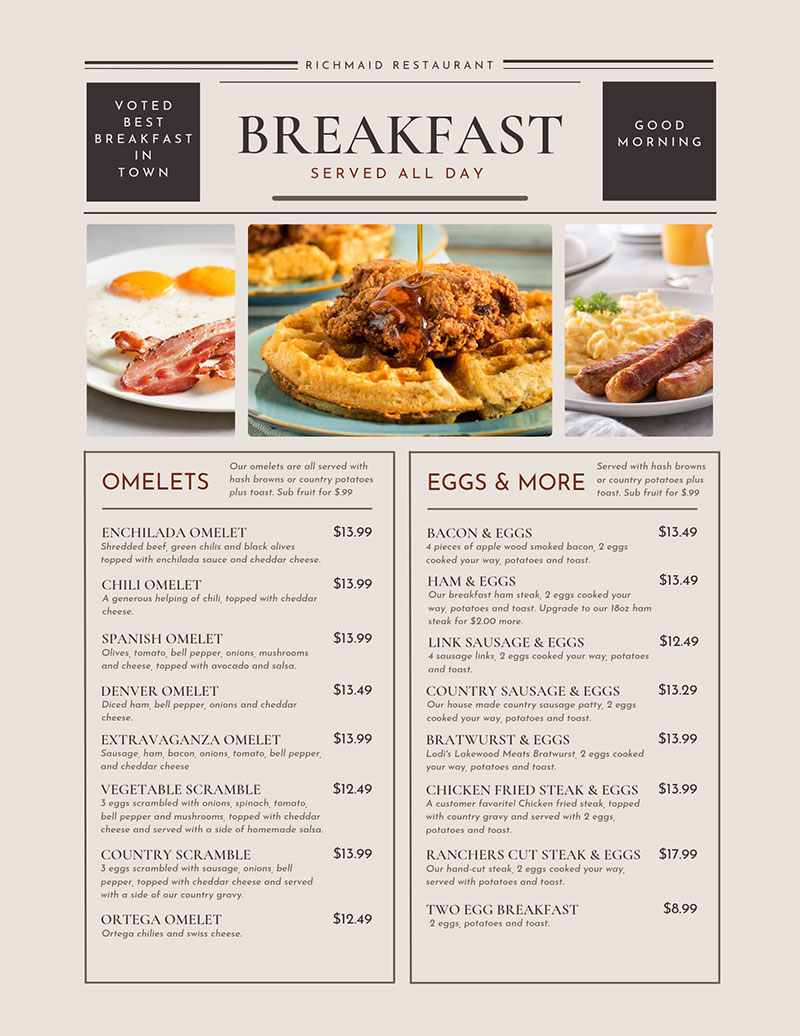
image4 9 Professional Tips to Follow When Designing Restaurant Menu

Source

Why?

A menu with poor-quality pictures, inconsistent design, and spelling errors will do more bad than good. A beautifully and thoughtfully crafted menu significantly impacts your revenue while leaving a positive impression on your customers.

In this article, we discuss several professional tips to follow when designing a restaurant menu.

9 Professional tips to follow when designing restaurant menu

Here are some professional tips that help you make strategic decisions about how your menu should look:

1.  Use a menu template

Did you know most of your customers do not read your menu line by line? They quickly scan and check the areas that catch their interest. Try to establish your menu such that it displays your most popular and profitable dishes.

That’s why restaurants use different colors and typography to attract customers’ attention. Using a free downloadable menu template provides you with many different ideas to play around with colors, designs, and typography.
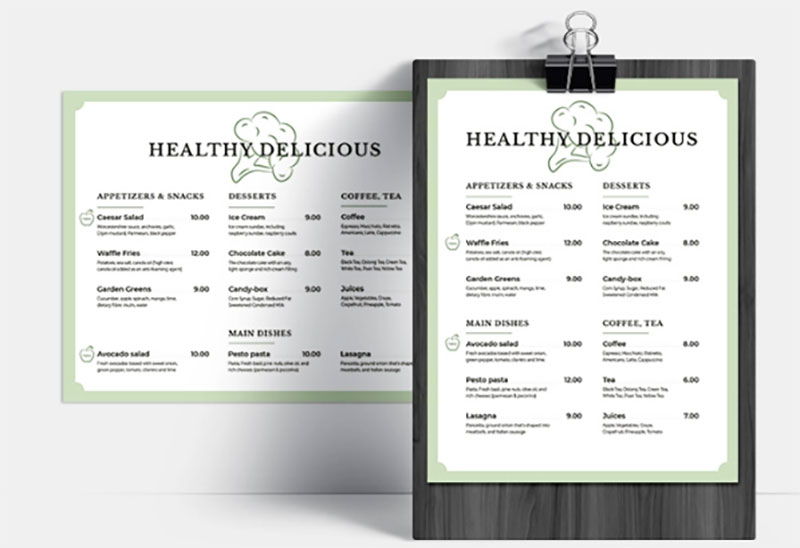
image1 9 Professional Tips to Follow When Designing Restaurant Menu

Choose a template that helps design your menu while keeping branding in mind. Whether you need a fine dining, fast-food joint, or café menu, the template should reflect your brand’s voice.

For instance, depending on the brand’s personality, you might want to get creative with the brand’s name and how you describe the dishes.

As the menu is the main communication channel inside your restaurant, it needs to stand out from the rest. This helps in building a connection with your customers.

2.  Focus on using the golden triangle

According to various menu engineering specialists, human eyes start seeing from the center of the page and then move to the top right, followed by the top left.

These studies suggest that placing popular menu items in the middle or at the top right helps maximize those food items’ visibility.

Here is an example of how to use a golden triangle in a menu:
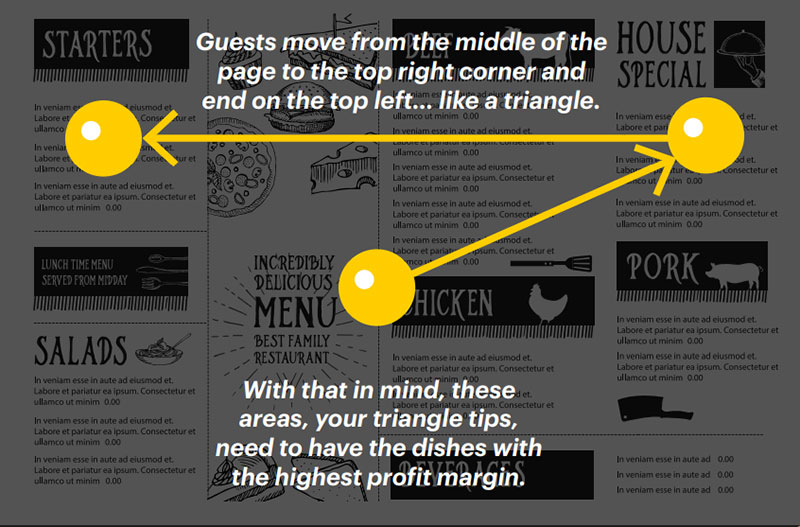
image7 9 Professional Tips to Follow When Designing Restaurant Menu

Source

Placing your star and popular items in the golden triangle area increases profitability and revenue.

When using the golden triangle psychology, focus on giving importance to food cost management and list your dishes clearly and as per the psychology.

3.  Make the best use of white spaces

Did you know that the human eye hates seeing clutter and prefers to look elsewhere?

According to various studies, properly using whitespaces between paragraphs and in the right and left margins increases comprehension by 20%.

Incorporating the same fundamentals in your menu design makes your food items stand out and increases readability.

Try to leave some negative space for improving the overall aesthetics and ensure that your customers feel safe.

Interestingly, white space contributes to the overall tone of your menu design.

4.  Divide the menu into logical sections

Focus on keeping the menu design uncluttered and clear. Focus on dividing the restaurant menu into logical sections using lines and boxes. Often, a restaurant segregates its menu into sections, such as drinks, starters, sweets, pasta, pizza, Chinese and Thai.

The font you choose should be aesthetically pleasing, bold, and visible.

Apart from creating logical sections, ensure that the color of the menu matches the overall restaurant design.
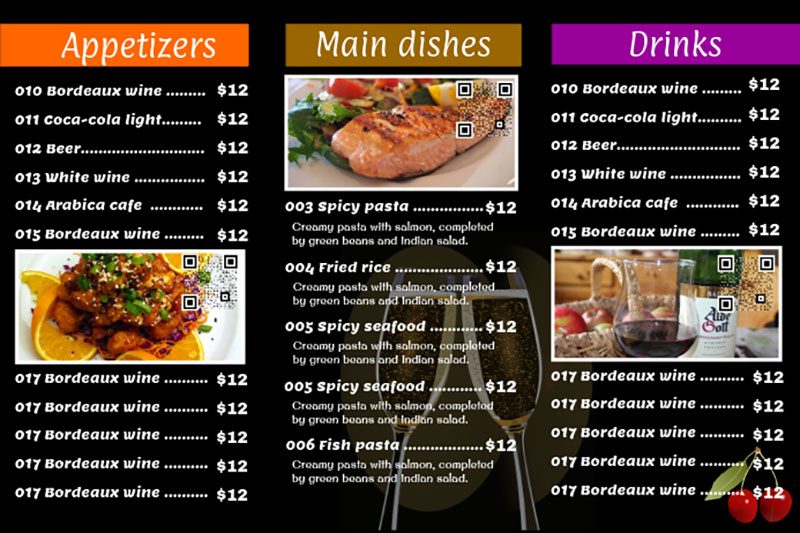
image6 9 Professional Tips to Follow When Designing Restaurant Menu

Source

At the same time, remember that using too many graphics might look messy and distract the customer’s attention from the menu item.

5.  Limit choices to make the buying decision

While your instinct might force you to provide customers with as many dishes as possible, more choice isn’t always better.

Why?

Too many choices force a customer not to make any choice at all. It even hinders the purchasing decision of the customers.

According to research, shoppers with 24 choices of jam were one-tenth less likely to purchase than shoppers who were given only six choices.

Even when you visit a restaurant, you’re less likely to come across a menu with an extensive list of food items. This decreases your ability to make a choice, and you’re likely to order something you have already tried.

Your customers are similar to you. So, focus on limiting your choices by offering a comprehensive menu that encourages them to try your chef’s special and popular dishes.

6.  Focus on the content of your menu

You might feel tempted to share the story of your restaurant with every single customer walking in and incorporating your story into the dining experience is a great way. Though it’s an excellent idea, it speaks to the uniqueness of your restaurant and gives a personal feeling.

However, the problem might crop up when the story becomes too long. As a result, the story gets ignored while the customers sift through the menu pages, frustrated, looking for their favorite drinks on Happy Hour.

Many restaurants include their story at the back of their menu design. Even you can follow this tactic, if it fits your menu design.

Remember that the primary content that requires attention in your menu is the food items, not your brand’s story.

7.  Use photos sparingly

The effectiveness of photos depends largely on the type of restaurant. Pairing a photograph with every food item is a tactic used by low-quality restaurants.

As a result, high-end and fine-dining restaurants avoid using this practice.

Interestingly, using one photograph per page on your restaurant menu increases sales for that item by 30%.

Try limiting one photo per category or page and using brackets to highlight the food items you display.

This technique is all about making a menu item more appealing to customers. So, ensure you place a high-quality and appealing photo to encourage customers to order the food or beverage.

If you’re not too keen on using photos, try using illustrations.

image3 9 Professional Tips to Follow When Designing Restaurant Menu

Source

Fine dining restaurants and eateries prefer illustrations over photos. They use one graphic or illustration per section.

8.  Connect it with the test of your marketing channels

Many restaurants focus only on the quality of the food they serve. Successful restaurants are the ones that focus on both promotions and building a strong rapport with customers.

Communicating and connecting with customers on social media is essential for building long-lasting relationships.

If your menu focuses only on the food items and provides no information about your social media handles or contact information, you miss out on a good opportunity.

Adding your social media handle is sufficient if you use it as a table menu. If it’s a takeover menu, it’s essential to provide contact details, including the phone number, email address, and social media details.

9.  Use the right color contrast

Would your customers prefer a reading menu that strains their eyes? Do they prefer an easily readable menu?

The difference between the above two menus is the color contrast.

Sometimes, this might happen when a menu designed for color printing gets printed in monochrome.
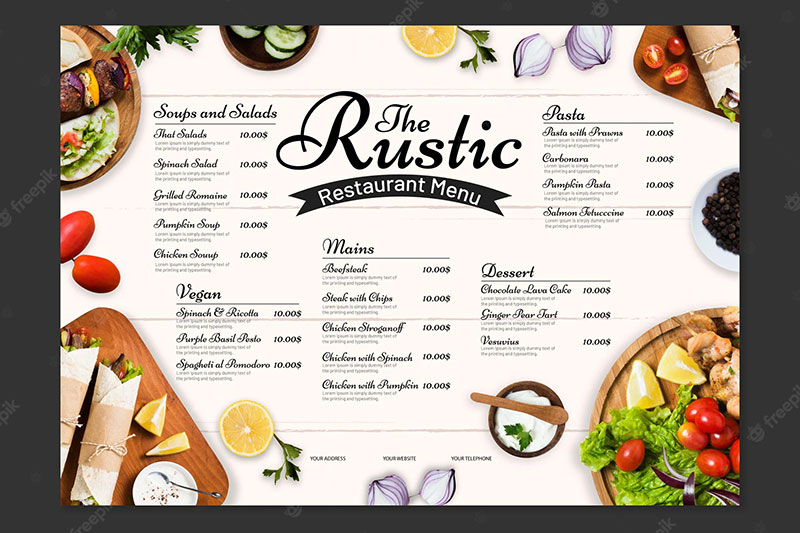
image5 9 Professional Tips to Follow When Designing Restaurant Menu

Source

Poor design leads to a lack of legibility in the text. This might occur because font colors do not stand out from the background colors or a patterned background. This decreases the visibility of letters printed on the menu.

As hungry customers are less likely to spend too much time figuring out the words written on the menu, having contrast in your restaurant menu uplifts the spirit of dining and increases readability.

Restaurant designs that speak for themselves

Intelligent and thoughtful restaurant design is a successful component of a restaurant strategy.

Only when your menu reflects your style and your food, it’s likely to have more impact on your customers.

Creating a restaurant menu is both an art and a science. Truly understanding what it takes to design a menu and incorporating these tips helps you create ones that attract customers’ attention.

When you design a menu mindfully, it’s likely to impact your bottom line.

While creating a menu, remember that your menu sells the dishes you serve, and it helps you achieve the sky while increasing customer loyalty.

Menus are crucial components, so ensure you touch upon every design element that delivers the ultimate guest experience and makes your restaurant a huge success.

Focus on designing catchy customer-centric menus that deliver the intended result.

The post 9 Professional Tips to Follow When Designing Restaurant Menu appeared first on Design your way.


Source: https://ift.tt/BRyTgsL

Design your way

Friday, November 18, 2022

Some CEOs and HR professionals believe that the labor market is still an “employer” market. However, constant research has pushed many experts to accept that the labor market is eventually the inverse, which means that CEOs must recruit and retain applicants for top and mid-level positions, as well as available jobs.

Meanwhile, every business owner dreams of employees who work with full dedication, strive to do their work faster and better, are responsible for results, improve their professional knowledge, and are ready to share their experience with others. In order to find the right candidate in the corporate world, HRs have to make more efforts. Due to the high degree of staff engagement, such companies have higher profits, a bigger number of regular customers, demonstrate a high quality of service, etc. So, how could the employer boost personnel engagement? Here are some tips to follow.

Why Invest in Staff Engagement?

As the labor market has shifted from an employer to a candidate, HRs must use a wide array of tools to ensure effective recruiting. So, the first step is to understand that the involvement of each individual employee, recognition of his contribution, and role in achieving the company’s success is the source of true productivity. To support these conclusions with numbers, Gallup Inc. has conducted research in which 1.8 million employees from 73 countries were surveyed. Businesses with better staff engagement are characterized by the following:

  • 21% higher profit;
  • 20% more effective sales;
  • 17% higher productivity;
  • 70% fewer injuries at the workplace;
  • 41% less absenteeism;
  • staff turnover is 24-59% lower!

It is not enough to hire a great specialist – he still needs to be attracted and retained. Thus, according to SHRM, 41% of workers directly associate their interests with professional growth opportunities. At the same time, only a third of the respondents were happy with the career prospects in their organizations. So, how to start building an effective employee engagement system? Start with the survey.

Determine the Goals

The engagement of each worker is influenced by many factors. These factors can reduce or increase engagement, allowing to achieve better financial results and general labor efficiency. Survey what really matters to your people:

  • Career and individual growth. Companies with a high engagement level provide their workers with chances to acquire new skills and reveal individual potential;
  • Effective talent management. Engaged personnel know that their CEOs appreciate them, know their talents, and create all the conditions for their development;
  • Clarity of corporate values. Employees need to know that the company’s values ​​are unambiguous and clear;
  • Understanding the personnel. Successful businesses show respect for all employees and their individual qualities, regardless of their position;
  • Corporate standards of ethical behavior. Ethical behavior of the company in relation to customers and competitors contributes to increasing the level of employee involvement;
  • Workers need to be able to make decisions about issues that may affect their work. Leaders create a trusting and work-stimulating atmosphere in which employees are encouraged to move away from traditional ideas about hierarchy and boldly offer their innovative ideas;
  • The willingness of personnel to recommend and promote their company’s products and services largely depends on their own perception of the quality of these products and services. Staff engagement is directly related to customer loyalty.

Once you’ve received your engagement survey results, it’s time to move on to particular actions.

Step Forward

In order to increase the level of staff engagement, it is important that CEOs are available and open, as well as that the employee always has feedback, understands the company’s strategy, and shares its values. Personnel who do not understand their role in the company are less engaged.

Most engagement problems are the result of poor leadership. In most cases, those who already have a lot of experience and subject skills in the industry plus they have already worked in the company for a long time are appointed to top positions. However, if you can’t manage people, your expertise is useless. It is essential that people who really deserve recognition receive it from the majority of employees in the company – both their colleagues and chiefs.

The post How Businesses Can Boost Employee Engagement appeared first on Design your way.


Source: https://ift.tt/Qngvw0G

Design your way

Tuesday, November 15, 2022

The LinkedIn platform today is an incredible resource for finding relevant B2B data as well as doing prospecting. You can also use this platform for capturing real email addresses of people in addition to reaching out to your prospects. Let’s see how you can find people’s emails using only LinkedIn, in detail.

Is it Possible to Get People’s Email Addresses from their LinkedIn Profiles?

The first thing we need to clarify is that we are not interested in personal (or direct) email – we need work emails to use in our email campaign. You try to avoid sending text messages to people on personal emails because let’s face it: it is highly unlikely that you will receive a response. The majority of people do not respond to business messages sent to their personal email accounts.

In some cases, LI accounts are synchronized with business email accounts, but this is quite rare. Just as with any other social media platform, LI is your social media print, so it is obvious that most people prefer to keep their LI account linked to their personal email account.

Using a manual search to find emails

You can always visit each profile individually and create a document with emails. But what a time-consuming task that is!

Fortunately, technology has made it easier than ever before to find and download emails, allowing you to focus on other tasks instead.

The best ways to find your potential clients’ emails on LinkedIn

The use of third-party data extractors can be invaluable if you want to get emails from LinkedIn quickly. CSV files can be exported from LinkedIn in bulk using Google extensions or cloud-based tools.

Closely

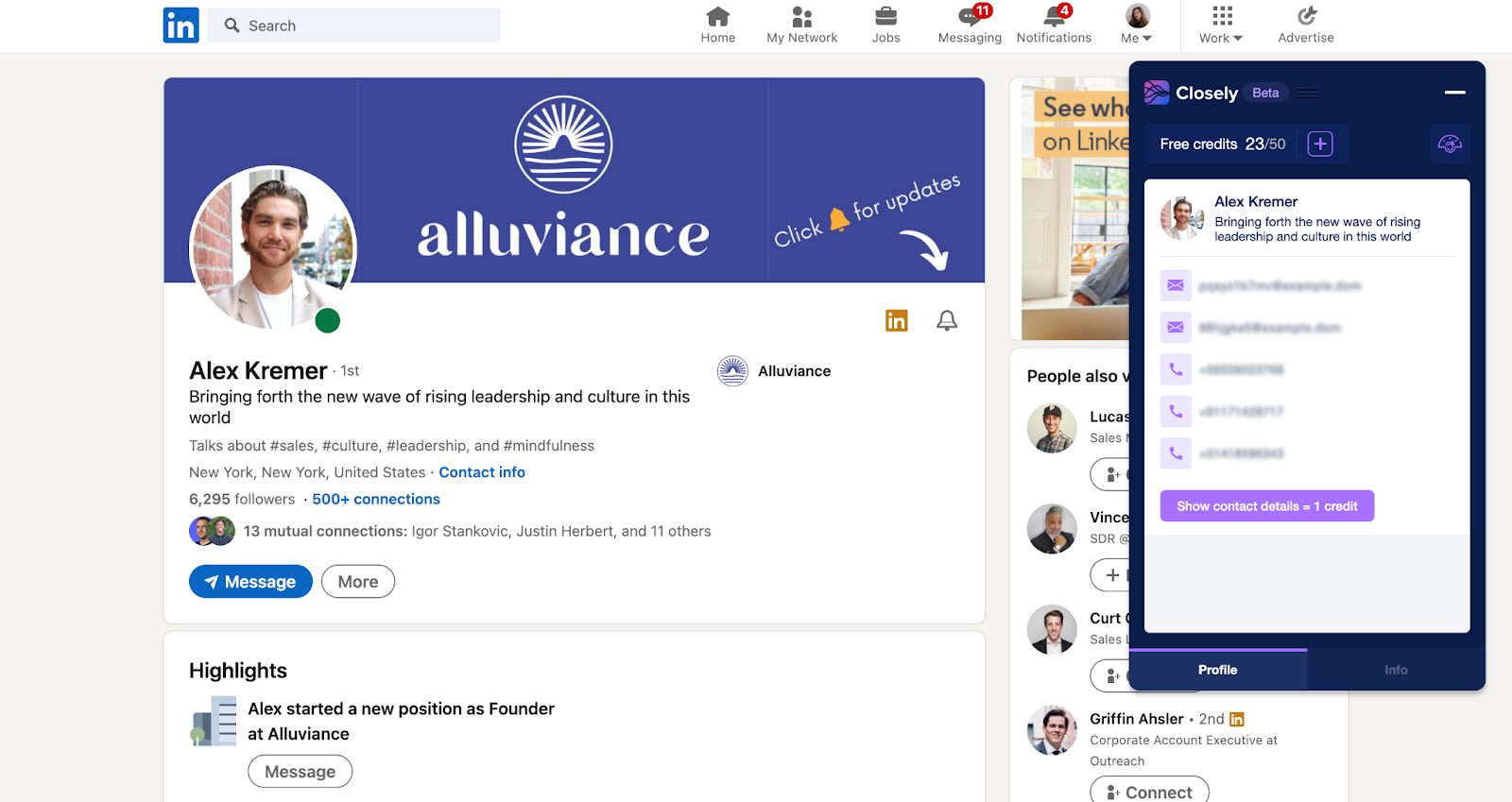
In addition to prospecting and scraping LI data, the Closely Surfer extension will assist you in exporting people’s emails by just visiting their profiles.

Simply open a needed page and open all emails available along with the other contact data.

word-image-41833-1 How to Extract Email Addresses from LinkedIn Profiles

Closely Surfer is a free extension developed by Closely – all-in-one LinkedIn automation tool. It simplifies prospecting for sales representatives and lead generation specialists.

This extension is a real miracle: just imagine being able to access any needed contact data right on LinkedIn pages. In addition, Closely Surfer lets you download LinkedIn search results to a CSV for free.

It is easy to extract an individual’s email address and phone number from a LI profile by opening any LI profile. Your screen will show both.

Among the other features are the ability to save search results as a CSV file in a click, the option to include the “job title” filter in your search in order to narrow down your audience more.

word-image-41833-2 How to Extract Email Addresses from LinkedIn Profiles

Closely Explorer

Closely Explorer can help you extend your database by digging up the email addresses of your prospects.

With Closely Explorer, you have access to one of the biggest B2B contact bases, which lets you search through potential buyers once you’ve logged in to your Closely account.

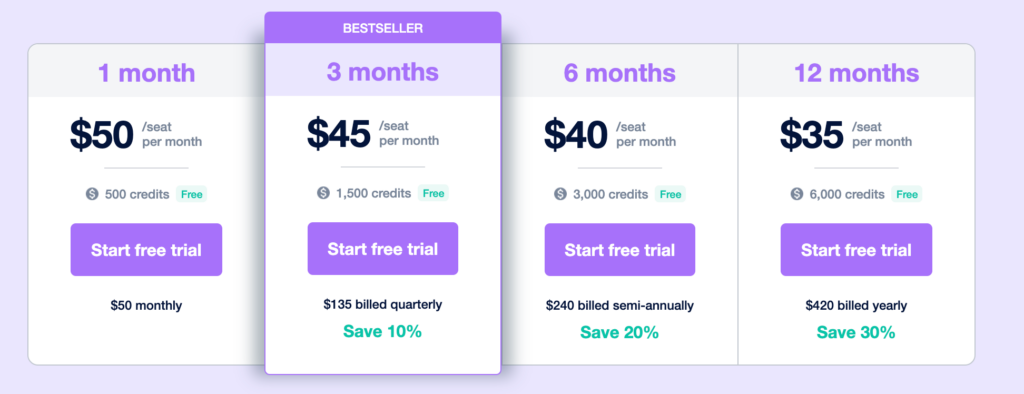
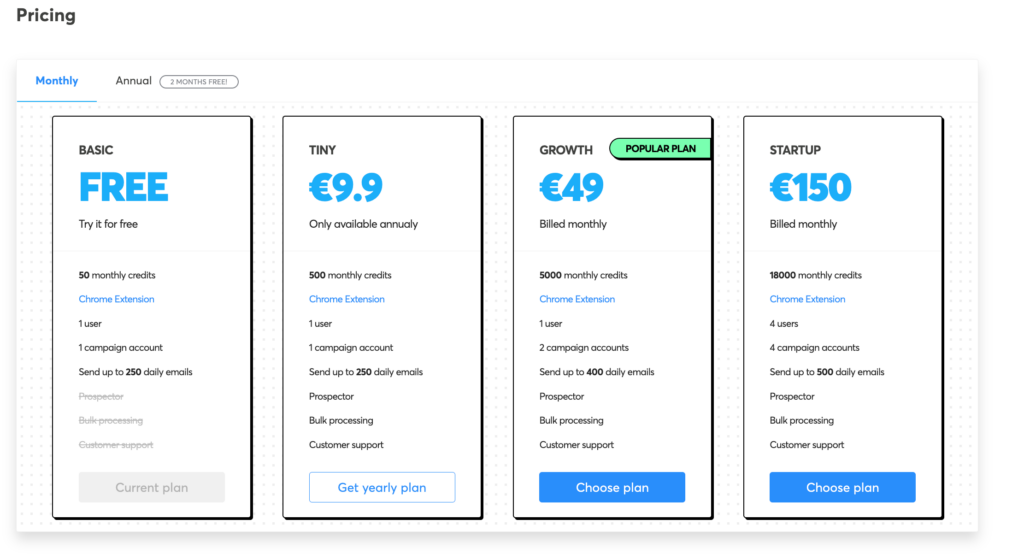
In this case, you will spend credits on opening emails (new users will receive 500 credits with each new seat – read more by clicking on the “pricing” tab).

You can use the entire list, as well as other data, in your campaigns, which are automatically run in Closely after the emails are revealed. You can use Closely to fulfill most prospecting tasks – just watch some of their webinars to learn more about automated LinkedIn prospecting in detail.

word-image-41833-3 How to Extract Email Addresses from LinkedIn Profiles

Closely shows you which email is BUSINESS and which one is DIRECT. In your file there will be distinction between the two, so you can always know who you’re texting.

word-image-41833-4 How to Extract Email Addresses from LinkedIn Profiles

Along with emails, it will find you their job title, name, second name, company name, Facebook profile and other data.

There is also an email validation feature right in the tool that’s also free:

word-image-41833-5 How to Extract Email Addresses from LinkedIn Profiles

Email verification is an extremely useful feature – it cleans your list to rid it of irrelevant emails so your open rate doesn’t suffer.

Pros

  • Accurate b2b contact database
  • Free option of saving LinkedIn search results
  • Free inbox and network management features
  • Reliable, has many positive user reviews
  • A feature-rich platform
  • Work goes smoothly
  • Interface that is easy to use
  • Fair price-to-quality ratio
  • Advanced lead list building
  • Email finder and validator
  • On Appsumo, you can find LTD

Cons

  • No email campaigns (in the main tool, but will be released soon)

Lusha

Lusha also offers email finding and data extraction. The information you receive through Lusha is accurate and can be accessed with the simple click of a button, and this is very helpful on its own. The accuracy of the contact data provided is incredibly high, but I do not know exactly how they find emails, but the quality is superb. After installing the extension, you can start visiting profiles, revealing emails, and saving them into the list that can be accessed further on the dashboard.

However, bugs may occur and the tool is pretty expensive, which pushes it lower in my list of top email extractors.

Pros

  • Bugs are present
  • Approximately 70% of the data is solid
  • User-friendly (great user experience)
  • The integration between the two ends (such as saving to the CRM directly) is excellent

Cons

  • The price is higher than average
  • No free features for email extraction on LinkedIn
  • Annual payments only, which is very inconvenient if you want to just try it out
  • There are times when it doesn’t have both the phone number and the email address. Absence of data happens and it’s not a rare occasion

In order to use the extension, simply install it and activate it from your browser’s top right corner as soon as you appear on the page you need. However, you’ll need to upgrade your Lusha account to start opening emails on LinkedIn profiles.

Once you’re upgraded, it will display all the data it has retrieved, including phone numbers, work emails, and personal emails. The email you need can be found by clicking “reveal”.

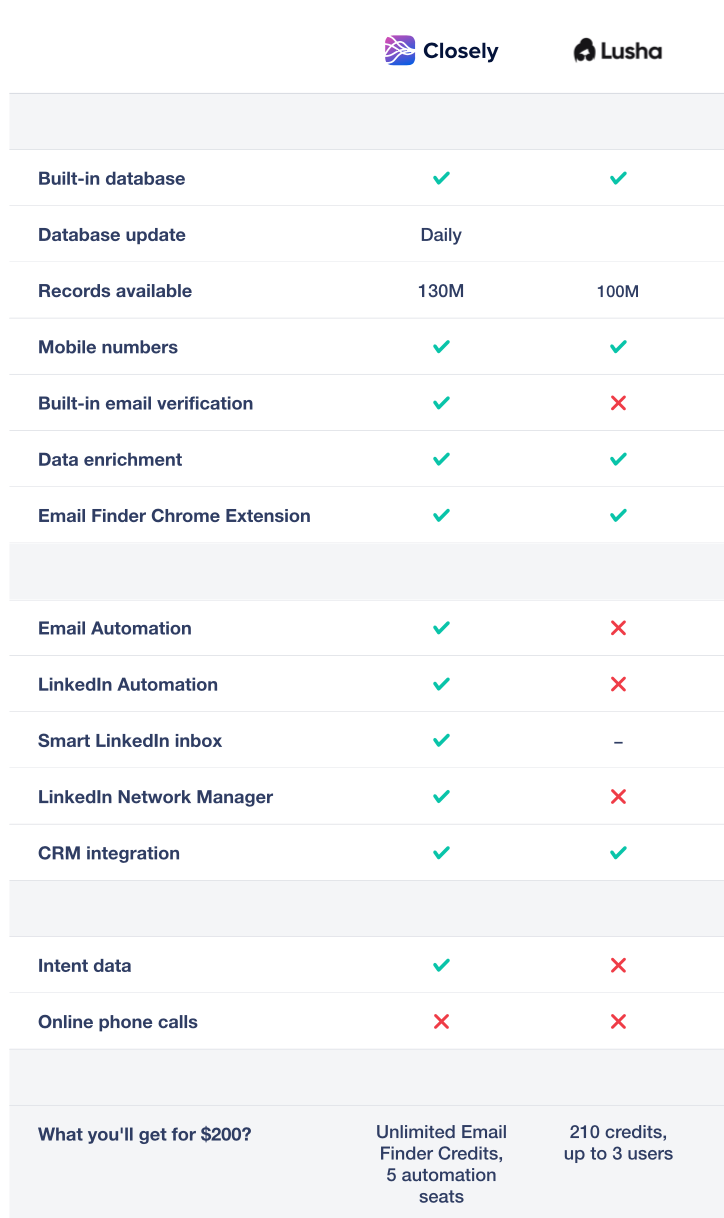
Lusha also offers an email finder tool, just like Closely. You can filter out its database and find the needed audience. It will let you open emails and save them in a CSV file, just like Closely does. However, Lusha comes with a limited number of credits. For the same price, you’ll get unlimited credits in Closely. Here is more detailed comparison:

word-image-41833-6 How to Extract Email Addresses from LinkedIn Profiles

Lusha is a very nice tool, but in my humble opinion, a bit overpriced. Also, bugs happen which is not that good in the long run when you need everything to run smoothly.

FindThatLead

In FindThatLead, you can either enter the URL of the LinkedIn profile, or type the name and company of the contact and it will extract email addresses for the request.

In any case, if you provide the link to John’s LinkedIn profile URL, you are much more likely to get the email than if you just type in “John Adams” in hopes of finding John’s email address. Small companies seem to also not be processed by them (possibly because they don’t have all of them in their database).

FindThatLead also offers email campaign automation and email verification.

word-image-41833-7 How to Extract Email Addresses from LinkedIn Profiles

Pros

  • Interface is quite intuitive
  • Verifier for email addresses included
  • Email campaign automation
  • No free email extraction

Cons

  • There have been reports that some users are reporting outdated data
  • Some search areas cannot be searched
  • Support can be slow

Conclusion

The absence of an email finder makes it difficult for modern B2B sales reps to make any significant improvements. Data is of invaluable importance, and its quality can either make it or break it for your startup. Being able to get emails purely from LinkedIn is not something new or outstanding – the email extractors have been on the market for years.

I’ve listed the most prominent tools that can easily get emails for you, right out of LinkedIn profiles.

In comparison to all of the aforementioned tools, Closely appears to be the best fit, especially for those on tight budgets or simply if you like things to be done neatly. Their team and support are top-notch, which creates a pleasant user experience. I was able to go from 0 to 7 leads in a matter of weeks using their super simplified automation and B2B data. The email extractor (Closely Surfer) is simply the best I’ve tried: it works, the data is always there, except for rare cases, it offers numerous freemium features. The Closely Explorer will fish up emails, phone numbers and other contacts data in a matter of minutes. Just take all that and do your outreach.

It is a good idea to try out all of the tools I’ve listed. There are many variations among cases, so it is best if you try it and figure it out for yourself.


The post How to Extract Email Addresses from LinkedIn Profiles appeared first on Design your way.


Source: https://ift.tt/YiXTKgj
 

The Cash Box Blueprint

Most Reading